Attention:DonotopenyourcomputerorattemptanyrepairbeforereadingandunderstandingtheChapter
1“Readthisfirst:Importantsafetyinformation”onpage1.
Toreplacetheinternalspeakers,dothefollowing:
1.Removeallmediafromthedrivesandturnoffallattacheddevicesandthecomputer.Then,disconnect
allpowercordsfromelectricaloutletsanddisconnectallcablesthatareconnectedtothecomputer.
2.Placeasoft,cleantowelorclothonthedeskorsurface.Holdthesidesofyourcomputerandgentlylay
itdownsothatthescreenisagainstthesurfaceandthecoverisfacingup.
3.Removetheframestand.See“Removingandinstallingtheframestand”onpage99.
4.Removethecomputercover.See“Removingthecomputercover”onpage102.
5.Recordtheroutingoftheinternal-speakercable.Then,disconnecttheinternal-speakercablefrom
thesystemboard.
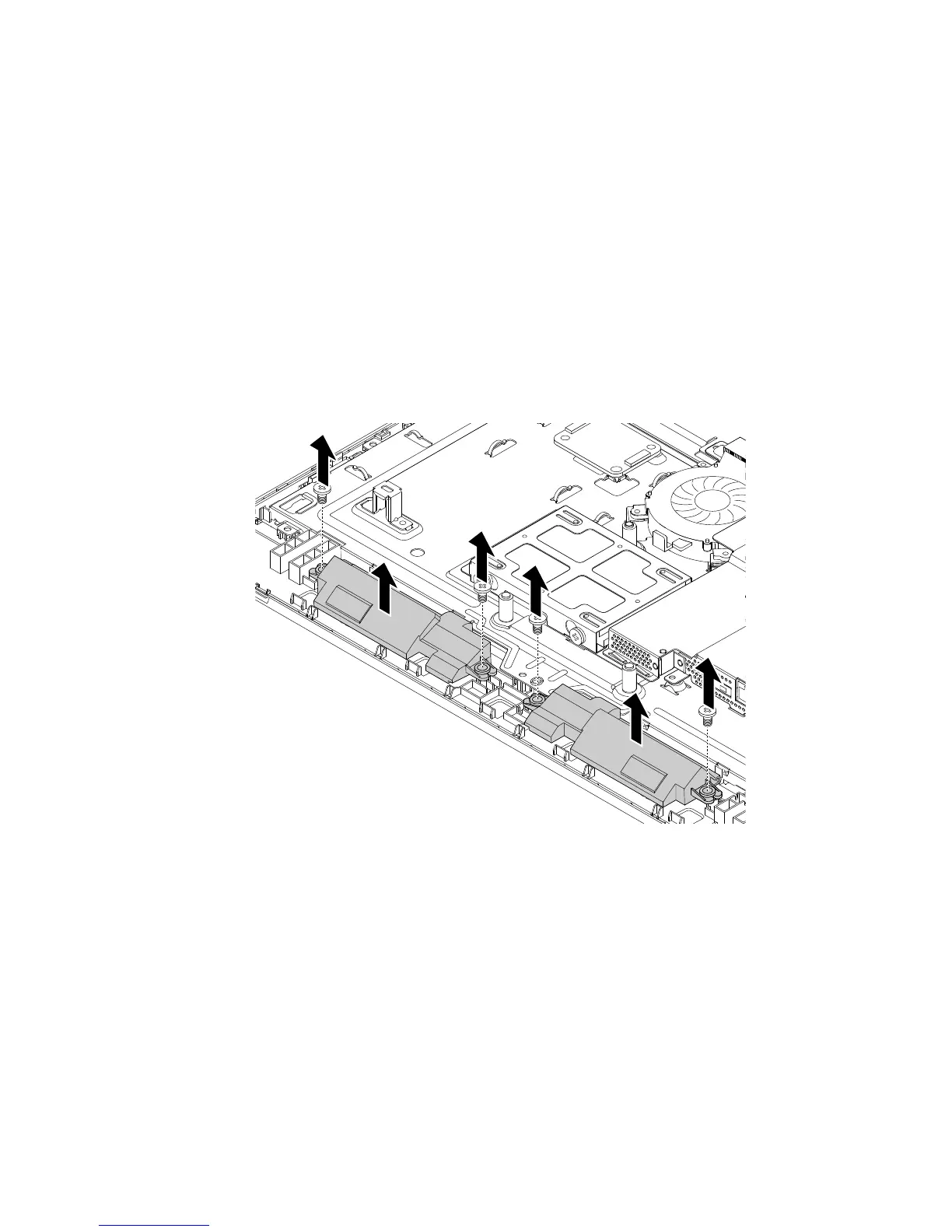
6.Removethefourscrewsthatsecuretheinternalspeakers.Then,lifttheinternalspeakerstoremove
themfromtheLCDfrontbezel.
Figure17.Removingtheinternalspeakers
Chapter11.Installingorreplacinghardware105












 To Next Page