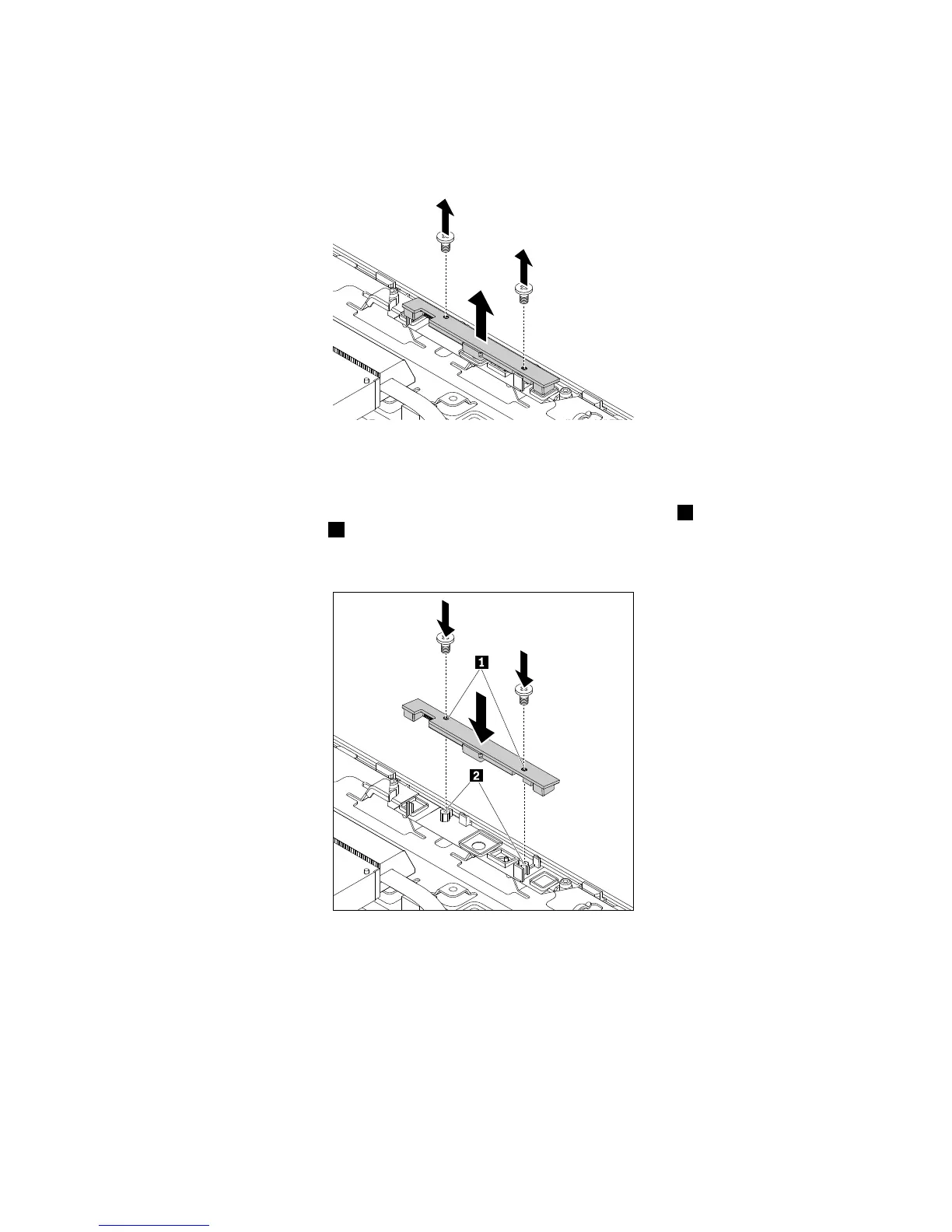
6.Removethetwoscrewsthatsecuretheintegratedcamera.Then,lifttheintegratedcameratoremove
thecamerafromthefrontbezel.
Figure20.Removingtheintegratedcamera
7.Toinstallthenewintegratedcamera,connecttheintegrated-cameracabletothenewintegratedcamera.
8.PositiontheintegratedcameraovertheLCDfrontbezelsothatthescrewholes1inthecameraalign
withthecorrespondingholes2inthefrontbezel.Then,installthetwoscrewstosecuretheintegrated
cameratothefrontbezel.
Figure21.Installingtheintegratedcamera
Whattodonext:
•Toworkwithanotherpieceofhardware,gototheappropriatesection.
•Tocompletetheinstallationorreplacement,goto“Completingthepartsreplacement”onpage127.
Replacingtheconverterboard
Attention:DonotopenyourcomputerorattemptanyrepairbeforereadingandunderstandingtheChapter
1“Readthisfirst:Importantsafetyinformation”onpage1.
108ThinkCentreE63zUserGuide












 To Next Page