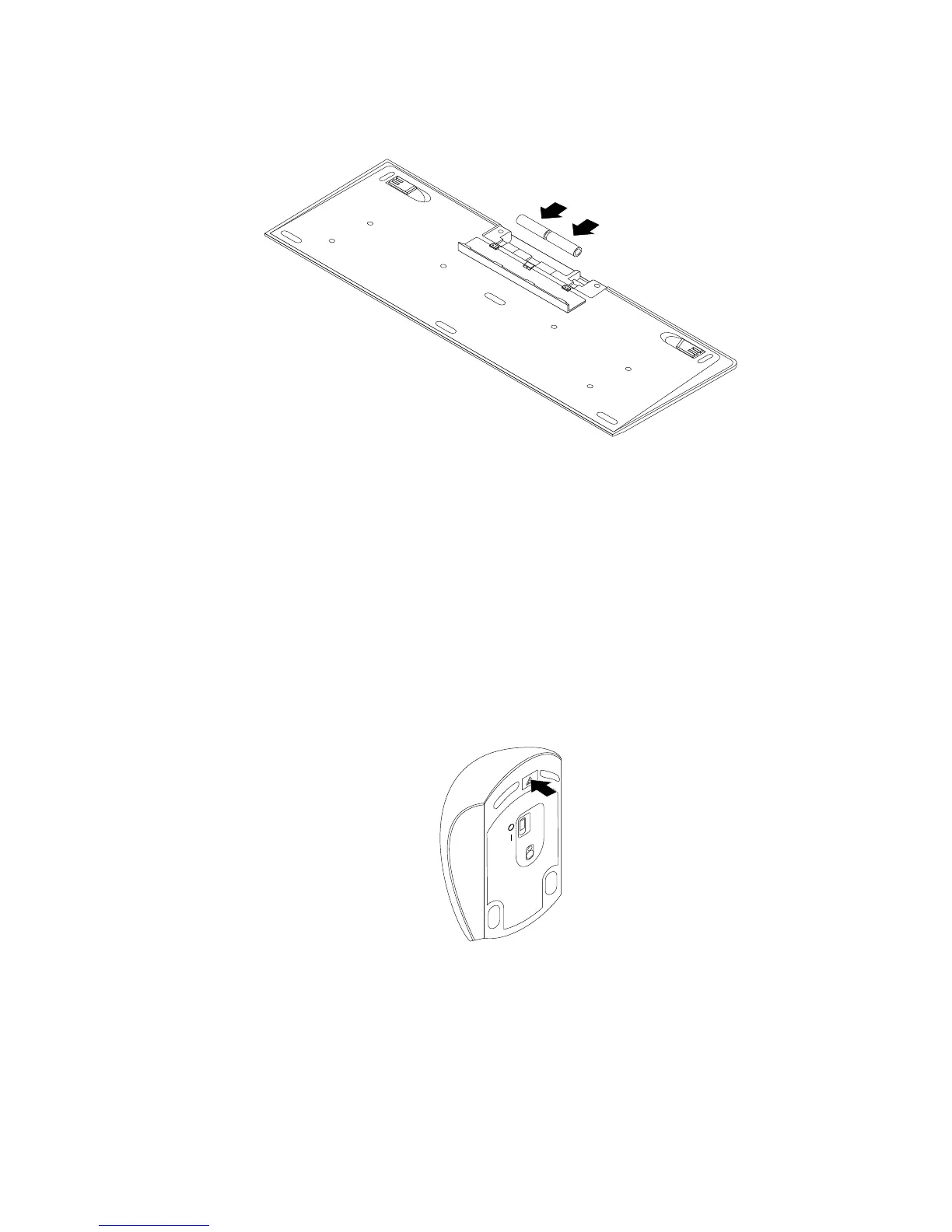
3.Openthebatterycompartmentcover,andInstalltwoAAAbatteriesaccordingtothepolarityindicators.
Figure45.Installingthekeyboardbatteries
4.TakeawaytheUSBdonglefromthekeyboardcompartmentorfromthewirelessmousecompartment
andconnectittoanavailableUSBconnectoronthecomputer.See“Replacingthewirelessmouse”on
page125.
5.Closethecompartmentcover.Thekeyboardisreadyforuse.
Replacingthewirelessmouse
Toreplacethewirelessmouse,dothefollowing:
1.DisconnecttheUSBdonglefromyourcomputer.Then,takeawayyourfailingwirelessmouse.
2.Removethenewwirelessmousefromthepackage.
3.Pressthebatterycompartmentreleasebuttontoopenthebatterycompartment.
Figure46.Openingthebatterycompartment
4.RemovetheUSBdonglefromthecompartmentofthenewwirelessmouseorfromthecompartmentof
thewirelesskeyboard.
Chapter11.Installingorreplacinghardware125












 To Next Page