Replacingthecoin-cellbattery
Attention:DonotopenyourcomputerorattemptanyrepairbeforereadingandunderstandingtheChapter
1“Readthisfirst:Importantsafetyinformation”onpage1.
Thissectionprovidesinstructionsonhowtoreplacethecoin-cellbattery.
Yourcomputerhasaspecialtypeofmemorythatmaintainsthedate,time,andsettingsforbuilt-infeatures,
suchasparallel-portassignments(configuration).Acoin-cellbatterykeepstheinformationactivewhenyou
turnoffthecomputer.
Thecoin-cellbatterynormallyrequiresnochargingormaintenancethroughoutitslife.However,ifthe
coin-cellbatteryfails,thedate,time,andconfigurationinformation(includingpasswords)arelost.Anerror
messagewillbedisplayedwhenyouturnonthecomputer.
Refertothe“Lithiumcoincellbatterynotice”intheSafety,Warranty,andSetupGuideforinformationabout
replacinganddisposingofthecoin-cellbattery.
Toreplacethecoin-cellbattery,dothefollowing:
1.Removeallmediafromthedrivesandturnoffallattacheddevicesandthecomputer.Then,disconnect
allpowercordsfromelectricaloutletsanddisconnectallcablesthatareconnectedtothecomputer.
2.Placeasoft,cleantowelorclothonthedeskorotherflatsurface.Holdthesidesofyourcomputerand
gentlylayitdownsothatthescreenisagainstthesurfaceandthecoverisfacingup.
3.Removetheframestand.See“Removingandinstallingtheframestand”onpage99.
4.Removethecomputercover.See“Removingthecomputercover”onpage102.
5.Removethesystem-boardshield.See“Removingandinstallingthesystem-boardshield”onpage106.
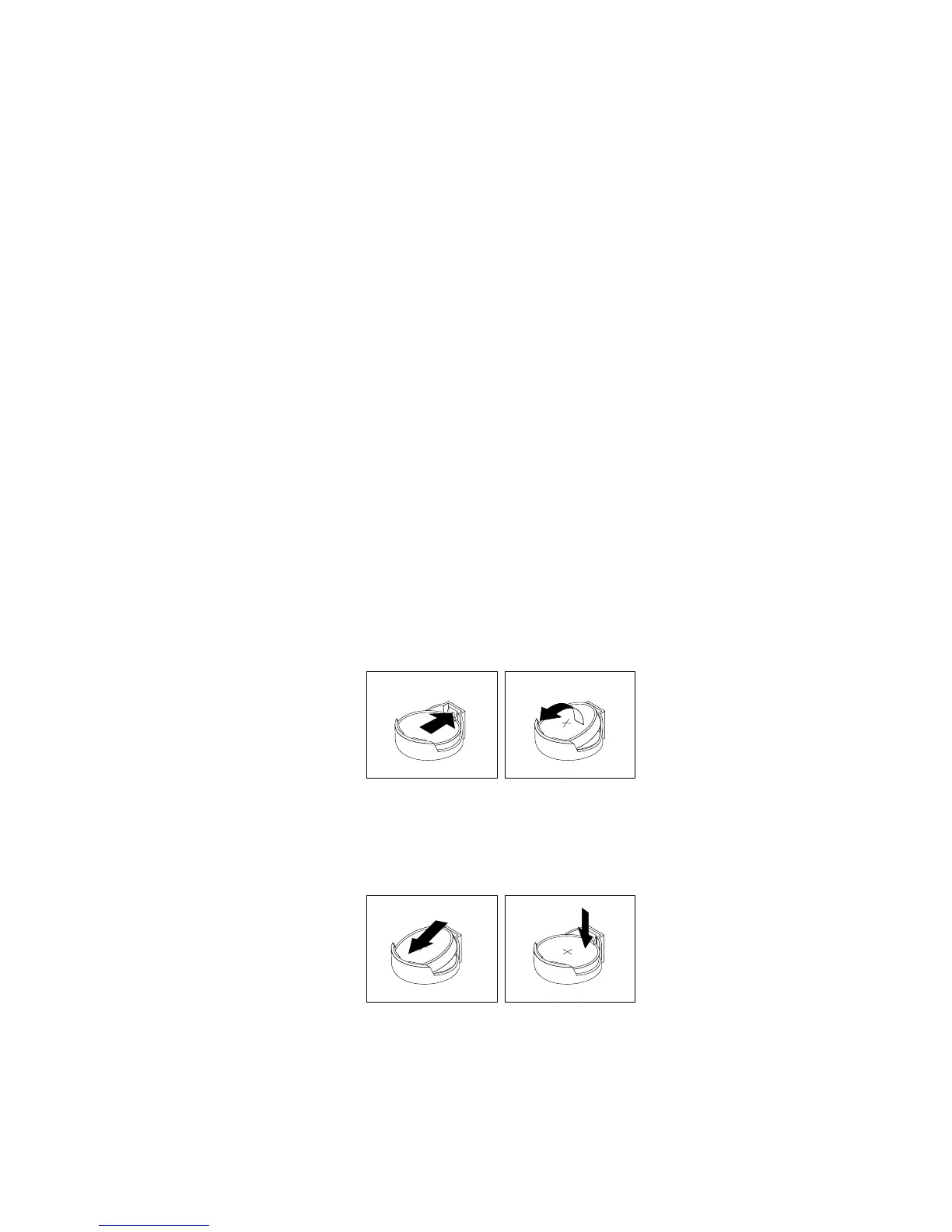
6.Removethecoin-cellbatteryasshown.
Figure25.Removingthecoin-cellbattery
7.Installanewcoin-cellbatteryasshown.
Figure26.Installingthecoin-cellbattery
8.Installthesystem-boardshield.See“Removingandinstallingthesystem-boardshield”onpage106.
9.Installthecomputercover.See“Completingthepartsreplacement”onpage127.
10.Installtheframestand.See“Removingandinstallingtheframestand”onpage99.
Chapter11.Installingorreplacinghardware111












 To Next Page