•Ifyouareinstallingamemorymodule,gotostep7.
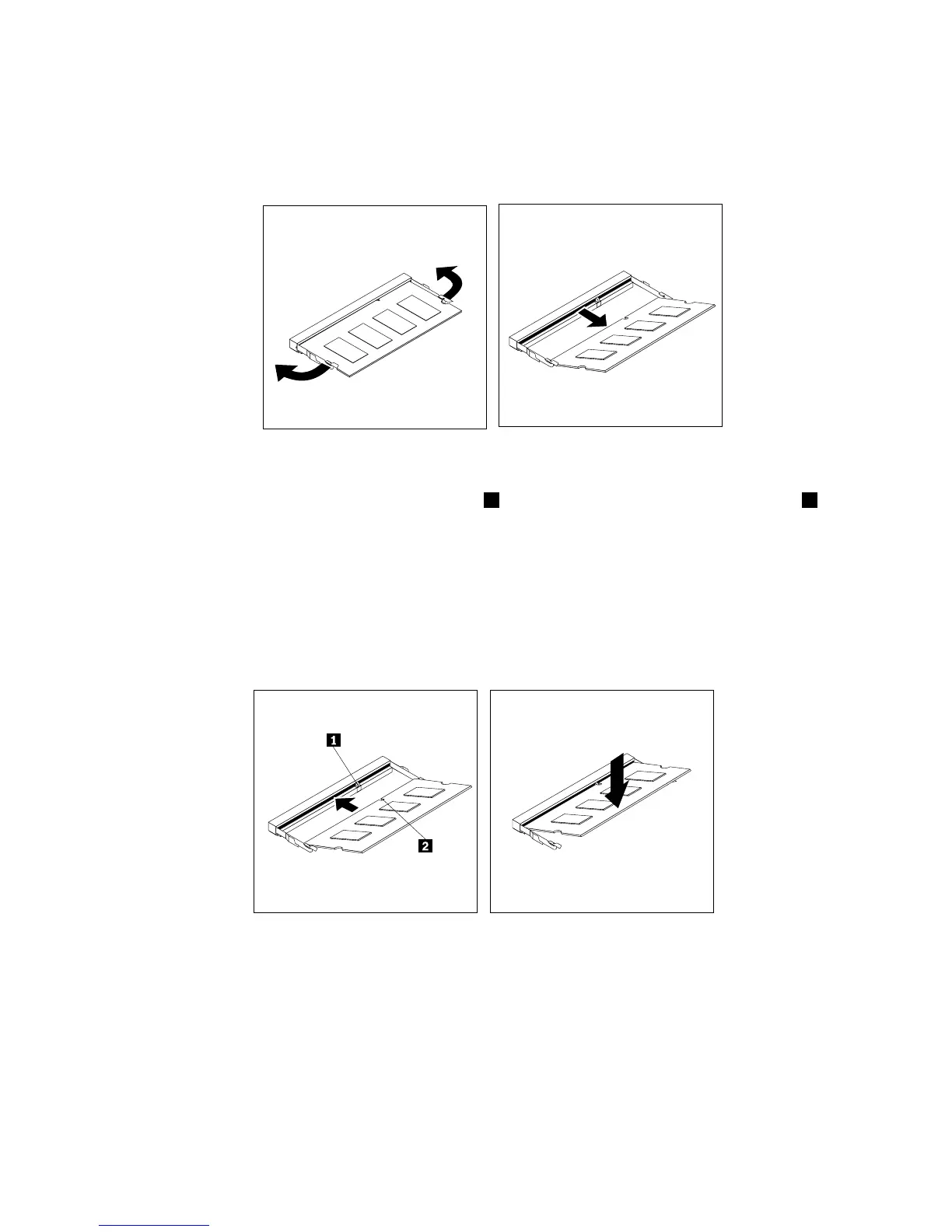
•Ifyouarereplacingamemorymodule,opentheretainingclipsandgentlypullthememorymodule
outofthememoryslot.
Figure23.Removingamemorymodule
7.Positionthenewmemorymodulesothatthenotch2onthememorymodulealignswiththekey1
inthememoryslot.Then,insertthememorymoduleintothememoryslotatanangleofabout20
degrees.Ensurethatthenewmemorymoduleisinsertedfirmlyandthenpivotthememorymodule
downwarduntilitsnapsintoposition.
Notes:
•Carefullyhandlethememorymodulebyitsedges.
•Ensurethatthememorymoduleissecuredintheslotanddoesnotmoveeasily.
Figure24.Installingamemorymodule
8.Installthesystem-boardshield.See“Removingandinstallingthesystem-boardshield”onpage106.
Whattodonext:
•Toworkwithanotherpieceofhardware,gototheappropriatesection.
•Tocompletetheinstallationorreplacement,goto“Completingthepartsreplacement”onpage127.
110ThinkCentreE63zUserGuide












 To Next Page