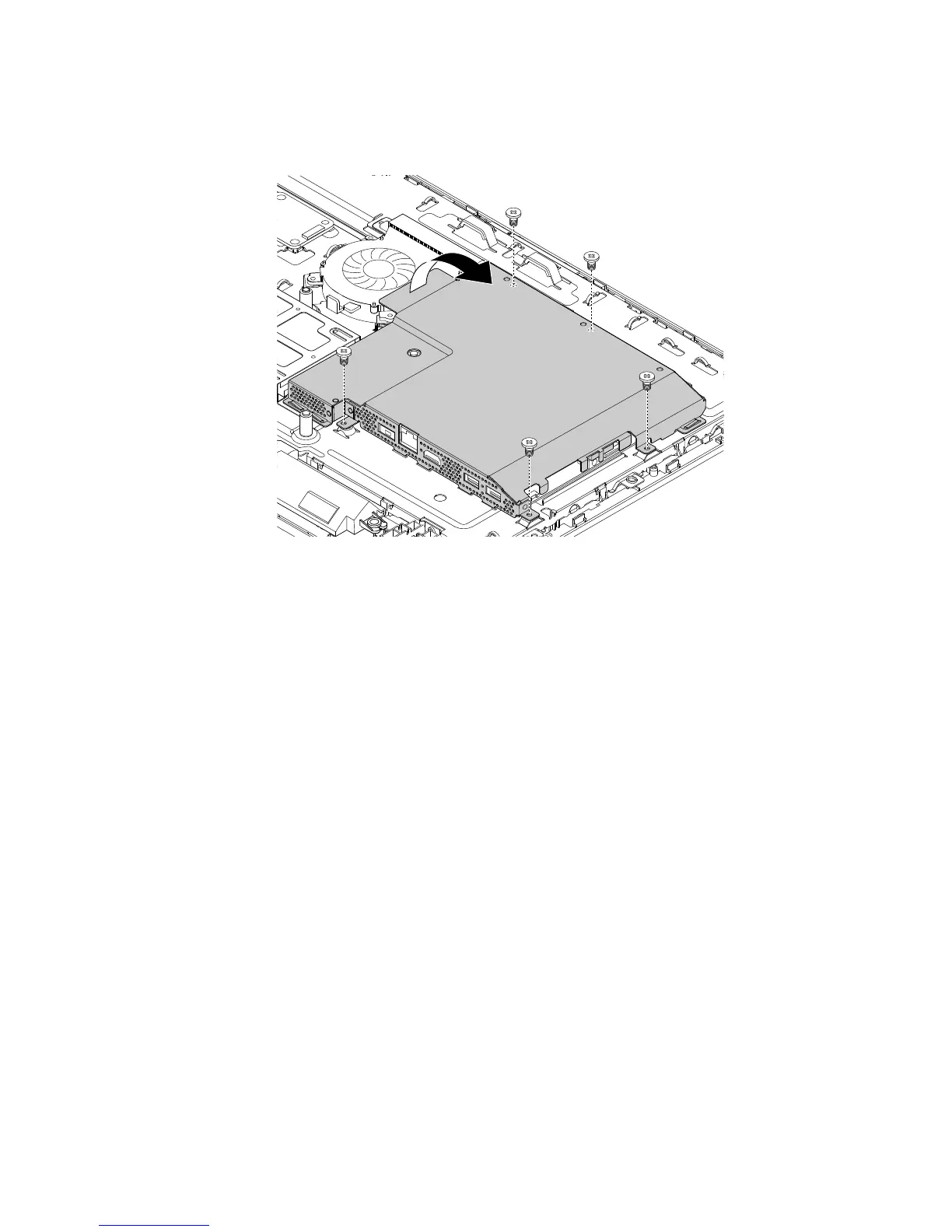
5.Removethefivescrewsthatsecurethesystem-boardshield.Then,liftthesystem-boardshieldto
removeitfromthechassis.
Figure19.Removingthesystem-boardshield
6.Toinstallthesystem-boardshield,positionthesystem-boardshieldintothechassissothatthescrew
holesinthesystem-boardshieldalignwiththecorrespondingholesinthechassis.Then,installthefive
screwstosecurethesystem-boardshieldtothechassis.
Whattodonext:
•Toworkwithanotherpieceofhardware,gototheappropriatesection.
•Tocompletetheinstallationorreplacement,goto“Completingthepartsreplacement”onpage127.
Replacingtheintegratedcamera
Attention:DonotopenyourcomputerorattemptanyrepairbeforereadingandunderstandingtheChapter
1“Readthisfirst:Importantsafetyinformation”onpage1.
Thissectionprovidesinstructionsonhowtoreplacetheintegratedcamera.
Note:Theintegratedcameraisavailableonlyonsomemodels.
Toreplacetheintegratedcamera,dothefollowing:
1.Removeallmediafromthedrivesandturnoffallattacheddevicesandthecomputer.Then,disconnect
allpowercordsfromelectricaloutletsanddisconnectallcablesthatareconnectedtothecomputer.
2.Placeasoft,cleantowelorclothonthedeskorotherflatsurface.Holdthesidesofyourcomputerand
gentlylayitdownsothatthescreenisagainstthesurfaceandthecoverisfacingup.
3.Removetheframestand.See“Removingandinstallingtheframestand”onpage99.
4.Removethecomputercover.See“Removingthecomputercover”onpage102.
5.Recordtheroutingoftheintegrated-cameracable.Then,disconnectthecablefromthesystemboard.
Chapter11.Installingorreplacinghardware107












 To Next Page