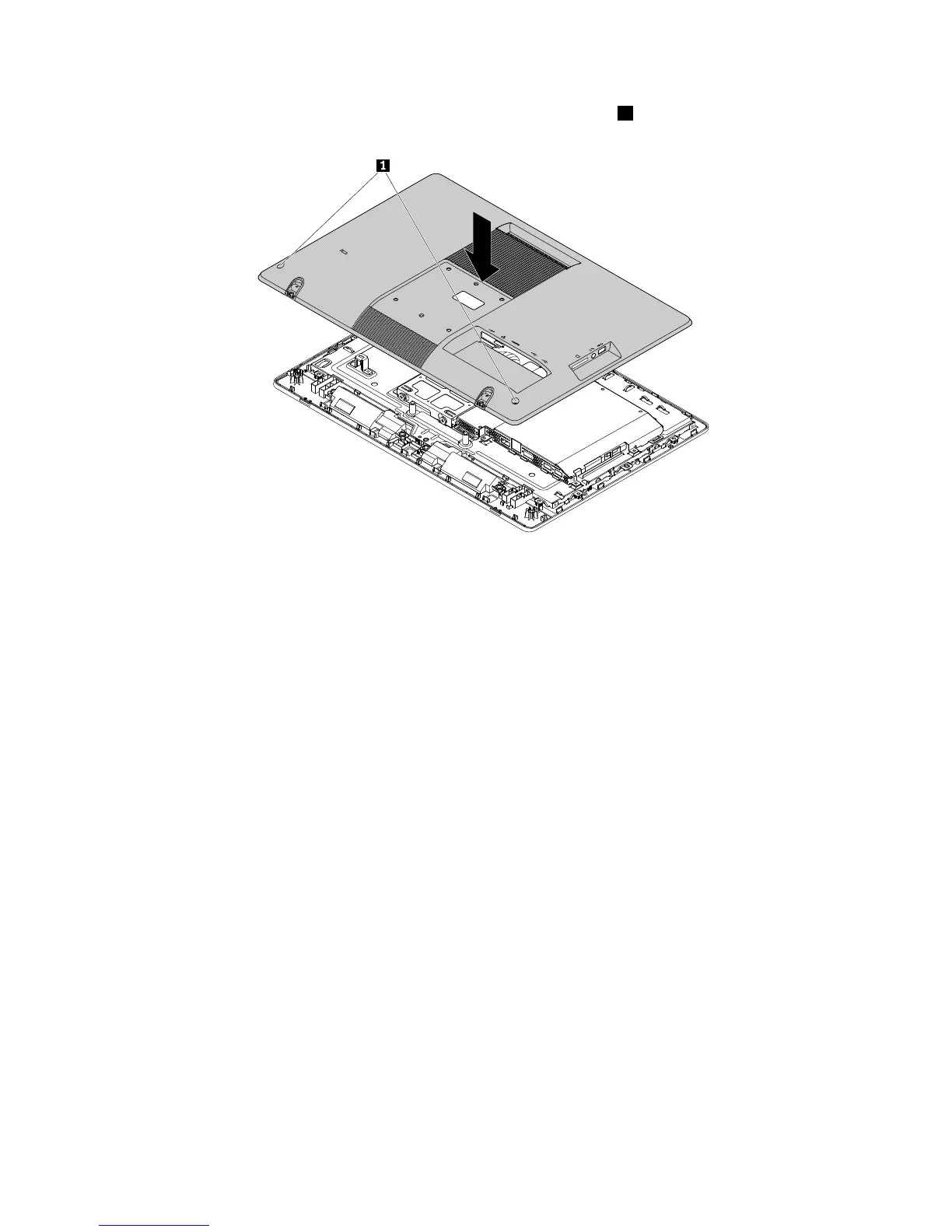
3.Positionthecomputercoverintoplaceandthentightenthetwoscrews1tosecurethecomputercover.
Figure52.Installingthecomputercover
4.Installtheframestand.See“Removingandinstallingtheframestand”onpage99.
5.IfaKensington-stylecablelockisavailable,lockthecomputercover.See“AttachingaKensington-style
cablelock”onpage56
6.Connecttheexternalcablesandtheacpoweradaptertothecomputer.
7.Dependingonthepartsyouinstalledorreplaced,youmightneedtoconfirmtheupdatedinformationin
theSetupUtilityprogram.Referto“UsingtheSetupUtilityprogram”onpage59.
Note:Inmostareasoftheworld,LenovorequiresthereturnofthedefectiveCustomerReplaceableUnit
(CRU).InformationaboutthiswillcomewiththeCRUorwillcomeafewdaysaftertheCRUarrives.
Obtainingdevicedrivers
Youcanobtaindevicedriversthatarenotpreinstalledinyouroperatingsystemat
http://www.lenovo.com/support.Installationinstructionsareprovidedinreadmefileswiththedevice-driver
files.
128ThinkCentreE63zUserGuide












 To Next Page