3.Removetheframestand.See“Removingandinstallingtheframestand”onpage99.
4.Removethecomputercover.See“Removingthecomputercover”onpage102.
5.Removethesystem-boardshield.See“Removingandinstallingthesystem-boardshield”onpage106.
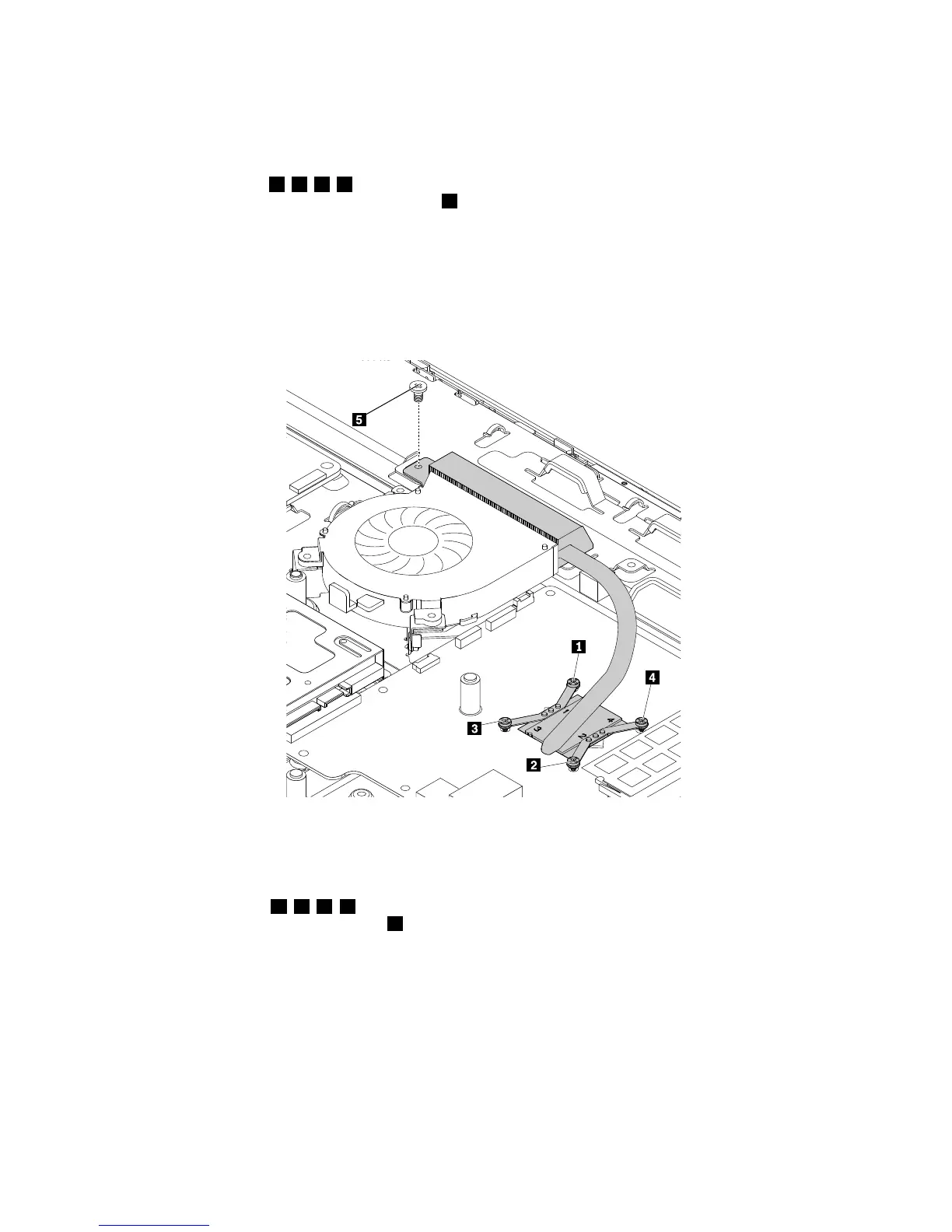
6.Followthesequence1,2,3,4asshowntoloosenthefourscrewsthatsecuretheheatsinkassembly
tothesystemboard.Then,removethescrew5asshown.Liftthefailingheatsinkassemblytoremove
itfromthesystemboard.
Notes:
a.Carefullyloosenthefourscrewsfromthesystemboardtoavoidanypossibledamagetothesystem
board.Thefourscrewscannotberemovedfromtheheatsinkassembly.
b.Donottouchthethermalgreasewhilehandlingtheheatsinkassembly.
Figure35.Removingtheheatsinkassembly
7.Toinstallthenewheatsinkassembly,positionthenewheatsinkassemblyonthesystemboardsothat
thefourscrewsintheheatsinkassemblyalignwiththecorrespondingholesinthesystemboard.
8.Followthesequence1,2,3,4totightenthefourscrewstosecuretheheatsinkassemblytothe
systemboard.Then,installthescrew5tosecuretheheatsinkassemblytothechassis.
118ThinkCentreE63zUserGuide












 To Next Page