3.Removetheframestand.See“Removingandinstallingtheframestand”onpage99.
4.Removethecomputercover.See“Removingthecomputercover”onpage102.
5.Removethesystem-boardshield.See“Removingandinstallingthesystem-boardshield”onpage106.
6.Removetheheatsinkassembly.See“Replacingtheheatsinkassembly”onpage117.
7.Removethememorymodules.See“Installingorreplacingamemorymodule”onpage109.
8.Removethecoin-cellbattery.See“Replacingthecoin-cellbattery”onpage111.
9.RemovetheWi-Ficard.See“ReplacingtheWi-Ficard”onpage112.
10.Recordthecableroutingandcableconnections,andthendisconnectallcablesfromthesystemboard.
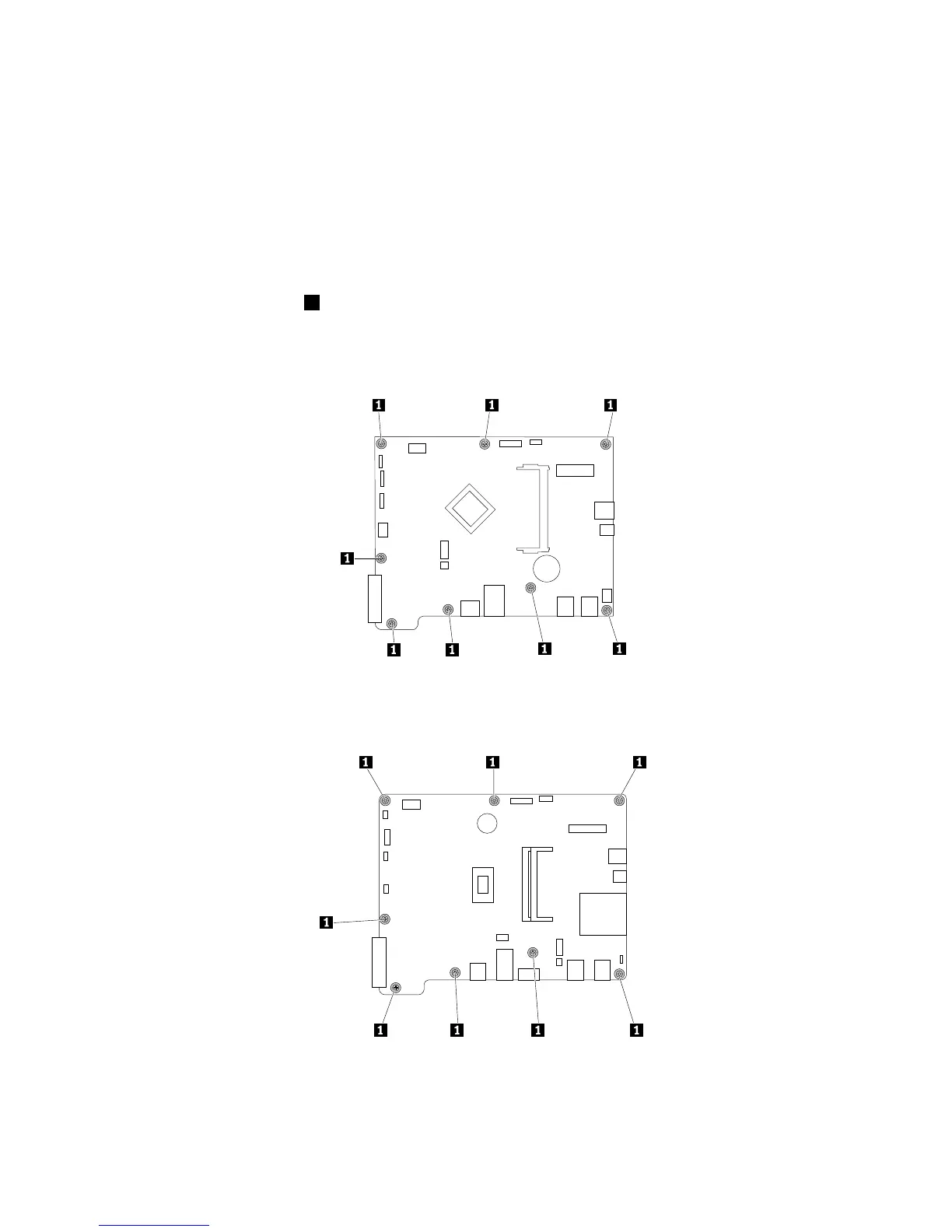
11.Removetheeightscrews1asshownthatsecurethesystemboard.Then,carefullyliftthesystem
boardtoremoveitfromthechassis.
Note:Carefullyhandlethesystemboardbyitsedges.
Figure37.Removingtheeightscrewsthatsecurethesystemboardon10D4,10D5,10D6,10D7,10EJ,and
10EKmodels
Figure38.Removingtheeightscrewsthatsecurethesystemboardon10E0,10E1,10E2,10E3,10EL,and10EM
models
120ThinkCentreE63zUserGuide












 To Next Page