215626 17 Revision A
2.3 Installing Platform Rail
The platform rail replaces the right stairs to ensure the safety of the operator and to make room for the Double Windrow
Attachment (DWA).
To install the platform rail, proceed to the section that applies to your windrower:
• 2.3.1 Installing Platform Rail – M155/M155E4/M205, page 17
• 2.3.2 Installing Platform Rail – M150/M200, page 18
2.3.1 Installing Platform Rail – M155/M155E4/M205
The right stairs must be removed from M155/M155E4/M205 windrowers in order to install the platform rail for the Double
Windrow Attachment (DWA).
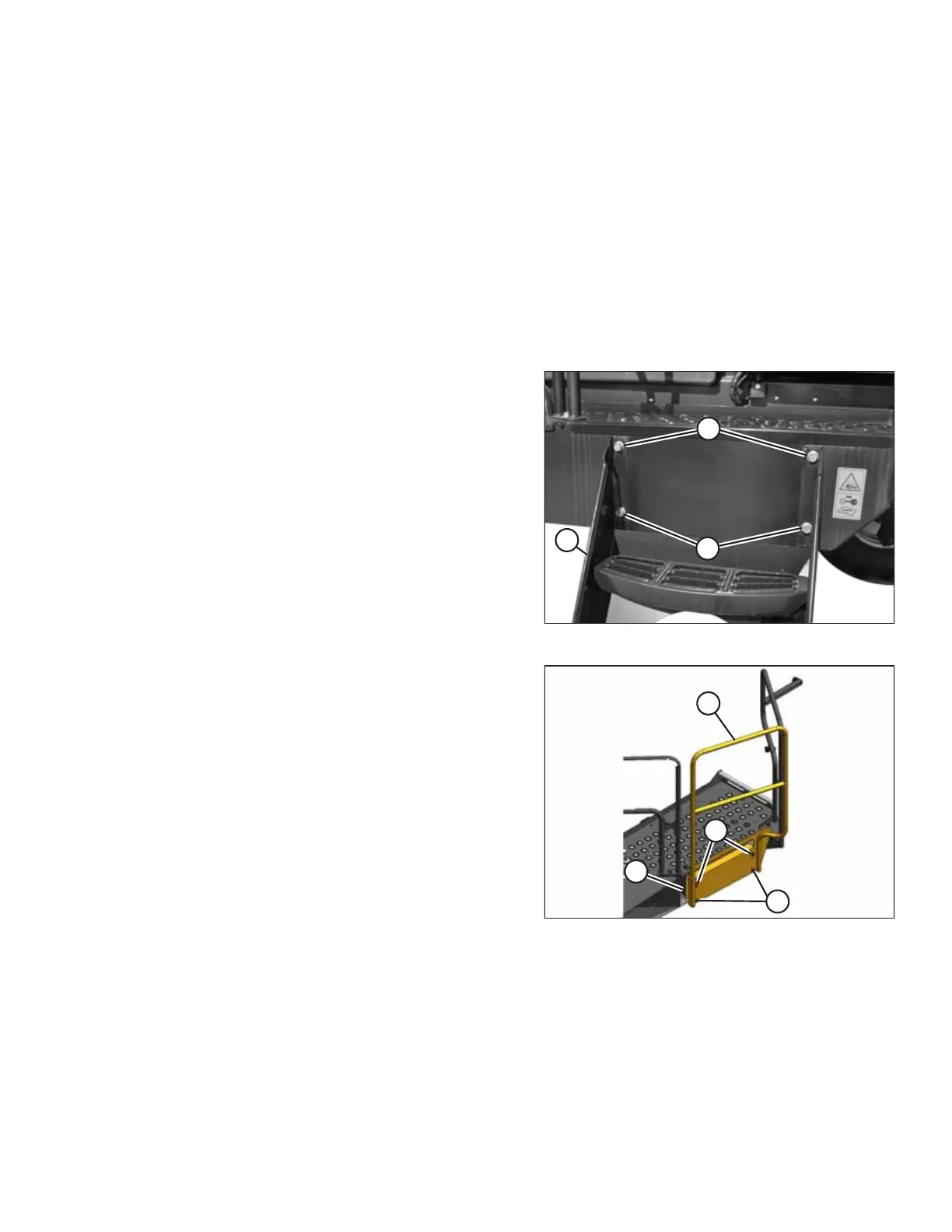
Figure 2.11: Right Stairs
1. Remove right stairs (C) from the platform by removing the
two top bolts (A) and loosening two bottom bolts (B).
Retain the bolts.
2. Lift the steps to detach the bottom keyhole slots from
bolts (B).
3. Remove bolts (B) from the bottom of the frame and loosely
install the bolts in top location (A).
Figure 2.12: Platform Rail
4. Hang platform rail (A) by fitting the keyhole slots in adapter
plate (B) onto top bolts (C).
5. Install two bottom bolts (D) and tighten all four bolts.
SETUP INSTRUCTIONS



 To Next Page