215626 48 Revision A
$
%
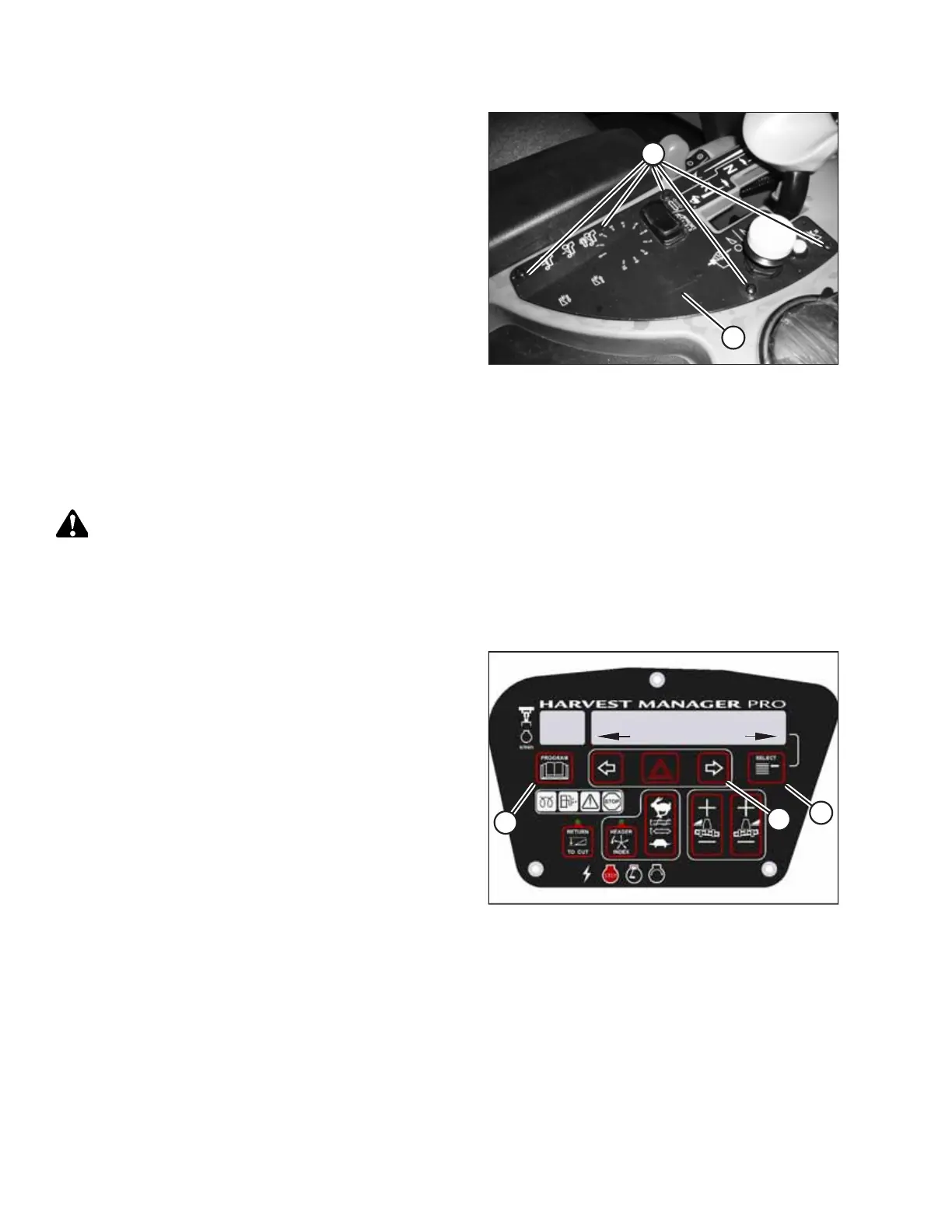
Figure 2.87: Console Control Plate
20. Reinstall cover (A) with five screws (B).
NOTE:
Refer to 2.8.1 Configuring Double Windrow Attachment
Controls, page 48 for instructions on how to program the
cab display module to control DWA functions.
2.8.1 Configuring Double Windrow Attachment Controls
Once the Double Windrow Attachment (DWA) is installed on the windrower, it must be configured to work with the
windrower’s controls.
CAUTION
Check to be sure all bystanders have cleared the area.
NOTE:
The cab display module images in this procedure apply only to a M155 Self Propelled Windrower; the M205’s display
module is similar.
&;;;
0;;;
:,1'52:(56(783"
12<(6
$
%
&
Figure 2.88: CDM Programming Buttons
1. Turn the ignition key to RUN, or start the engine.
2. Press PROGRAM (A) and SELECT (C) on the cab display
module (CDM) to enter programming mode.
• WINDROWER SETUP? appears on the upper line.
• NO/YES appears on the lower line.
3. Press right arrow (B) to select YES. Press SELECT (C).
• SET KNIFE SPEED? appears on the upper line.
SETUP INSTRUCTIONS



 To Next Page