Chapter 6 Communications
6-14
Using SPC-IV
Use SPC-IV to connect a computer to the QC200 and transfer data to the
computer. Like HyperTerminal, SPC-IV uses the RS-232 ports on the com-
puter and the QC200 to send data to a spreadsheet. Contact your Metronics
distributor to purchase SPC-IV for your computer.
To connect to a computer using SPC-IV
NOTENOTE
NOTENOTE
NOTE
SPCSPC
SPCSPC
SPC
-IV must have the gage control module installed to receive-IV must have the gage control module installed to receive
-IV must have the gage control module installed to receive-IV must have the gage control module installed to receive
-IV must have the gage control module installed to receive
data from the QC200.data from the QC200.
data from the QC200.data from the QC200.
data from the QC200.
Steps 1 through 15 describe how to set up SPC-IV to receive data from the
QC200.
Step 1
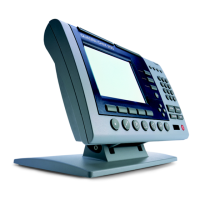
Double-click on the SPC-IV icon.
NOTENOTE
NOTENOTE
NOTE
Use the Use the
Use the Use the
Use the
Windows start menuWindows start menu
Windows start menuWindows start menu
Windows start menu
to open SPC -IV if there is no shortcut to open SPC -IV if there is no shortcut
to open SPC -IV if there is no shortcut to open SPC -IV if there is no shortcut
to open SPC -IV if there is no shortcut
icon on the desktop.icon on the desktop.
icon on the desktop.icon on the desktop.
icon on the desktop.
Step 2
Click on the file menu and select new.


 To Next Page