Setting 3.2 I/O channels
EM-7361 P27
3.2.3 Operation input (OI) setting
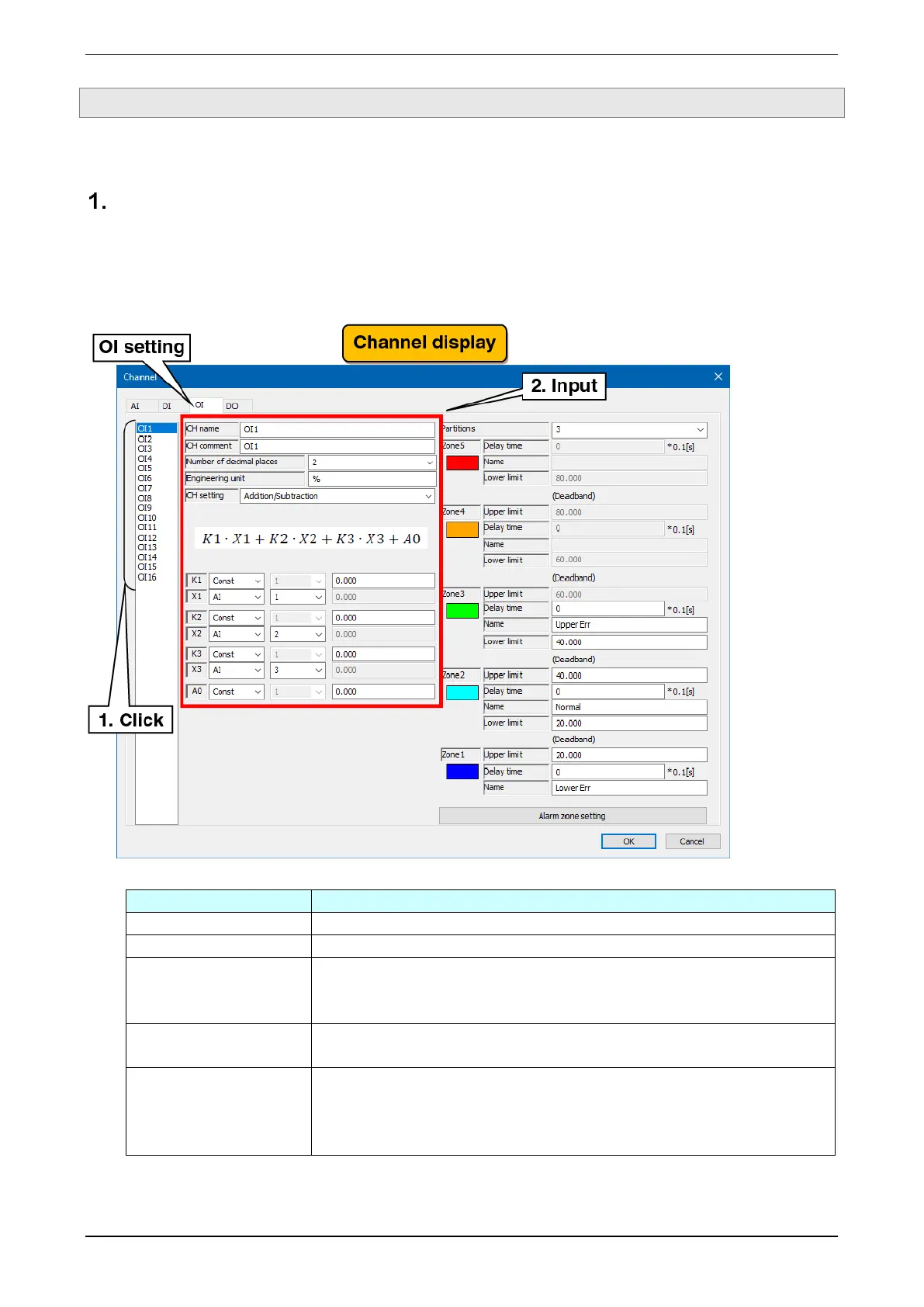
Make the operation input (OI) setting. There are 16 operation input channels (OI1 to OI16).
Basic setting
Make the basic setting for the operation input (OI).
(1) Clicking the channel to be set displays the current setting.
(2) Make the basic setting. In reference to the table below, set the various parameters.
Set the name of the channel within 16 characters.
Set the tag name or other comments about the channel within 16 characters.
Set the number of decimal places for numbers displayed such as on the WEB
display.
Set this in the range of 0 to 3.
Set the engineering unit.
Set this within eight characters.
Select from the following: Unused/ Addition/Subtraction / Multiplication / Division /
Extraction of square root / Moving average / First order lag / exp / Common
logarithm / Natural logarithm / Peak hold (maximum) / Peak hold (minimum) /
Power / Analog integration / F-value operation / antilogarithm / Scaling / Time.



 To Next Page