Setting 3.5 Recording report
EM-7361 P49
3.5.2 Channel setting
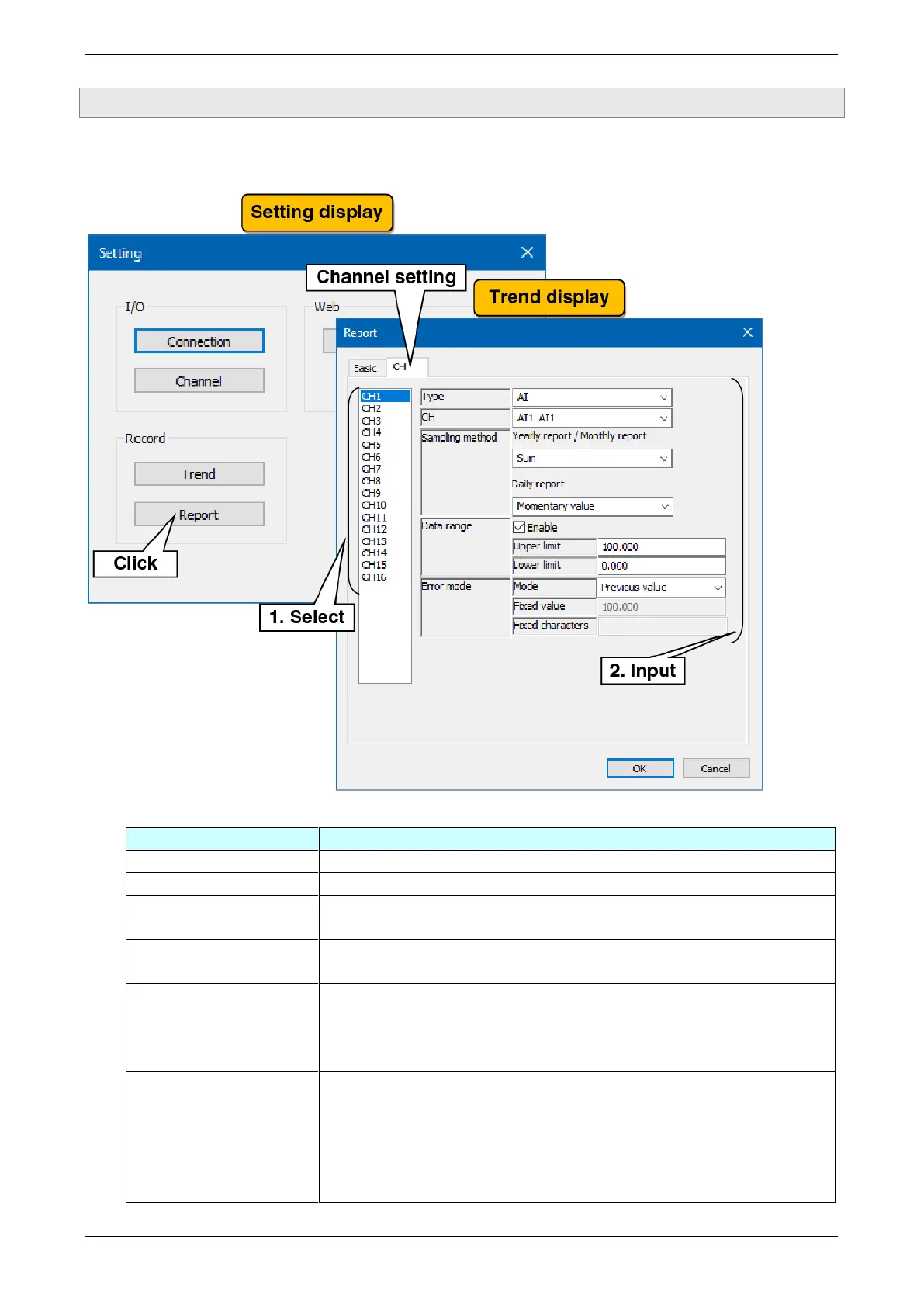
Make the setting for the content of recording.
(1) Select the channel to be set and, in reference to the table below, set the various parameters.
Select the type of the channel to be assigned from None / AI / OI.
Select the channel to be assigned.
Sampling method
Yearly report / Monthly report
Select the sampling method for the “daily/monthly data” to be recorded in the
yearly / monthly report from Total / Average / Maximum / Minimum.
Sampling method
Daily report
Select the sampling method for the “hourly data” to be recorded in the daily report
from Momentary value / Average / Maximum / Minimum.
1
- To set an effective range for data to be recorded on the reports, check the
“Enable” check box.
- Upper limit: Set the upper limit when “Enable” is checked.
- Lower limit: Set the lower limit when “Enable” is checked.
- Mode: Select the value to be recorded in the report data when data could not
be obtained or when data outside the range set in the data range is obtained
from Previous value / Fixed value / Fixed characters.
- Fixed value: Set a value when set to “Fixed value.”
- Fixed characters: Set a character string within 24 characters when set to “Fixed
characters.”



 To Next Page