EasyManua.ls Logo

MG PC Series - Alarm Zone Setting

MG PC Series
79 pages
Print Icon
To Next Page IconTo Next Page
To Previous Page IconTo Previous Page
Loading...
Setting 3.2 I/O channels
EM-7361 P32
MG CO., LTD.
www.mgco.jp
Alarm zone setting
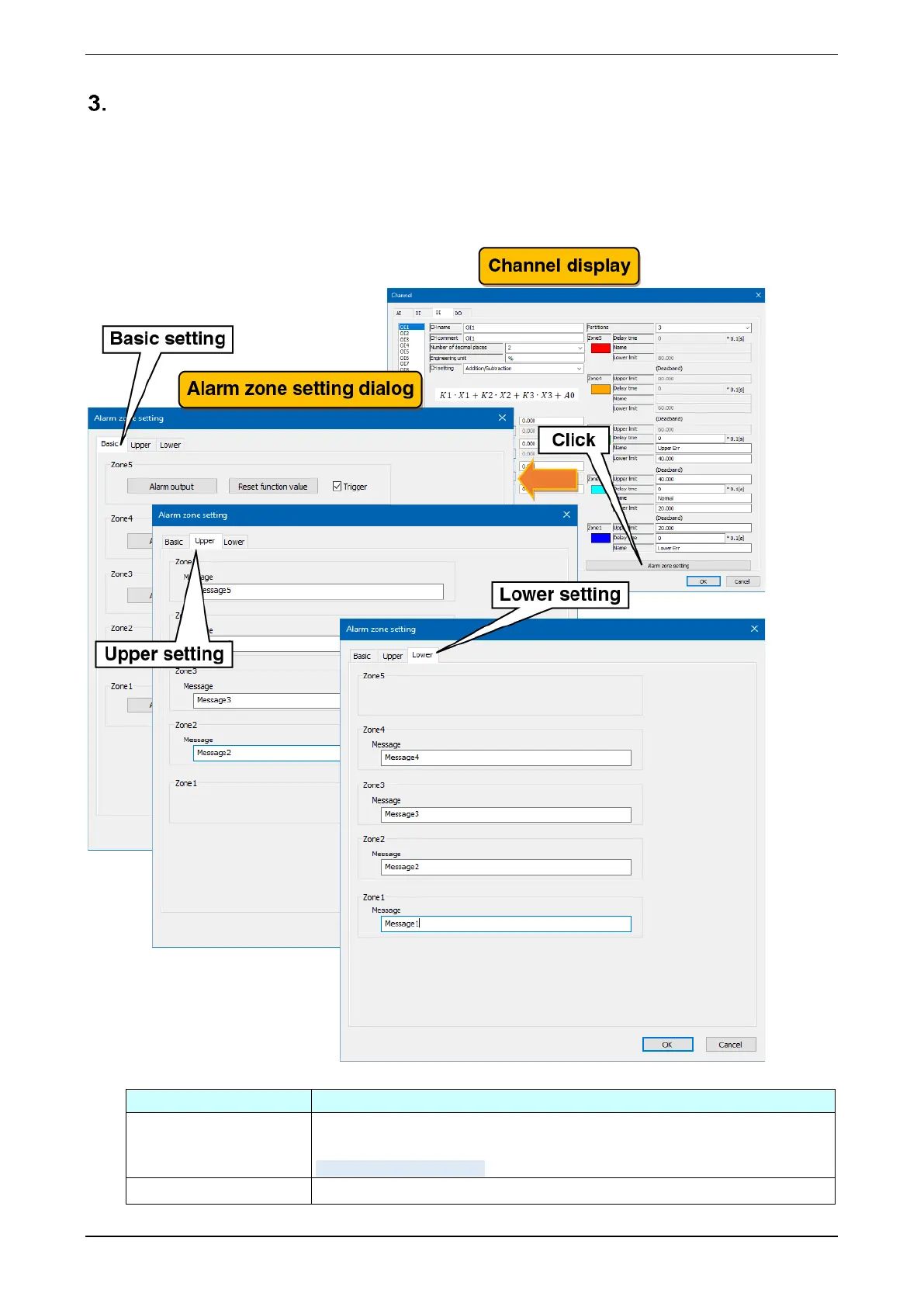
An event occurs when a transition is made to a zone set in the zone setting.
(1) Clicking the “Alarm zone setting” button on the “Channel” display show the “Alarm zone setting” dialog. If
the partitions is 0 (unused), the click is invalid.
(2) In reference to the table below, set the various parameters. Click the [OK] button to return to the
“Channel” display.
Settings
Description
Trigger
Set whether or not to perform trigger recording when the input value changes and
enters the corresponding zone. To use the trigger recording, select the checkbox.
-> 3.4.13. Trigger recording
Message
Set the message when the event occurs within 32 characters.

Table of Contents

Related product manuals