SECTION II
TESTING AND TROUBLESHOOTING
© Midmark Corporation 2002 SF-1803 Page 2-4 Printed in U.S.A.
2.2 Service Diagnostics
Service Diagnostics allows testing the various compo-
nents of the sterilizer through use of operator buttons,
and the display.
To Initiate Service Diagnostics:
(1) Unplug unit from electrical outlet.
(2) Remove panels (Refer to para 4-2).
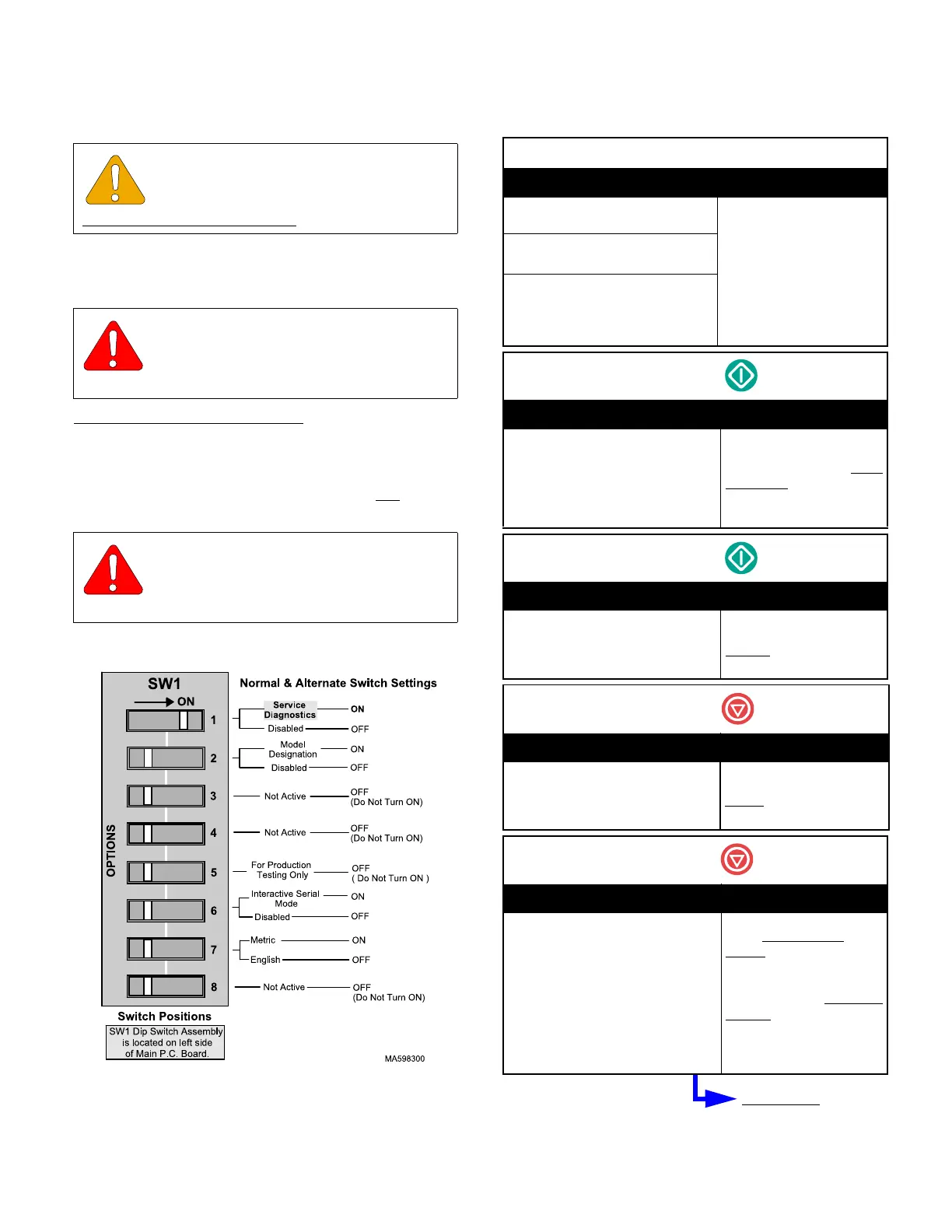
(3) Place SW1 Switch 1 (Figure 2-3) in ON
(right)
position.
(4) Plug unit into outlet.
(5) Use Table 2-2 to perform the Service Diagnos-
tics.
Service Diagnostics. Table 2-2.
EQUIPMENT ALERT
Always complete Service Diagnostics
before replacing any major components
especially the Main P.C. Board.
WARNING
Unplug unit from electrical outlet to pre-
vent possibility of personal injury or
death from electrical shock.
WARNING
Use extreme caution when unit is
plugged into outlet to prevent possibil-
ity of personal injury from electrical shock.
Fig. 2-3. SW1 Dip Switch
Plug Unit Into Outlet
Display Action / Notes
INITIALIZING
SYSTEM
•Total number of cycles that
have been ran on unit.
•Model Number (M9, M9D,
M11, or M11D)
* Model designation is set
using SW1 switch 2.
•Software version number.
TOTAL CYCLES XX
M9
*, vX.XX
SERVICE DIAGNOSTICS
< START > TO CONTINUE
Press START
Display Action / Notes
< START > I / O TEST
< STOP > RECALL ERRORS
< HANDPIECES > KEYTEST
Press START to go to I/O
Te st
Press STOP to display last 5
error codes.
Press HANDPIECES to run
Key Test.
Press START
Display Action / Notes
AIR VALVE TEST
< START > TO TOGGLE
< STOP > FOR NEXT TEST
Pressing START energizes
Air Valve solenoid coil,
opening
the valve.
Press STOP
Display Action / Notes
VENT VALVE TEST
< START > TO TOGGLE
< STOP > FOR NEXT TEST
Pressing START energizes
Vent Valve solenoid coil,
closing
the N/O valve.
Press STOP
Display Action / Notes
FILL VALVE TEST
< START > TO TOGGLE
< STOP > FOR NEXT TEST
Pressing START opens Fill
Valve. (Door must be
closed)
Water flows into chamber.
NOTE: Water Level Probe
does not function. Water can
overflow from chamber
unless START button is
pressed again or STOP is
pressed to terminated test.
Next Page
Return To Table of Contents



 To Next Page