29
Meter Operations 3.4 3.4.1
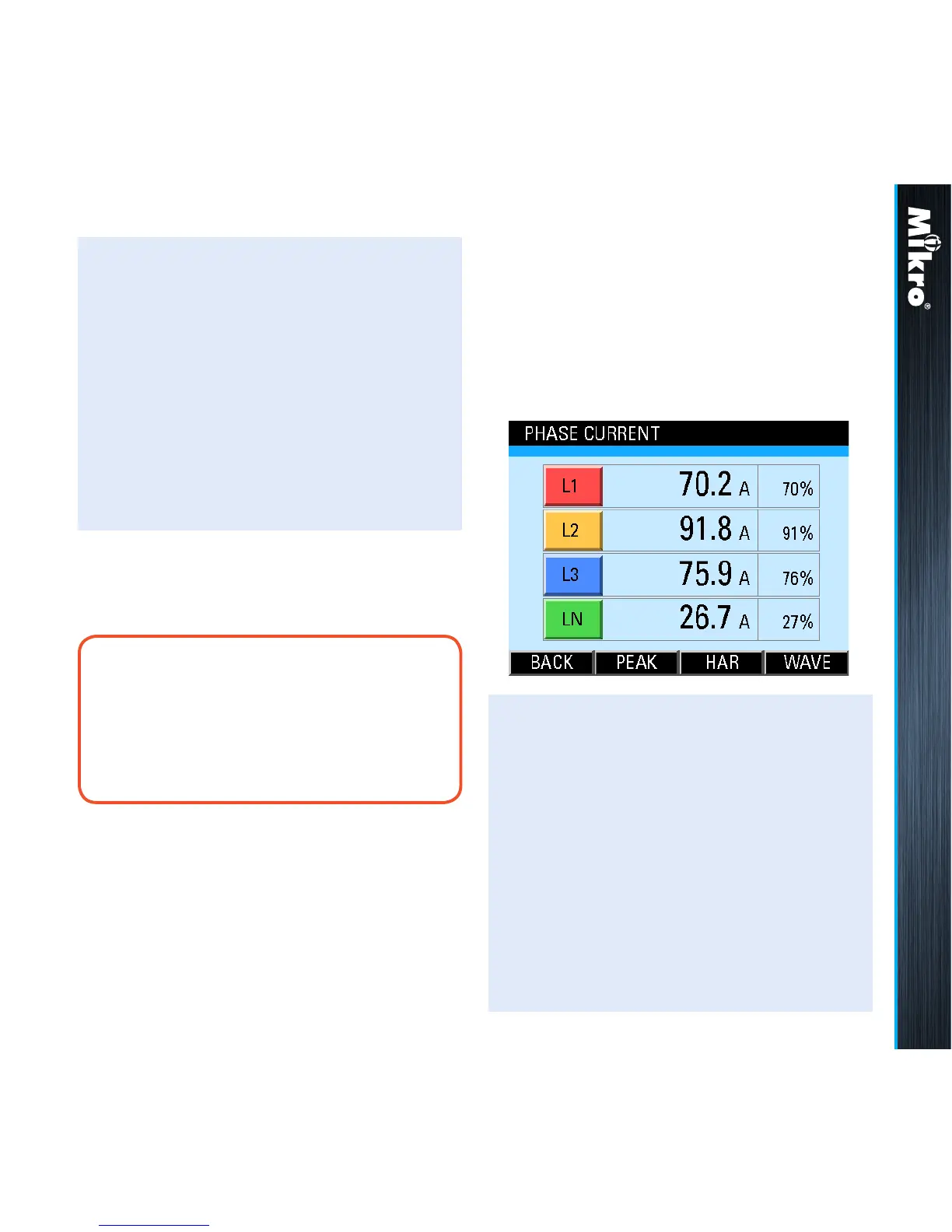
The right-most column of the current value
display shows the corresponding percentage
loading of the rated metering current input.
noTE:
In a star system without a neutral CT as
shown in Fig 7, the displayed neutral current
is derived from the summation of the phase
CT currents.
TouCH BuTTon funCTions:
• to select the parameter page of interest,
touch either the UP (F2) or DOWN (F3)
button until the parameter item is highlighted
(within a dashed rectangular box and a RED
dot to its left). To conrm this selection, touch
the ENTER (F4) button.
• to return to the MAIN MENU, touch the
BACK (F1) button.
3.4.1
pHasE CurrEnT
The Phase Current page shows the true RMS
current of each phase and where applicable,
neutral as shown in Fig 33:
Fig 33 : Phase Current page
TouCH BuTTon funCTions:
• to jump to the Maximum Current page,
touch the PEAK (F2) button.
• to jump to the Current Harmonics page,
touch the HAR (F3) button.
• to jump to the Current Waveform page,
touch the WAVE (F4) button.
• otherwise, touch the BACK (F1) button to
return to the CURRENT sub-menu.



 To Next Page