60
Meter Operations 3.8.2.1
3.8.2.1
ETHErnET (TCp/ip)
(onlY for DpM680)
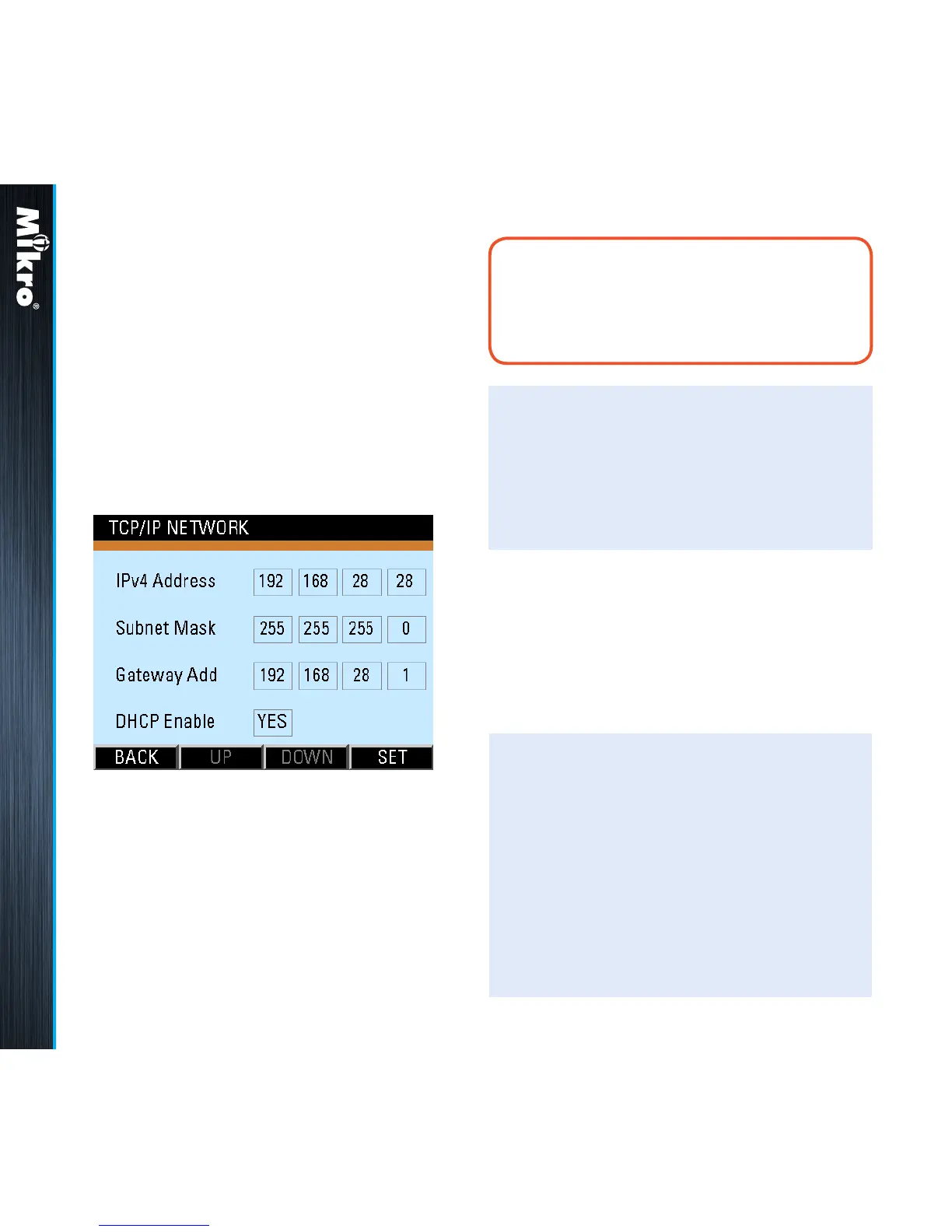
The Ethernet (TCP/IP) sub-page as shown in Fig
74 displays and allows the setting of DHCP and
xed TCP/IP network parameters for the purpose
of accessing the webpage and the Modbus TCP/
IP server.
Fig 74 : Ethernet (TCP/IP) sub-page
TouCH BuTTon funCTions:
• to input new settings, touch the SET (F4)
button.
• otherwise, touch the BACK (F1) button to
return to the Communication Settings page.
TouCH BuTTon funCTions:
• to increase the number or toggle the eld,
touch the UP (F2) button.
• to decrease the number or toggle the eld,
touch the DOWN (F3) button.
• to select the next eld to change, touch the
NEXT (F4) button and repeat the above 2
steps.
The default xed TCP/IP settings are as follow:
IPv4 address: 192.168.28.28
Subnet mask: 255.255.255.0
Gateway address: 192.168.28.1
In the input mode, the UP (F2) and DOWN (F3)
buttons will become active and the background
colour of the active eld will be changed to white.
Each eld in the IPv4 address, subnet mask
and gateway address must be numerical from
0 to 255.
noTE:
The DHCP Enable field must be toggled to
NO in order to use the alternate fixed TCP/
IP settings.



 To Next Page