EasyManua.ls Logo

Milesight UG63 - Page 31

Milesight UG63
84 pages
Print Icon
To Next Page IconTo Next Page
To Previous Page IconTo Previous Page
Loading...
31
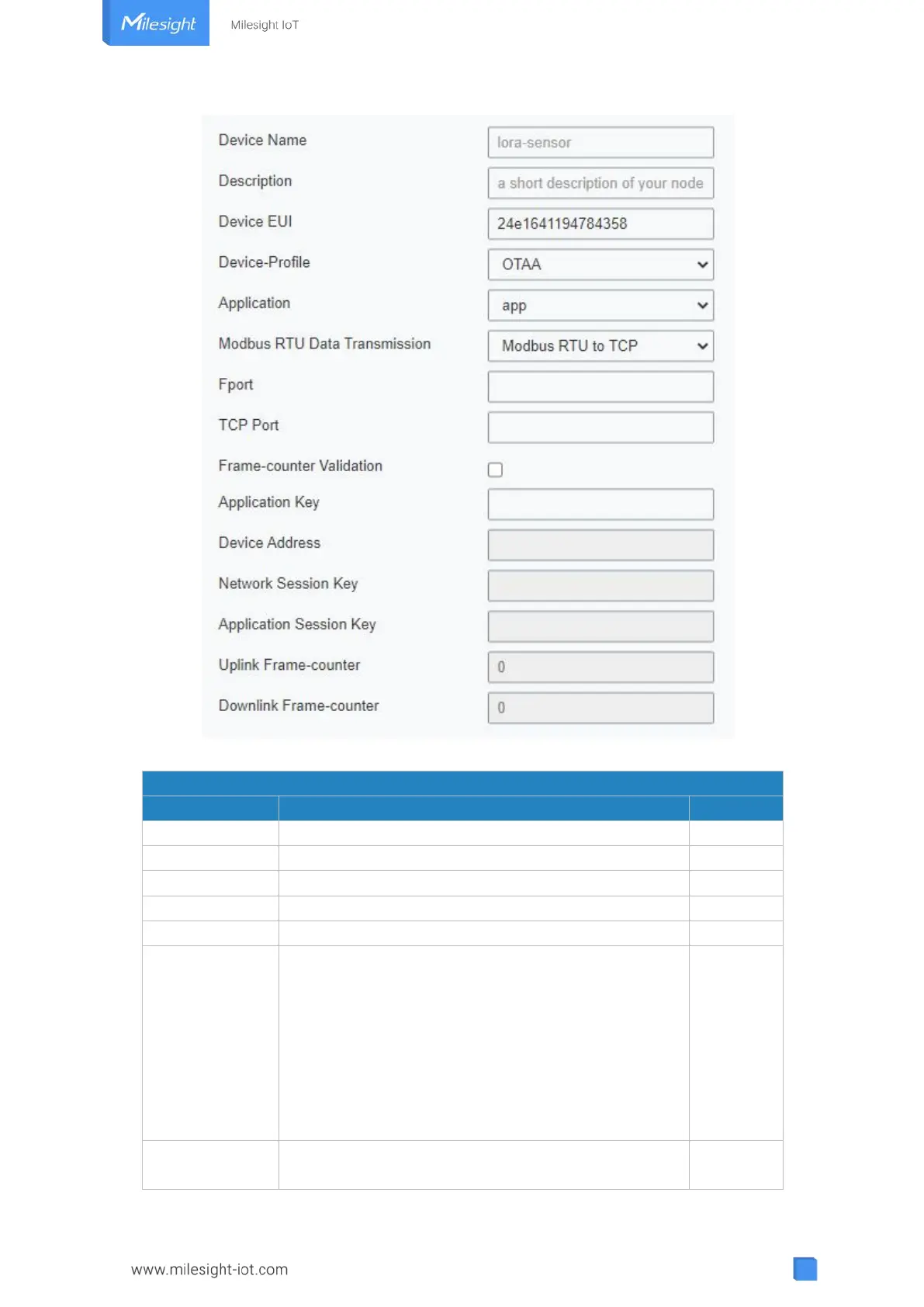
Figure 3-2-2-11
Device Configuration
Item
Description
Default
Device Name
Enter the name of this device.
Null
Description
Enter the description of this device.
Null
Device EUI
Enter the EUI of this device.
Null
Device-Profile
Choose the device profile.
Null
Application
Choose the application profile.
Null
Modbus RTU
Data
Transmission
Choose from: "Disable", "Modbus RTU to TCP",
"Modbus RTU over TCP". This feature is only
applicable to Milesight class C type LoRaWAN
®
controllers.(UC300/UC501/UC1152, etc.)
-Modbus RTU to TCP: TCP client can send Modbus
TCP commands to ask for controller Modbus data.
-Modbus RTU over TCP: TCP client can send Modbus
RTU commands to ask for controller Modbus data.

Disable
Fport
Enter the LoRaWAN
®
frame port for transparent
transmission between Milesight LoRaWAN
®
Null

Other manuals for Milesight UG63

Related product manuals