Enter the real remote IP address of GRE tunnel.
Set the local IP address.
Set the local tunnel IP address of GRE tunnel.
Enter remote tunnel IP address of GRE tunnel.
All the data traffic will be sent out via GRE tunnel when this
function is enabled.
Enter the remote subnet IP address of GRE tunnel.
Enter the remote netmask of GRE tunnel.
Enter the maximum transmission unit. Range: 64-1500.
Table 3-3-2-4 GRE Parameters
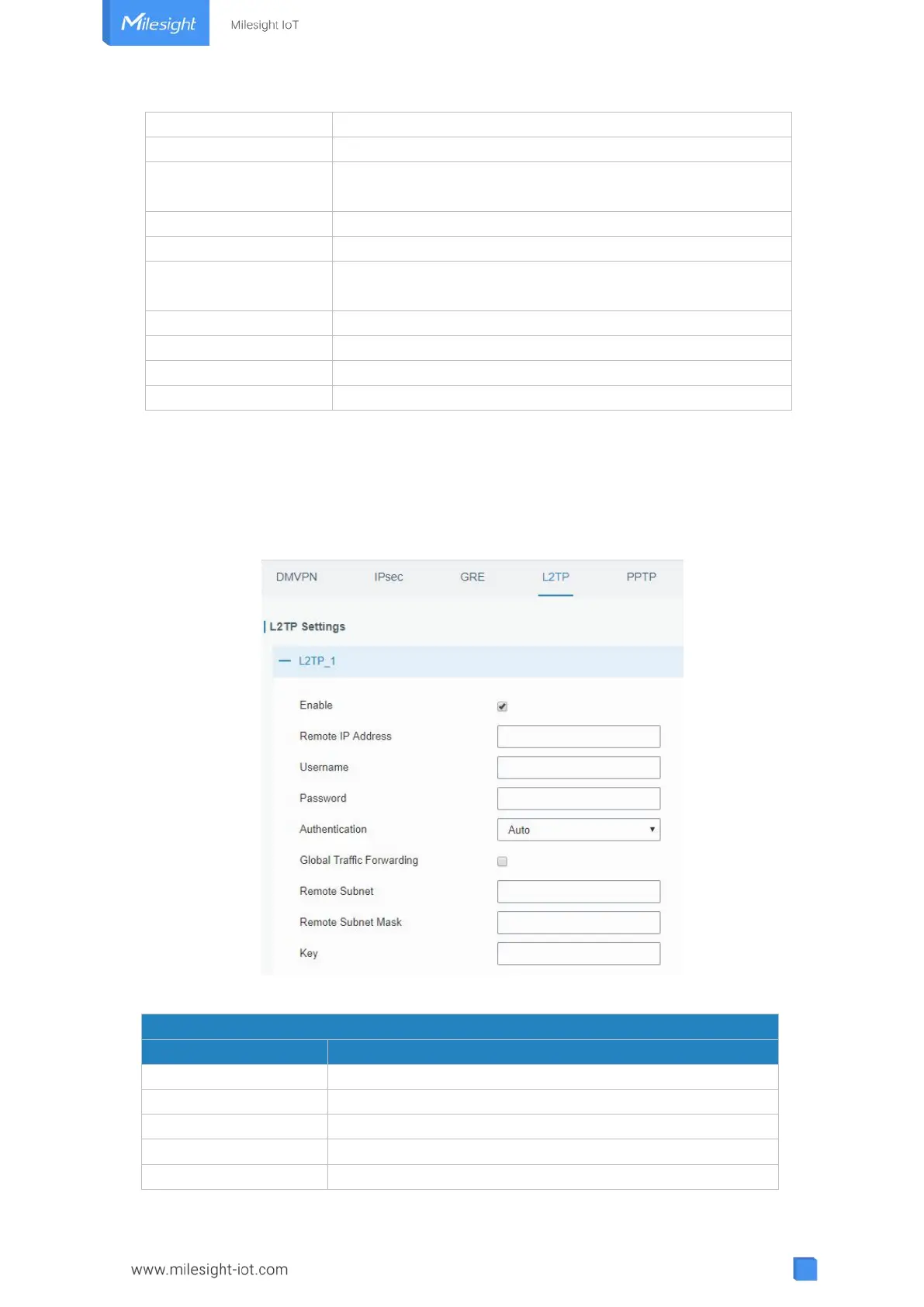
3.3.2.4 L2TP
Layer Two Tunneling Protocol (L2TP) is an extension of the Point-to-Point Tunneling
Protocol (PPTP) used by an Internet service provider (ISP) to enable the operation of a
virtual private network (VPN) over the Internet.
Figure 3-3-2-6
Check to enable L2TP function.
Enter the public IP address or domain name of L2TP server.
Enter the username that L2TP server provides.
Enter the password that L2TP server provides.
Select from "Auto", "PAP", "CHAP", "MS-CHAPv1" and



 To Next Page