Related Topic
Packets
4.9 Connect to UG65/UG67 Gateway
Milesight UG6x LoRaWAN
®
gateway can set up multi-gateway architecture, which can mak
e different gateway failover each other and extend signal coverage, while make one node
device roams in multiple gateways. One UG65/UG67 gateway can be used as network
server and other UG6x series gateways can be used as packet forwarder and transmit all
data to the main gateway.
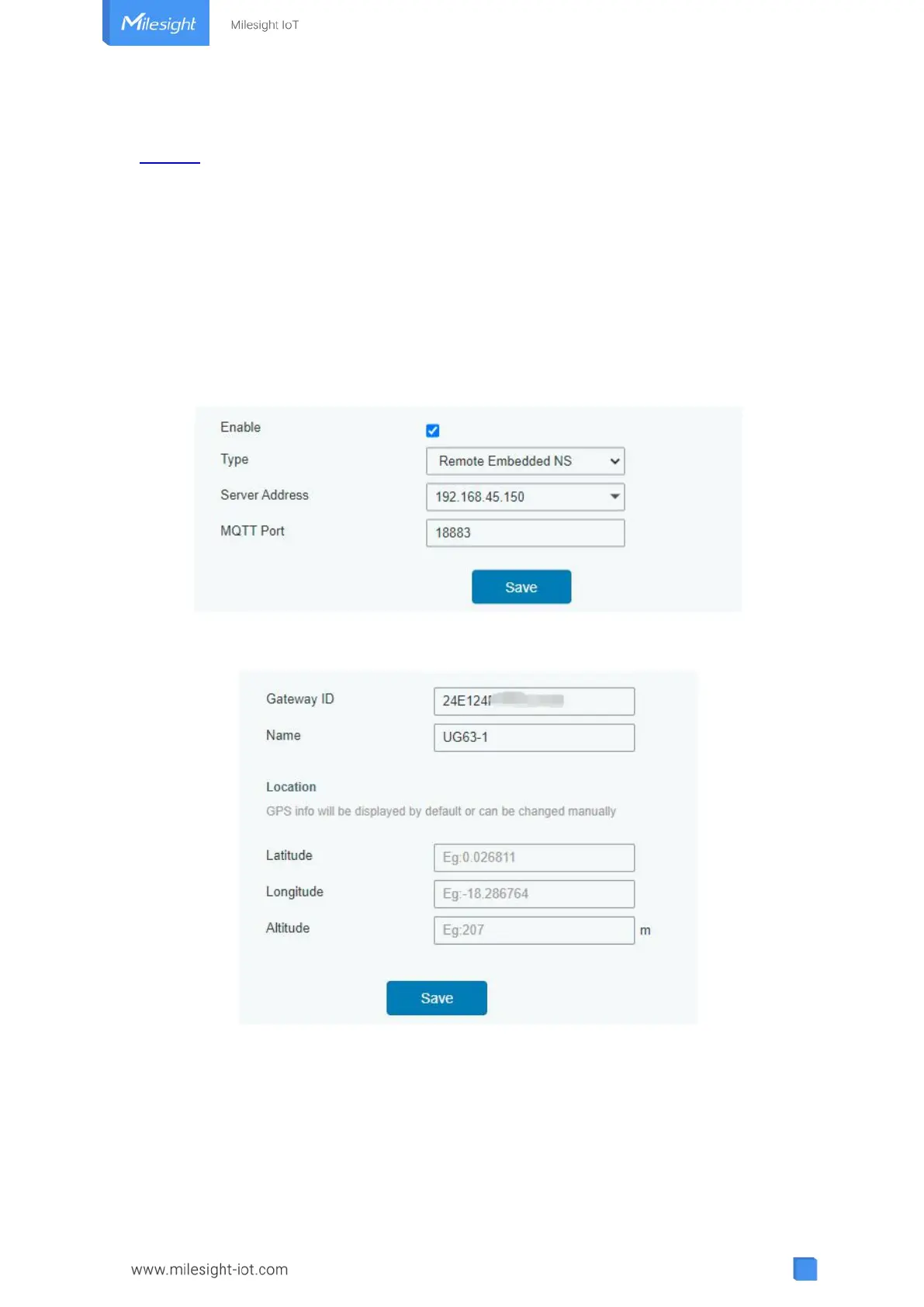
1. Go to “Packet Forwarder” → “General” page to enable the “Remote Embedded NS” and
fill in the main gateway IP address which can reach.
2. Go to “Network Server” → “Gateway Fleet” page of UG65/UG67 to add the gateway ID of
UG63 gateway and define a name, then save the settings.
3. After connected, the UG63 can transfer node data to UG65/UG67 and you can check the
data details on “Network Server” → “Packets” page of UG65/UG67.



 To Next Page