UG65 User Guide
www.milesight-iot.com
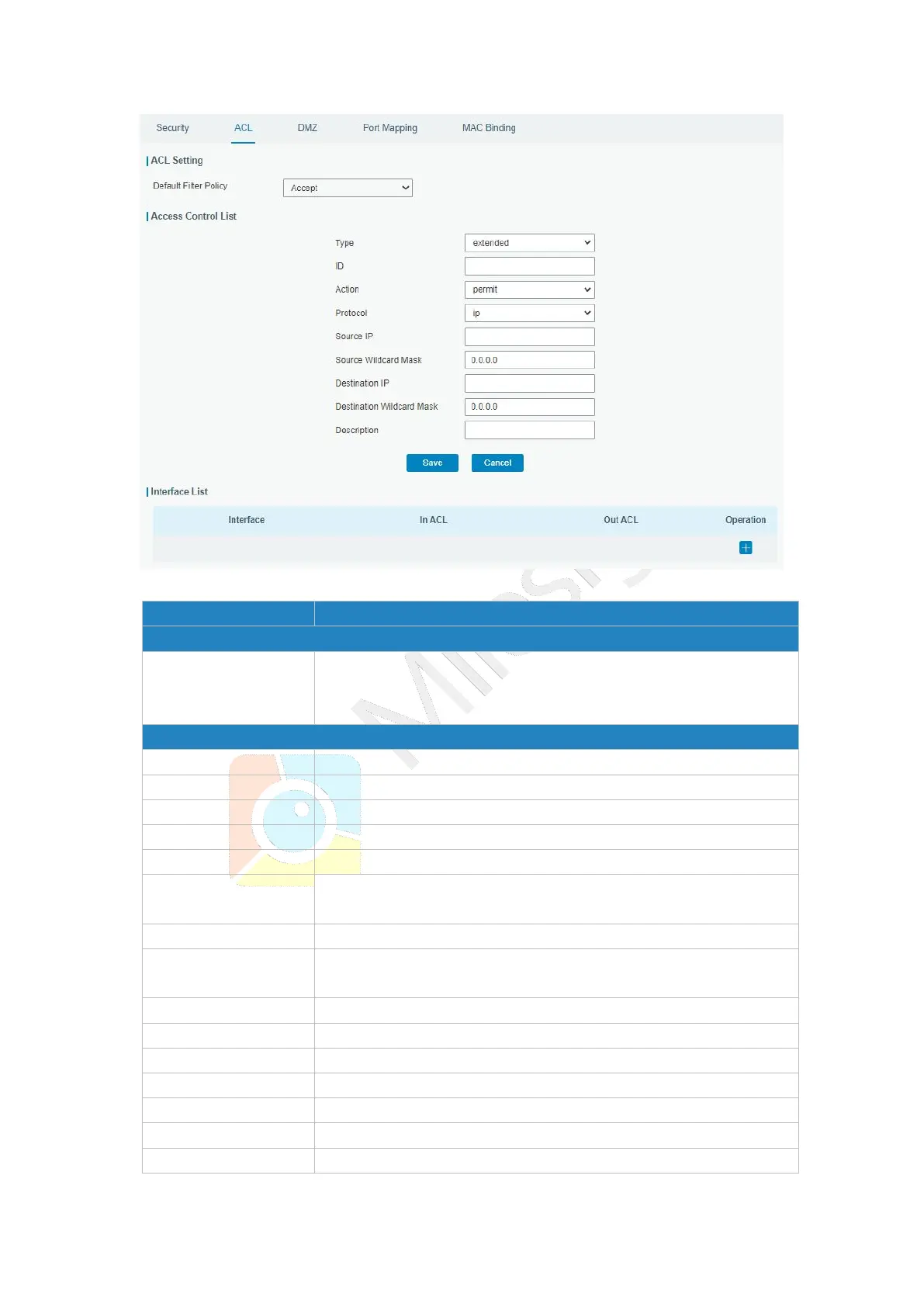
Figure 3-3-2-2
Select from "Accept" and "Deny".
The packets which are not included in the access control list will
be processed by the default filter policy.
Select type from "Extended" and "Standard".
User-defined ACL number. Range: 1-199.
Select from "Permit" and "Deny".
Select protocol from "ip", "icmp", "tcp", "udp", and "1-255".
Source network address (leaving it blank means all).
Wildcard mask of the source network address.
Destination network address (0.0.0.0 means all).
Wildcard mask of destination address.
Fill in a description for the groups with the same ID.
Enter the type of ICMP packet. Range: 0-255.
Enter the code of ICMP packet. Range: 0-255.
Select source port type, such as specified port, port range, etc.
Set source port number. Range: 1-65535.
Set start source port number. Range: 1-65535.
Set end source port number. Range: 1-65535.


 To Next Page