UG65 User Guide
www.milesight-iot.com
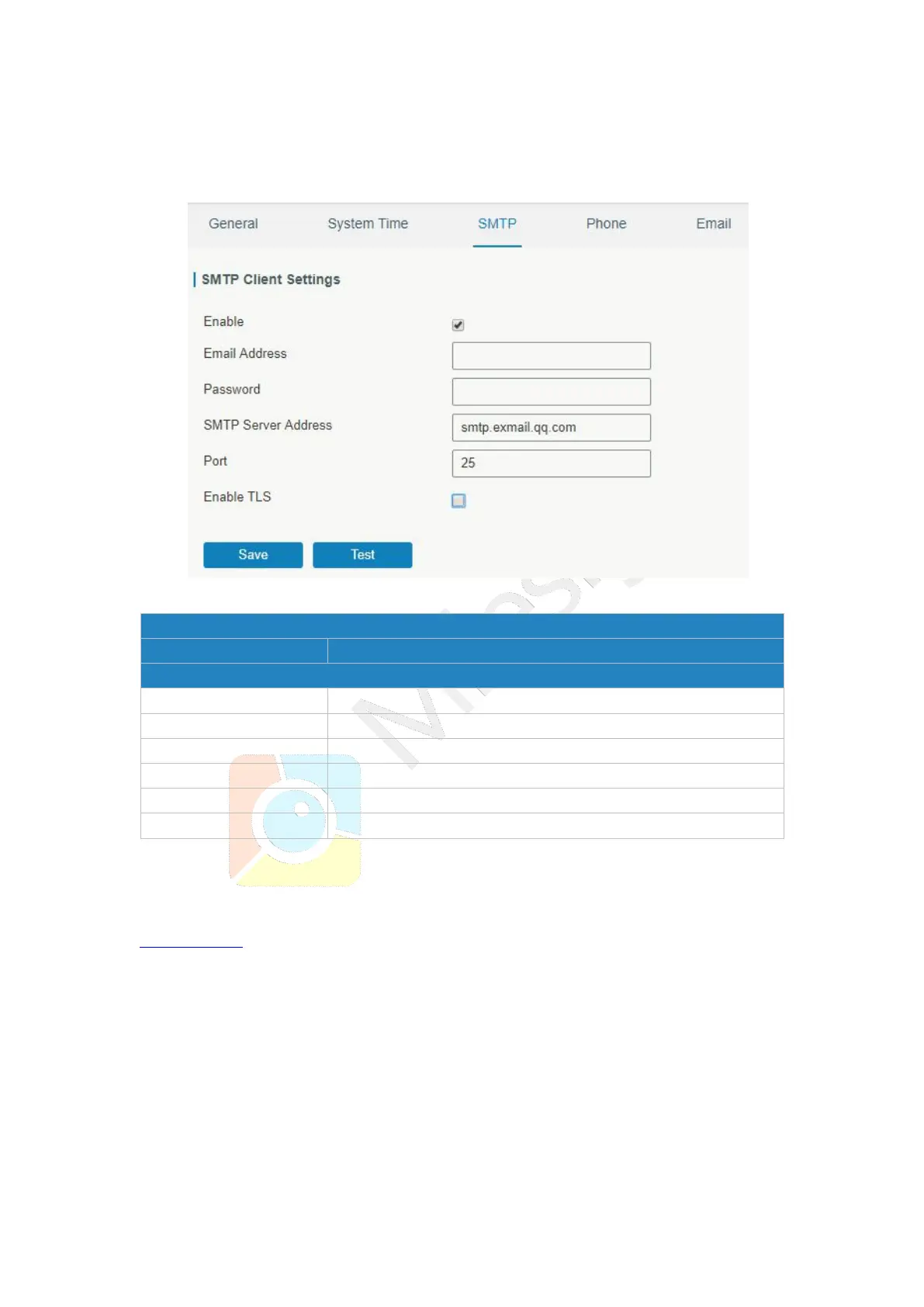
3.4.1.3 SMTP
SMTP, short for Simple Mail Transfer Protocol, is a TCP/IP protocol used in sending and
receiving e-mail. This section describes how to configure email settings.
Figure 3-4-1-5
Enable or disable SMTP client function.
Enter the sender's email account.
Enter the sender's email password.
Enter SMTP server's domain name.
Enter SMTP server port. Range: 1-65535.
Enable or disable TLS encryption.
Table 3-4-1-3 SMTP Setting
Related Topics
Events Setting
3.4.1.4 Phone
Phone settings involve in call/SMS trigger and SMS alarm for events.
1. Add phone list.
2. Select phone numbers and add them to the phone group.
3. Go to “Network > Interface > Cellular > Connection Mode > Connect on Demand >
Trigger by Call / Trigger by SMS” or go to “System > Events > Event Settings > SMS”
and then select the phone group ID.



 To Next Page