UG65 User Guide
www.milesight-iot.com
The permission of the specified MIB node is read and write.
The permission of the specified MIB node is read only.
Set the name of SNMPv3 group.
Select from "NoAuth/NoPriv", "Auth/NoPriv", and " Auth/Priv".
Select an MIB view to set permission as "Read-only" from the MIB view
list.
Select an MIB view to set permission as "Read-write" from the MIB view
list.
Select an MIB view to set permission as "Inform" from the MIB view list.
Table 3-4-3-3 VACM Parameters
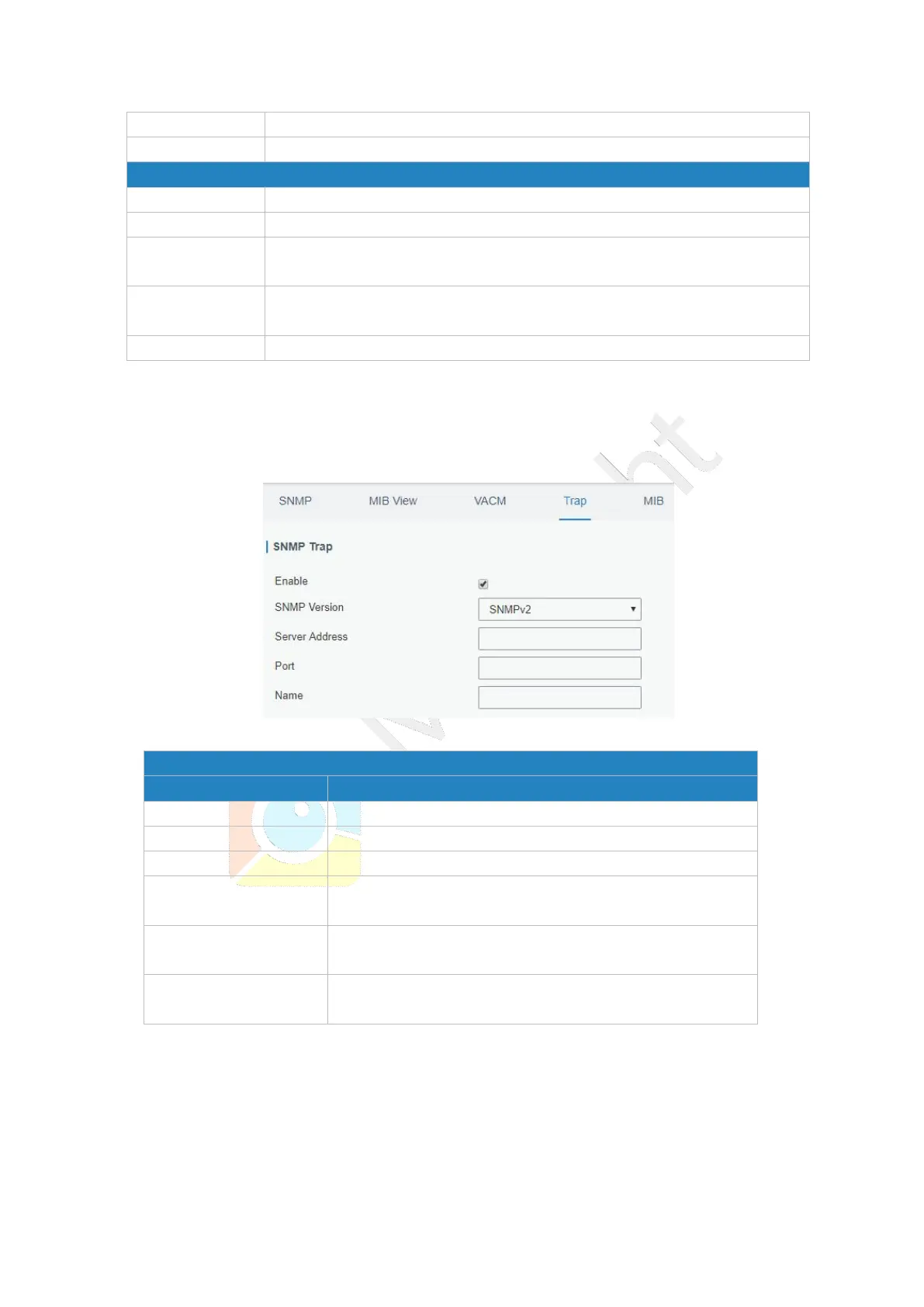
3.4.3.4 Trap
This section explains how to enable network monitoring by SNMP trap.
Figure 3-4-3-4
Enable or disable SNMP Trap function.
Select SNMP version; support SNMP v1/v2c/v3.
Fill in NMS's IP address or domain name.
Fill in UDP port. Port range is 1-65535. The default port is
162.
Fill in the group name when using SNMP v1/v2c; fill in
the username when using SNMP v3.
Select from "NoAuth & No Priv", "Auth & NoPriv", and
"Auth & Priv".
Table 3-4-3-4 Trap Parameters
3.4.3.5 MIB
This section describes how to download MIB files.



 To Next Page