UG65 User Guide
www.milesight-iot.com
Set the secondary DNS server.
Define the Windows Internet Naming Service obtained
by DHCP clients from DHCP sever. Generally you can
leave it blank.
Set a static and specific MAC address for the DHCP
client (it should be different from other MACs so as to
avoid conflict).
Set a static and specific IP address for the DHCP
client (it should be outside of the DHCP range).
Table 3-3-3-1 DHCP Server Parameters
3.3.4 DDNS
Dynamic DNS (DDNS) is a method that automatically updates a name server in the Domain
Name System, which allows user to alias a dynamic IP address to a static domain name.
DDNS serves as a client tool and needs to coordinate with DDNS server. Before starting
configuration, user shall register on a website of proper domain name provider and apply
for a domain name.
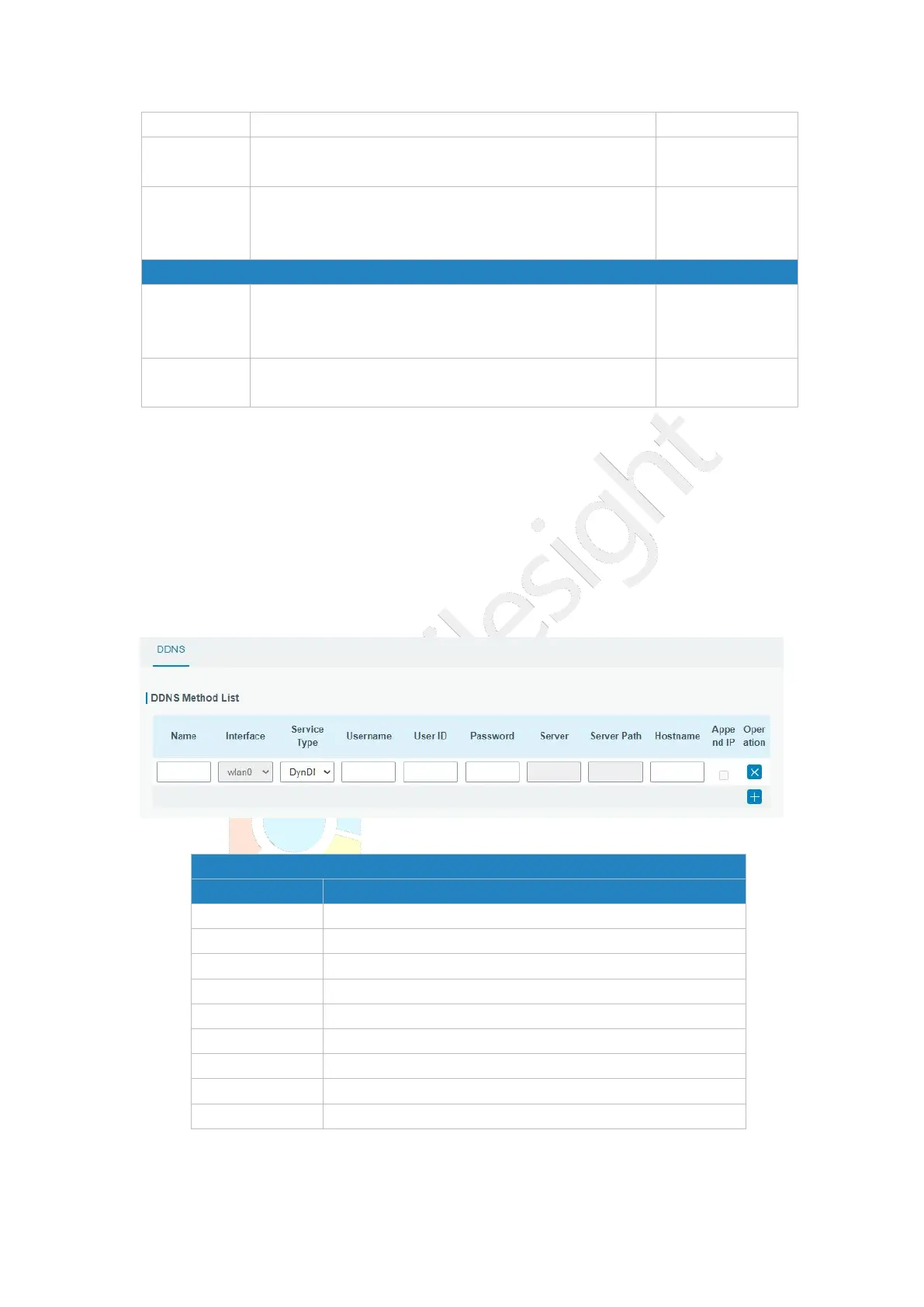
Figure 3-3-4-1
Give the DDNS a descriptive name.
Set interface bundled with the DDNS.
Select the DDNS service provider.
Enter the username for DDNS register.
Enter User ID of the custom DDNS server.
Enter the password for DDNS register.
Enter the name of DDNS server.
Enter the hostname for DDNS.
Append your current IP to the DDNS server update path.
Table 3-3-4-1 DDNS Parameters



 To Next Page