106
Mio Connect
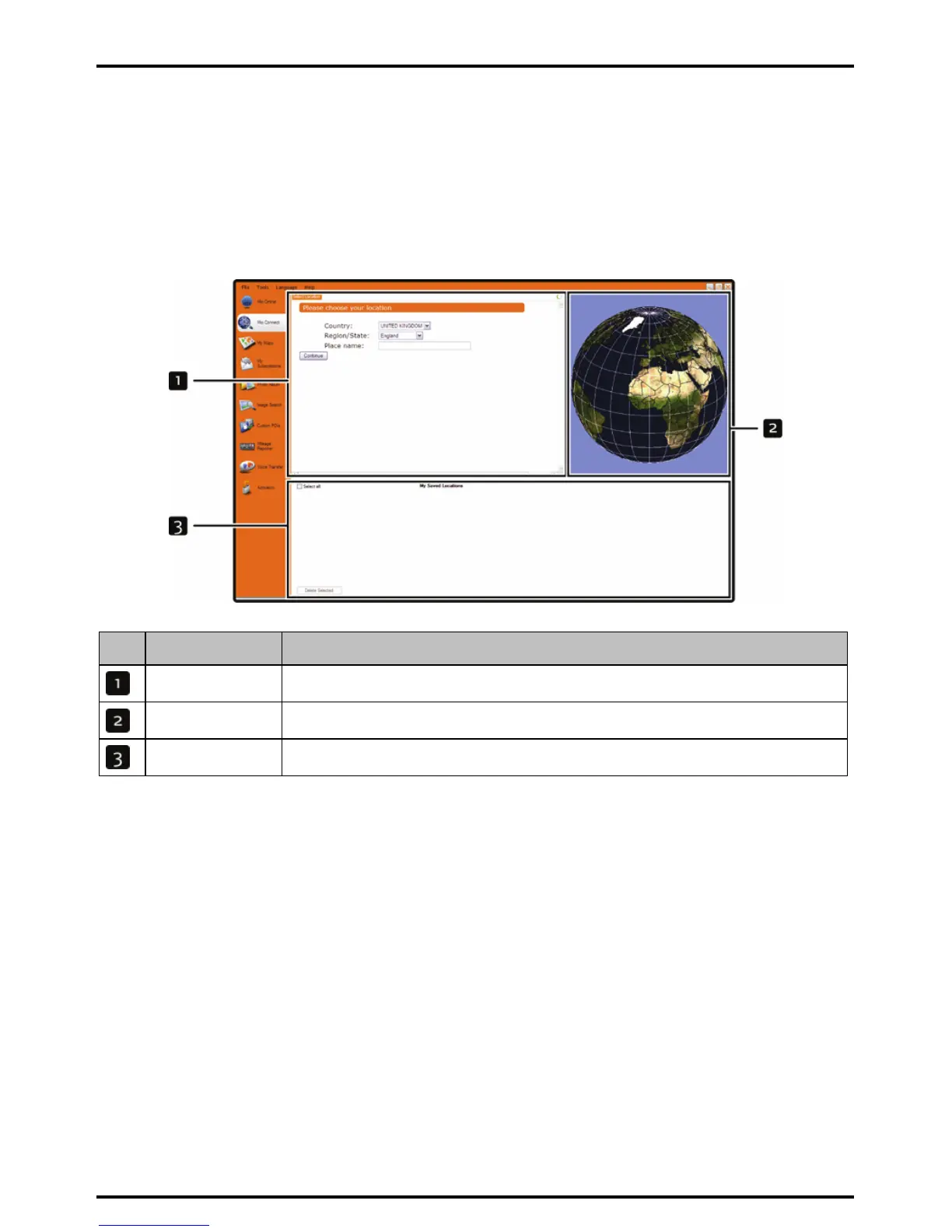
Mio Connect is a MioMore Desktop application that allows you to search and install local POI information from
your computer to your Mio.
Tip: Before you begin, ensure your Mio is correctly plugged into your computer: Plug the large end of the USB cable directly into
a USB port on your computer (not a USB hub); plug the small end into the USB Socket on the side of your Mio.
Start Æ All Programs Æ Mio Æ MioMore Desktop Æ Mio Connect
Element Description
Search location Displays search fields
Globe Displays selected place name results.
My saved locations Displays a list of POIs that are installed on your Mio.
How do I search for a POI using Mio Connect?
1. From the country drop down box, select a Country.
2. From the Region/State drop down box select a Region/State if required.
3. In the Place name box, enter the first few letters of a city and then select your preference.
4. Click Continue.
The Available Services page will display.
5. Select your preferred search service.
The selected services page will display.
Note: Depending on the country you are navigating, the available search services may vary.
6. Enter your search criteria and then click Search.
The Select search method page will display.
Note: For some countries you are required to accept the terms of use.
7. Select your preferred search method and then click Search.
A list of search results will display.














 To Next Page