118
Mileage Reporter
Note: Mileage Reporter is not available for all models
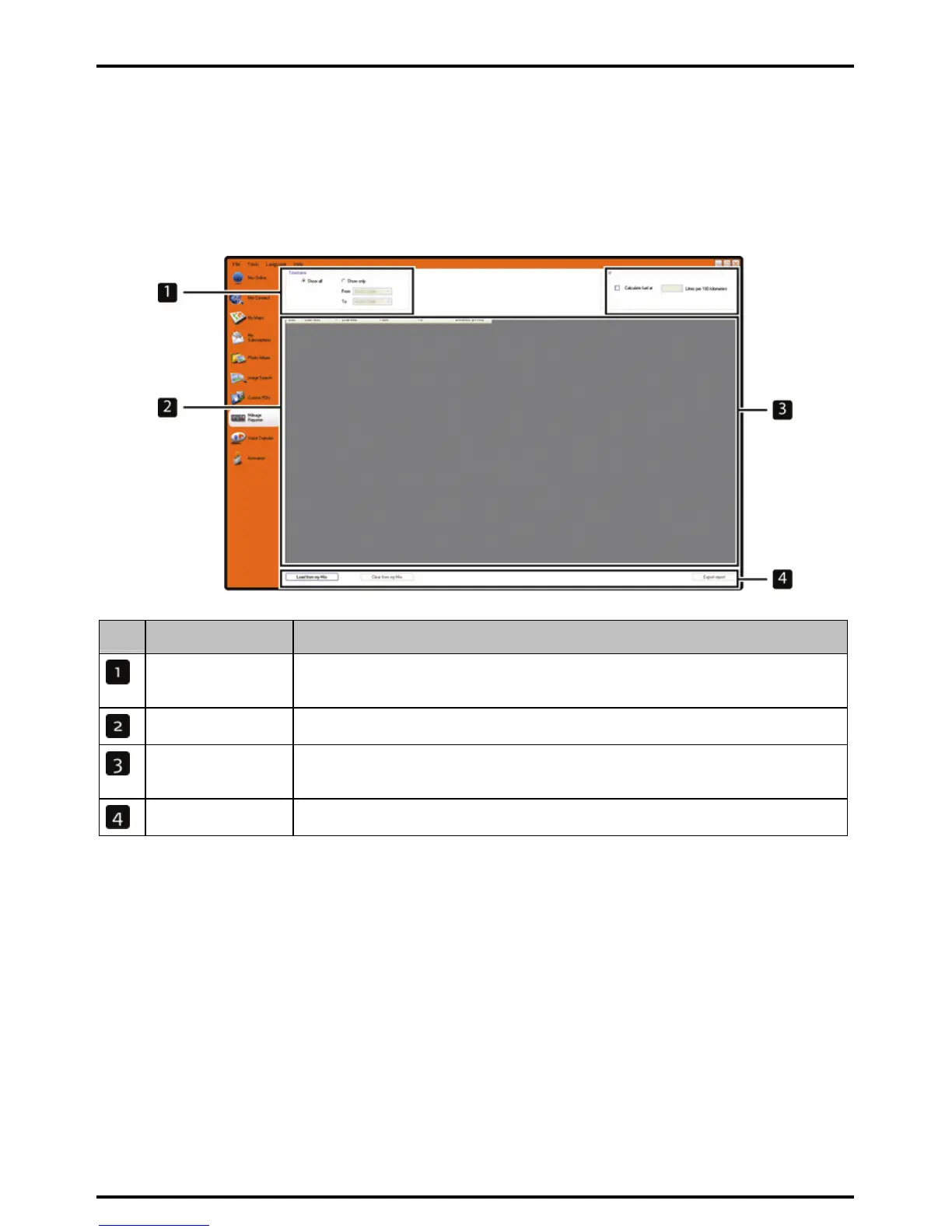
Mileage Reporter is a MioMore Desktop feature that allows you to create expense reports (.csv format) based
on the mileage and estimated fuel usage recorded by your Mio.
Start Æ All Programs Æ Mio Æ MioMore Desktop Æ Mileage Reporter
Element Description
Timeframe specifies the time for which the mileage report will be created.
Select Show All to include all recorded mileage.
Report panel displays your trip logs.
Fuel Select to include the amount of fuel (estimate) used for the mileage recorded.
If selected, specify the number of miles travelled per gallon, or kilometres travelled per litre.
Report data buttons click to input report data from your Mio or export to a report (.csv).
To set the trip recording preference on your Mio, see “
Data Recording 4/4” on page 78.
How do I input my trip data?
1. Select Show All in the Timeframe section.
2. Select the Calculate fuel check box and enter the fuel consumption.
3. Click Load from Device on the Report data button section.
The Transfer Log progress bar will display.
All your trip logs can now be viewed in the Report panel section.
How do I export a mileage report?
1. Select a trip log from the report panel section.
2. Click Export report on the Report data button section.
The open dialog box will open.














 To Next Page