65
How can I make a phone call using the
Dial
screen?
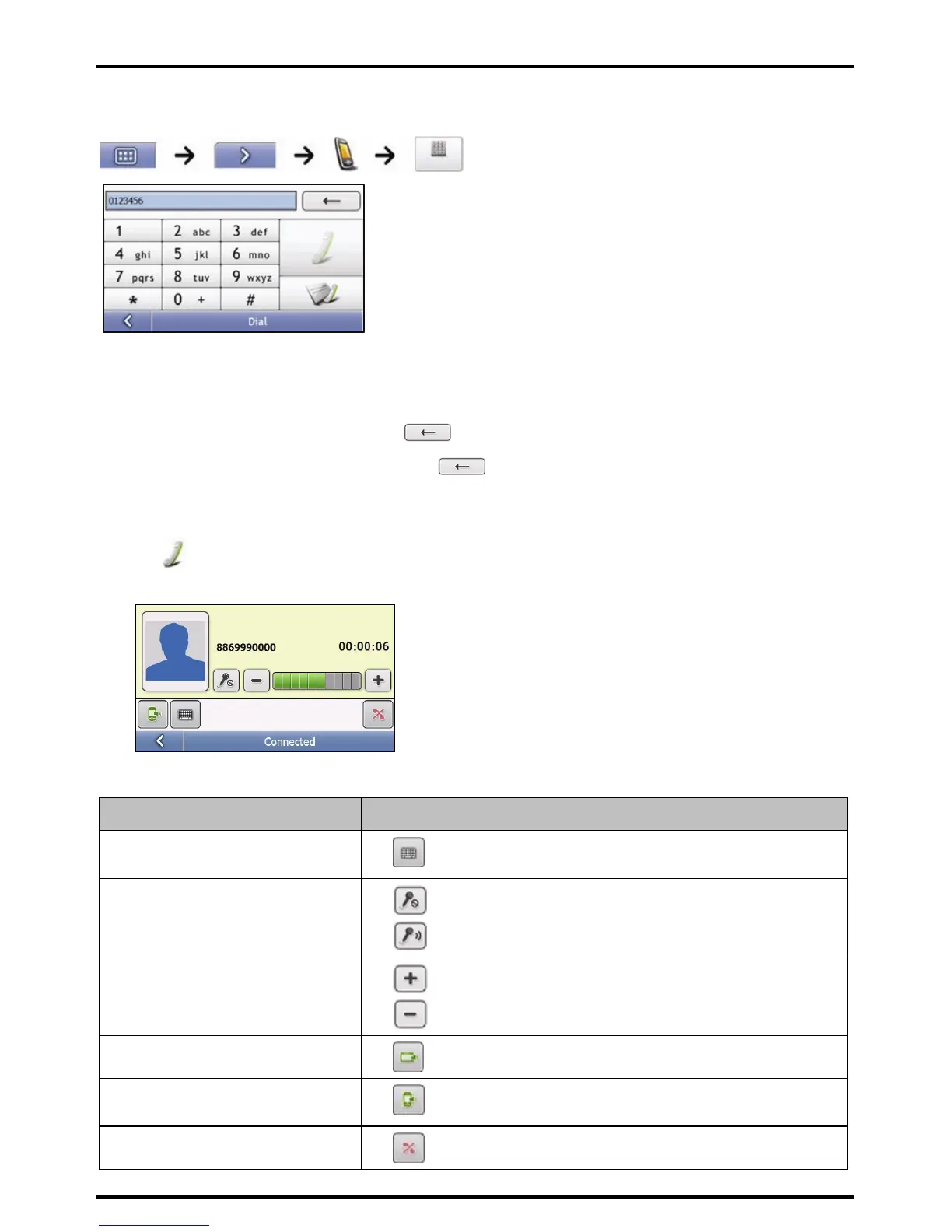
1. Enter the number you want to call.
Note: The number of the last call displays when you next access the Dial screen. The number will be cleared as you start
entering the number.
To delete the last digit entered, tap .
To clear the entire number, tap and hold
Tip: International calls require a country code to be included in the phone number. On your Mio, the country code is separated
from the rest of the number sequence by a +. If you are making an international call, tap and hold 0 until the + sign displays.
2. Tap to place the call.
The Dialling screen will display.
3. Complete the following:
If you want to… Then…
enter other numbers such as an extension
number
Tap
adjust sound so that the other party
cannot hear you
Tap
to mute.
Tap
to unmute.
adjust the volume
Tap
to increase the volume.
Tap
to decrease the volume.
make and receive calls via your Mio
Tap
.
make and receive calls via your mobile
phone
Tap
.
end or cancel the call
Tap
.














 To Next Page