Page84 CREASING/FOLDING
FAULT:-‘NOSYNC’appearsontouchscreen.(Machinewillnotbootup).
CAUTION.
NOTE.
1.CHECKTHEATXPOWERSUPPLYASFOLLOWS:-
2.CHECKTHEITXMOTHERBOARDASFOLLOWS:-.
(i)Disconnectthe20/24wayATXpowersupplyconnectorfromtheITXMotherboard.
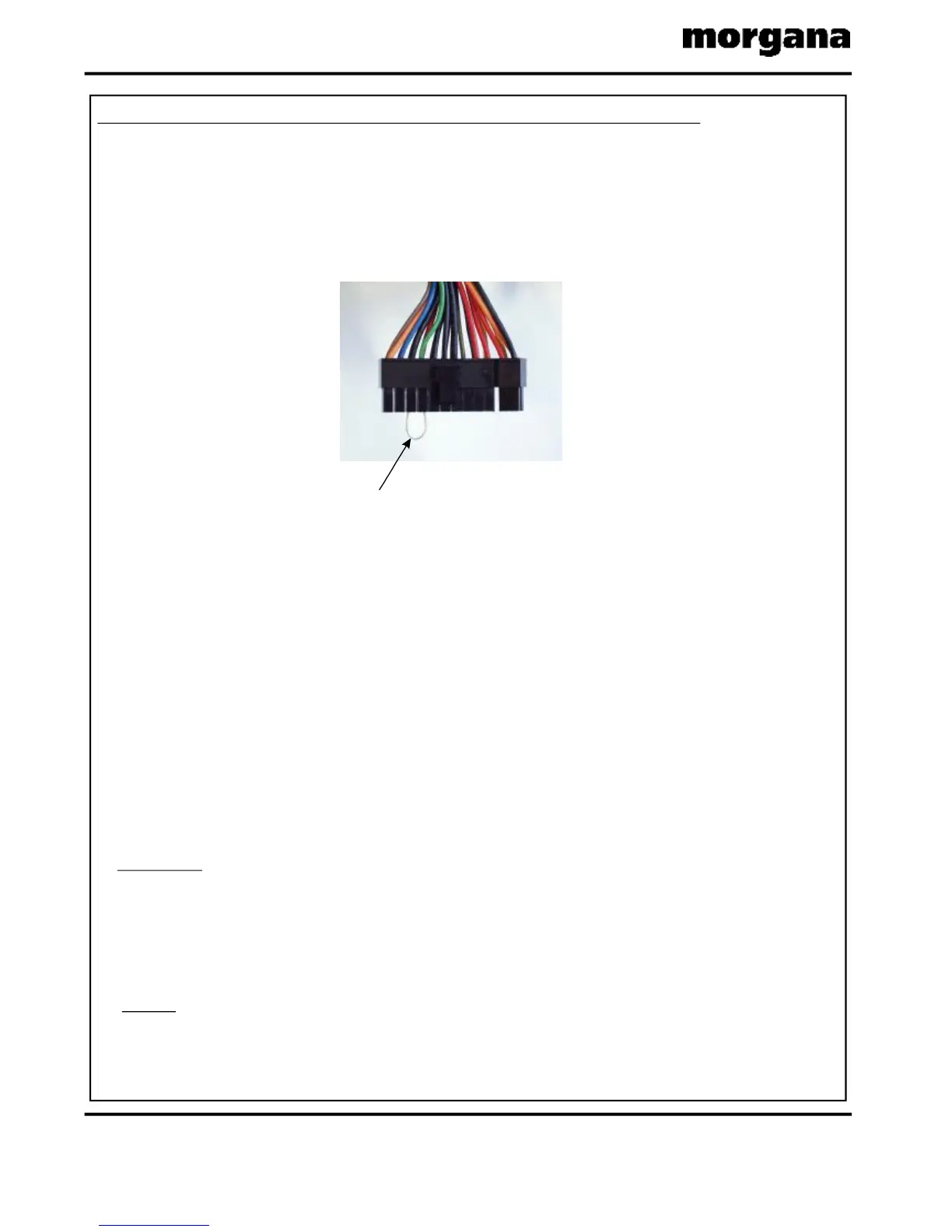
(ii)Usingapieceoftinnedcopperwire,shortouttheGREENandBLACKwiresofthe
connectorasshowninFIG.1below
(iii)WiththeATXpowersupplyswitchedon,useamultimetertomeasurethevoltageacross
theREDandBLACKwiresofoneofthe4wayconnectors.
Themeasuredvoltageshouldbebetween4.75Vto5.25V.Anythingbelow4.7Vshouldbe
regardedassuspectandthepowersupplyshouldbereplaced.
(iv)WiththeATXpowersupplyswitchedon,useamultimetertomeasurethevoltageacross
theYELLOWandBLACKwiresofoneofthe4wayconnectors.
Themeasuredvoltageshouldbebetween11.75Vto12.25V.Anythingbelow11.7Vshould
beregardedassuspectandthepowersupplyshouldbereplaced.
(i)Removethe3VlithiumdiscbatteryfromtheITXmotherboardandcheckthevoltageusing
amultimeter.Ifthevoltageislessthan1.5VreplacetheITXmotherboard.Ifthevoltageis
morethan1.5Vrefitthebatterytotheboard.
1.RISKOFEXPLOSIONIFBATTERYISREPLACEDBYANINCORRECTTYPE.
2.DISPOSEOFBATTERIESACCORDINGTOTHEMANUFACTURERSINSTRUCTIONS.
(ii)Withthepowertothemachineturnedon,linkpins3&4oftheconnectorshowninFIG.2
withasmallflatbladedscrewdriver.Thefanontheboardwillstartspinning,waitfor30
secondsandthemachinewillrestartandbootupasnormal.
Whenthepowertothemachineisturnedoffandbackonagaintheprocedureoflinking
pins3&4mustberepeatedtorestartthemachine.Thisisthereforeonlyashorttermfixto
getthecustomerupandrunning,ifareplacementITXmotherboardisnotreadilyavailable.
FIG.1
TINNEDCOPPERWIRELINK



 To Next Page