SUPREMATouch
202
Installation
MSA
US
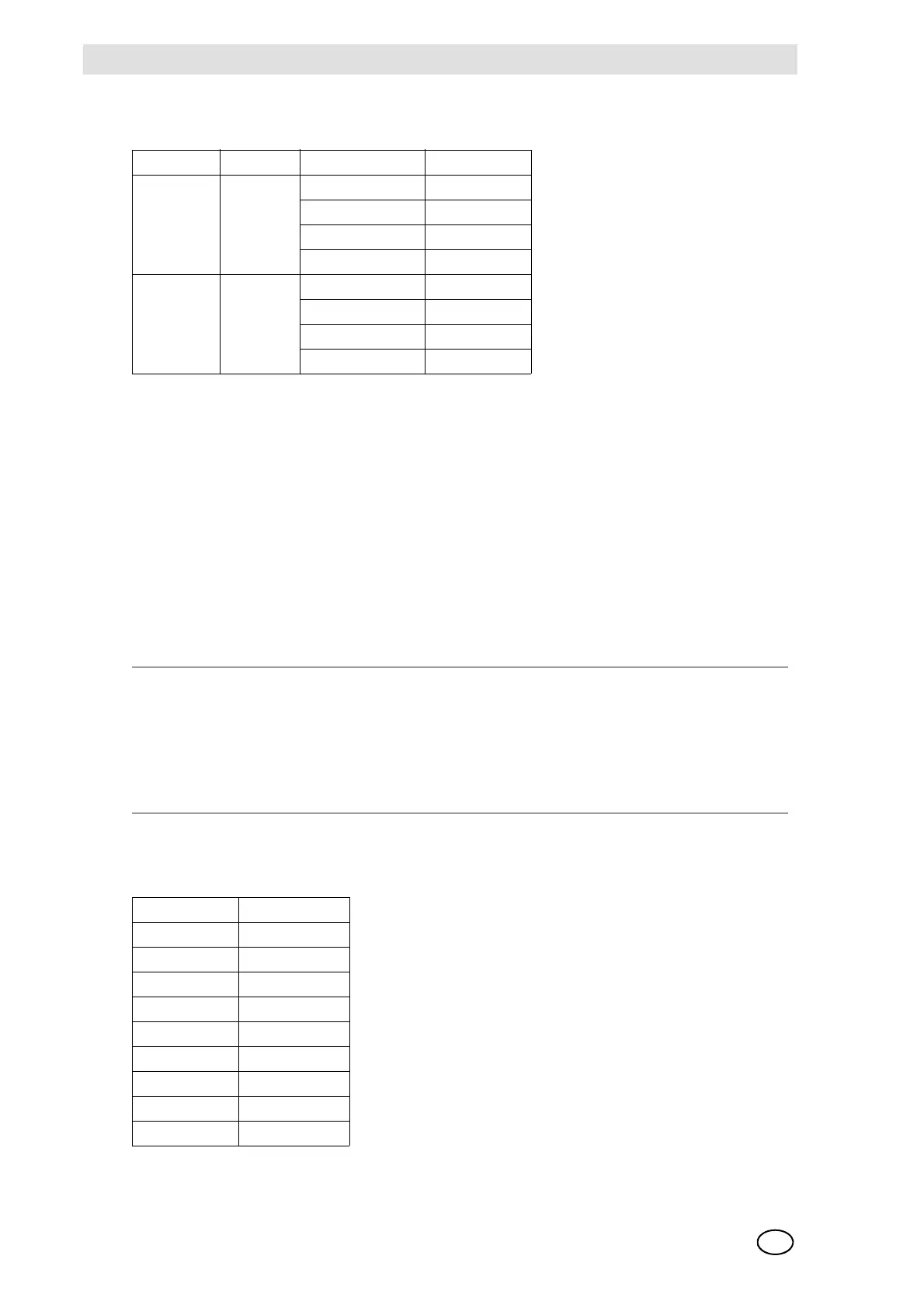
Plug Assignment:
Fig. 143 MST Module, Pin Assignment, CAN Bus Ports
Only screened (>80 % coverage) CAN-cables are to be used. These must have separate cable
screen, which is connected to the plug housing. A wire is to be provided in the cable for the CAN
GND.
PC/Laptop Port (System Operation, RS 232A)
A PC or a laptop can be plugged into this port. By using the SUPREMA operating program, the
system can be operated with a Windows interface. This is recommended, especially for the initial
setup of a new system with an average to large number of inputs (Chapter 12.1), It also makes it
easier to perform calibrations and routine maintenance. The PC/laptop should meet the following
minimum requirements:
The terminal assignment of the RS 232A connection is given in the following table
(see figure 142). Connect the screening to the pin housing.
Fig. 144 RS 232A Terminal Assignment
Plug Name Terminal No. Assignment
X13, X15 CAN A 2 CAN_L
3GND
6GND
7CAN_H
X14, X16 CAN B 2 CAN_L
3GND
6GND
7CAN_H
System Requirements for PC:
- Minimum Pentium IV, 2GHz, 2 GB of RAM
- Windows XP SP 3
- Connecting cable USB: miniUSB / RS232: RS 232 extensions, SUB-D connector 9-way,
plug and socket (do not use a null-modem cable!)
- RS 232 configuration: 19200/115200 kBits/sec., 8 data bits, 1 stop bit, Parity none
Socket No. Assignment
1
2T x D
3 R x D
4
5GND
6
7
8
9



 To Next Page