HYDROCAL 1005 Manual for Installation and Operation Page 67/111
On HYDROCAL device:
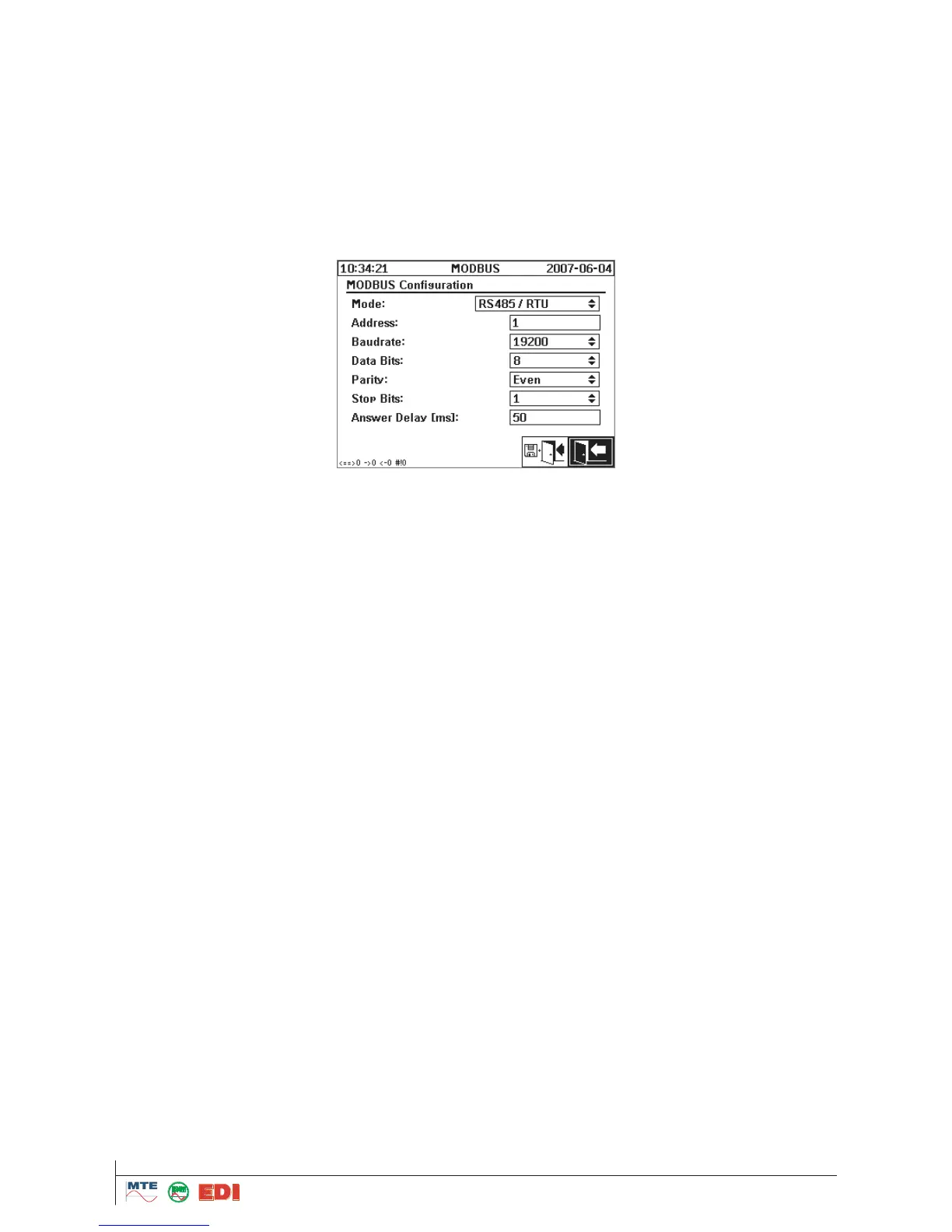
Activate MODBUS using the RS485 and the desired mode (RTU/ASCII)
Set an unique MODBUS address for each device (1..247). Note: Communication with HYDRO-
CAL1005 can be made right now with up to 32 units
Set "Baudrate", "Data Bits", "Parity" and "Stop bits"
Setup "Answer Delay" if required (i.e. if communication problems occur)
Remark:
If the MODBUS protocol on the RS 232 interface is active:
* If the data flow control (RTS / CTS) is not available
* If the internal modem is not available
The following parameters in the configuration menu can be entered
Mode:
This is a toggle button to select the transmission mode (RTU / ASCII) and the serial interface to use
for MODBUS. Available entries are:
- Off (i.e. the proprietary HYDROCAL protocol is used)
- MODBUS RTU via RS485
- MODBUS ASCII via RS485
- MODBUS RTU via RS232
- MODBUS ASCII via RS232 only available for service purposes
Address:
This is an edit field to enter the device address. For MODBUS, values in the range from 1 to 247 are
allowed. For the proprietary HYDROCAL protocol the addresses can be configured from 1 to 254.
Note: Communication with HYDROCAL1005 can be made right now with up to 32 units
Baud rate, Data Bits, Parity and Stop Bits
These toggle buttons allow adjusting the coding format of the serial interface for MODBUS protocol.
Remarks:
o Change of the transmission mode does not set the coding format parameters to the default
values for the selected mode (RTU: 19200,8,E,1; ASCII 19200,7,E,1). The right configuration
has to be configured manually.
o The proprietary HYDROCAL protocol allows only configuration of the baud rate. The settings of
the Data Bits, Parity and Stop Bits toggle buttons are ignored and the configuration is fixed to
8-N-1.
Answer delay
Test / Debug Options at the HYDROCAL Device
In the lower left corner of the configuration screen there is a small MODBUS statistics line with the
following information:
<==> 0 ; count of all MODBUS messages
-> 0 ; count of MODBUS messages for this device
<- 0 ; count of all MODBUS answers from this device
#! 0 ; count of parity and framing errors in the interface
MODBUS via network
The MODBUS communication is also possible via the network interface. MODBUS/TCP is imple-
mented on the device and using the default port number 502. It is available regardless of the serial
configuration. The functions, registers and address mapping are identical to the serial port imple-
mentation. Two MODBUS/TCP connections are possible at the same time.



 To Next Page