HYDROCAL 1005 Manual for Installation and Operation Page 94/111
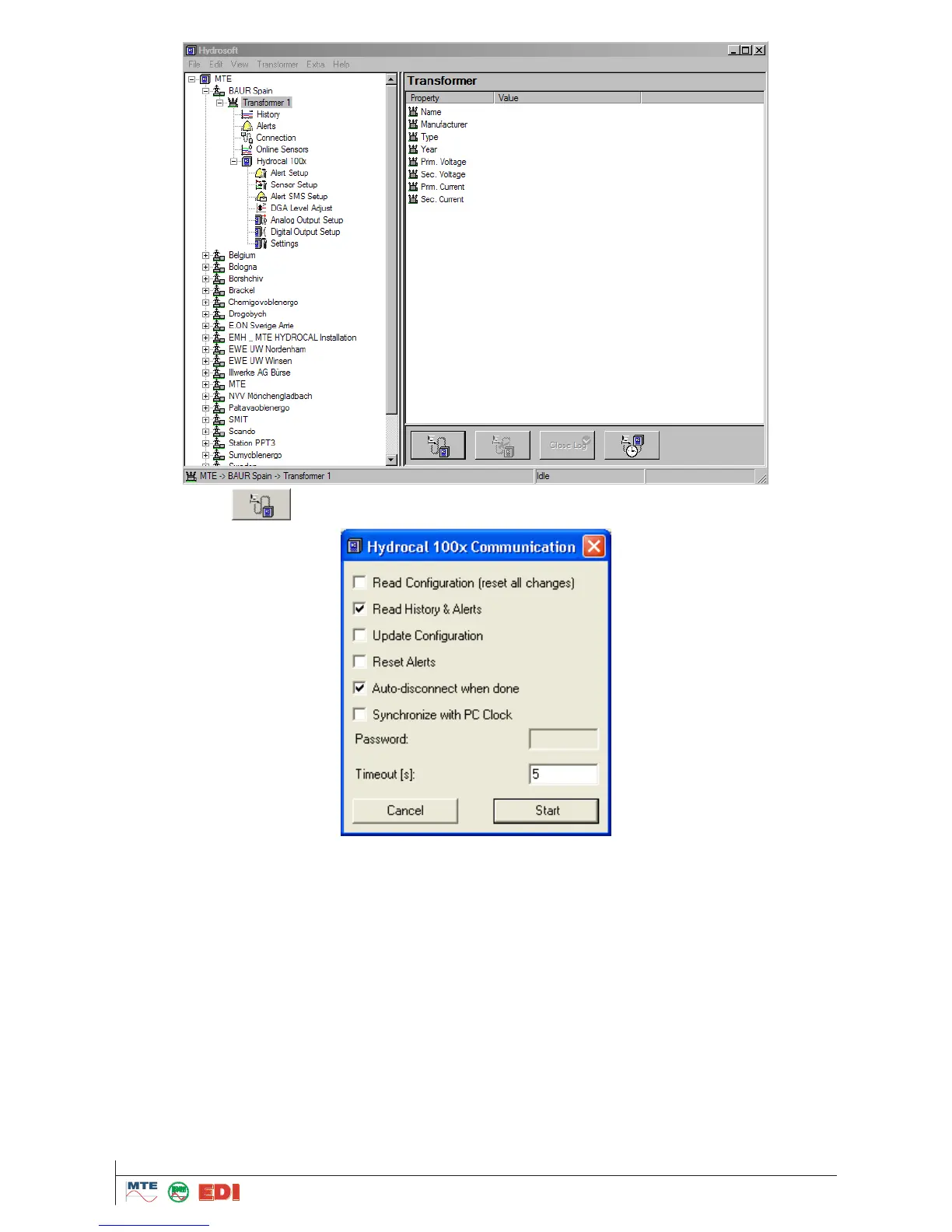
Pressing button the connection is initiated and the following selection box is opened:
In the dialogue, the following actions can be selected:
„Read Configurations“: Read configurations from HYDROCAL1005 unit. This means that the
modifications of alarms and sensor settings made in HydroSoft (indicated by a star) are overwrit-
ten by the settings active in the HYDROCAL unit.
„Read History and Alerts“: All measured and stored values, not downloaded previously, are read
and stored in the database of HydroSoft.
„Update Configuration“: All sensor and alarm modifications made in HydroSoft are transferred to
the HYDROCAL unit and activated there. Input of a numerical password is necessary for this ac-
tion (Default password is 999).
„Reset Alert“: This command resets all alarms on the HYDROCAL unit which have not previously
been acknowledged. Input of a numerical password is necessary for this action (Default password
is 999).
„Auto disconnect when done“: Disconnects automatically the line after data transmission. It is rec-
ommended that this field is always selected when using modem connections in order to save on
transmission costs.
„Synchronize with PC clock“: synchronize automatically the date and time on the unit with internal
PC clock. Input of a numerical password is necessary for this action (Default password is 999).



 To Next Page