Technical Manual N5 (CANopen)
4 Commissioning
b. Select Network and Sharing Center.
c. Select Change advanced sharing settings.
d. Open the Public section.
e. Under Network discovery, select the Turn on network discovery option.
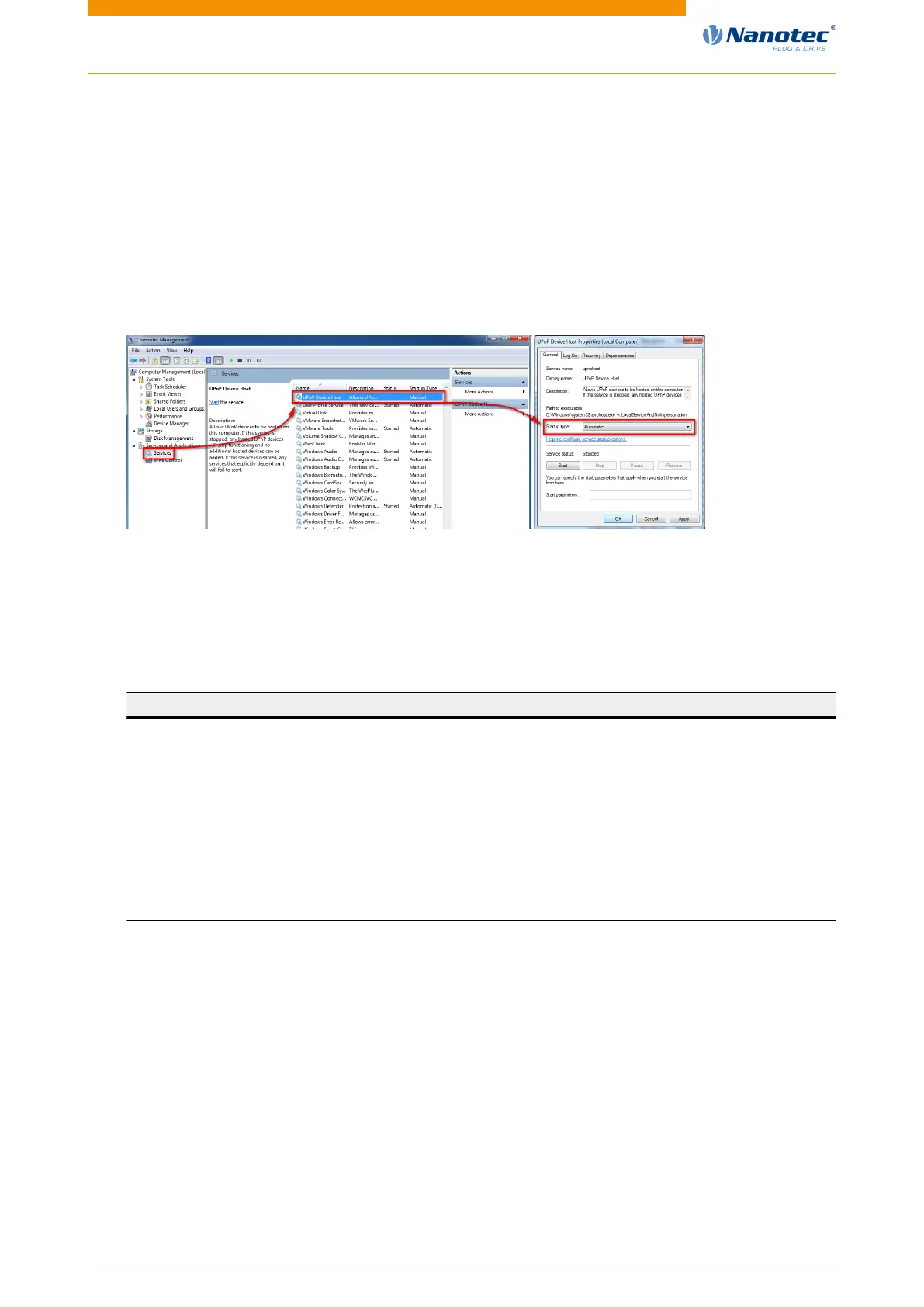
2. Activating the UPnP service:
a. Press the Windows Start button and then right-click on Computer and select Manage.
b. Open the Services and Applications node and select Services.
c. Double-click the UPnP device host service to open.
d. As Startup type, select Automatic and press the Start button.
e. Confirm acceptance of the entries with the OK button.
Setting a static IP address
If static addresses are to be assigned to the controller and the communication partner, just a few
settings need to be performed on the controller and the communication partner.
The controller can be assigned a static IP address and network mask (each IPv4) through OD entries.
The following entries are relevant in the object dictionary:
Index Description
2010
h
IP configuration, bit mask with the following meaning:
Bit 0: A static IP address from object 2011
h
and the network mask from
object 2012
h
are used.
2011
h
Static IP address, 4 bytes in hex coding
2012
h
Static IP subnet mask, 4 bytes in hex coding
2014
h
Active IP address, 4 bytes in hex coding
2015
h
Active IP subnet mask, 4 bytes in hex coding
6503
h
Drive catalogue number / MAC address
Notes:
• If DHCP was activated and Auto-IP is not active, the controller uses the set static IP address if no
address could be assigned via DHCP (e.g., because the DHCP service is temporarily unavailable).
• If both objects 2010
h
and 2011
h
are set to the value "0", an incorrect configuration is assumed and
DHCP, UPnP and Auto-IP are switched on.
• If bit 0 is set in object 2010
h
, the static IP address is used. DHCP and Auto-IP are not used in this
case.
• If DHCP and Auto-IP are activated simultaneously, DHCP is used first to try and obtain an address.
If this does not function, Auto-IP is executed.
• If only DHCP is switched on and an IP address assignment did not function, an attempt is made
independent of bit 0 to connect using the entered static IP address.
Version: 2.0.1 / FIR-v1650 31


 To Next Page