Narda IDA-3106 125
6.16 Changing the operating mode
There are two ways to change the operating mode:
• Using the same parameters by means of the Extras softkey
• Without using the same parameters by means of the Main menu
6.16.1 Changing the operating mode and keeping the
same parameters
You can switch directly from one operating mode to another without opening
the main menu. Certain measurement parameters are kept the same when
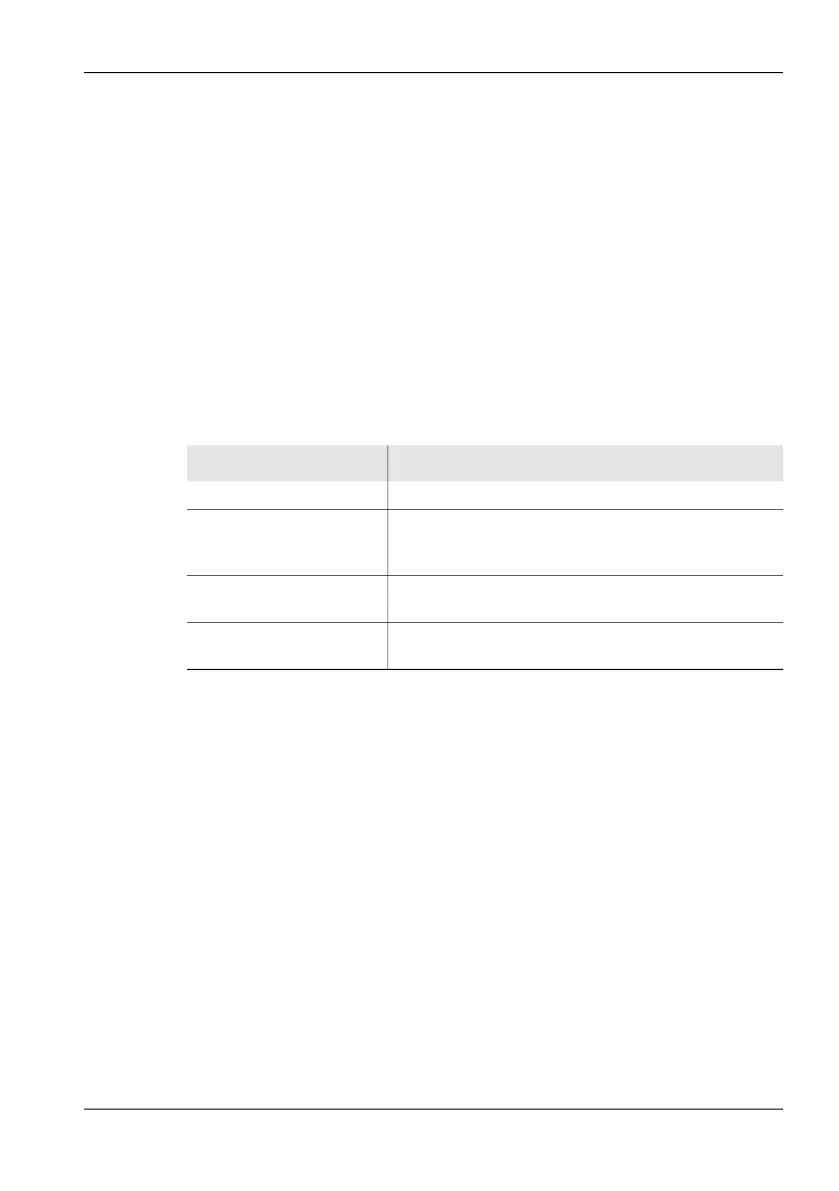
you do this, depending on the target operating mode (see table below).
To change the operating mode keeping the same parameters:
1. Press the Extras softkey.
2. Press the Go to: ... softkey for the desired operating mode.
NOTE: The RBW values set in the multi-channel tables have no function when
parameters are retained. These RBW values are only used in
Multi-Channel Power mode. If a channel is marked in Multi-Channel Power
mode, the parameters are kept for this channel bandwidth when the
operating mode is changed, and the most suitable CBW is set.
6.16.2 Changing the operating mode from the Main
menu
1. Press the MENU key until the Main menu is displayed.
2. Press the softkey for the desired operating mode.
Table 30: Parameters retained when changing operating mode
Parameter Operating modes
Fcent All operating modes
Marker frequency Instead of Fcent when marker is activated in
Spectrum, and for the frequency views in
I⁄Q Analyzer
CBW In Direction Finding, Time Domain (Scope),
Level Meter and I⁄Q Analyzer
Demodulation bandwidth
set as CBW
From Spectrum to Direction Finding, Level Meter,
Time Domain (Scope) and I⁄Q Analyzer



 To Next Page