5.3 Displaying and editing configuration data
Narda IDA-3106 77
5.3 Displaying and editing configuration data
Main Menu • Settings
The Settings menu includes the following functions in addition to the system
settings:
• Displaying and selecting Antennas
• Displaying and selecting External Devices (page 78)
• Displaying and selecting cables (page 79)
• Displaying, selecting and creating Multi-Channel Tables (page 79)
• Displaying, selecting and creating Transmitter Tables (page 82)
5.3.1 Displaying and selecting Antennas
Main Menu • Settings
1. Press the Antenna softkey.
The available antennas are listed with their characteristic data.
The detected antenna type will be displayed when you use a Narda
antenna.
2. Use the rotary control knob or arrow keys to highlight the desired item.
3. Press the OK key to confirm your selection.
NOTE: If the antenna is not recognized, the associated antenna configuration is
probably missing. The antenna configuration data are uploaded to the
instrument using the IDA Tools PC software.
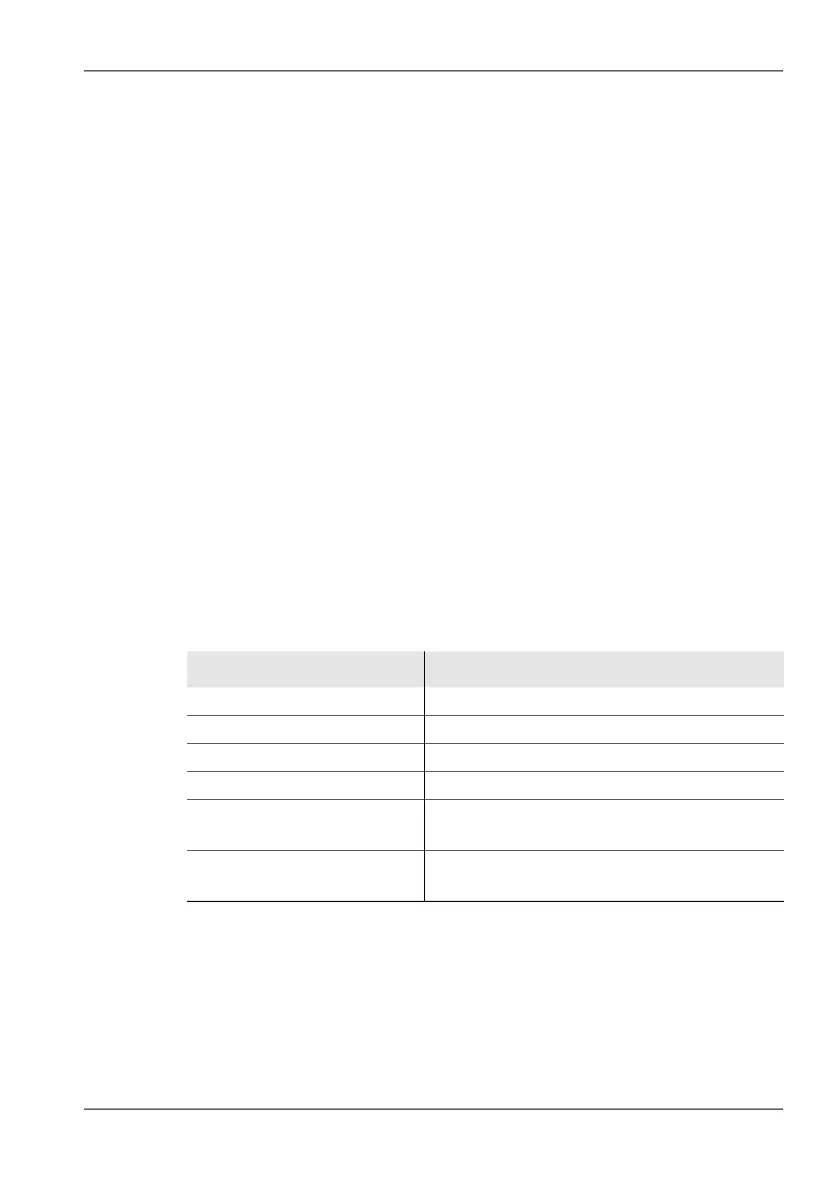
Table 16: Description of Antennas list
Item Description
Short Name Short name (in the display)
Fmin Lower limit frequency
Fmax Upper limit frequency
Property Field type (E-field, H-field)
Rel. Date
(for Narda directional antennas)
Antenna version release date
Calibration Date
(for other antennas)
Calibration date



 To Next Page