6.7 Selecting the trace type (Trace)
Narda IDA-3106 101
6.7 Selecting the trace type (Trace)
Spectrum • Trace
Multi-Channel Power • Trace
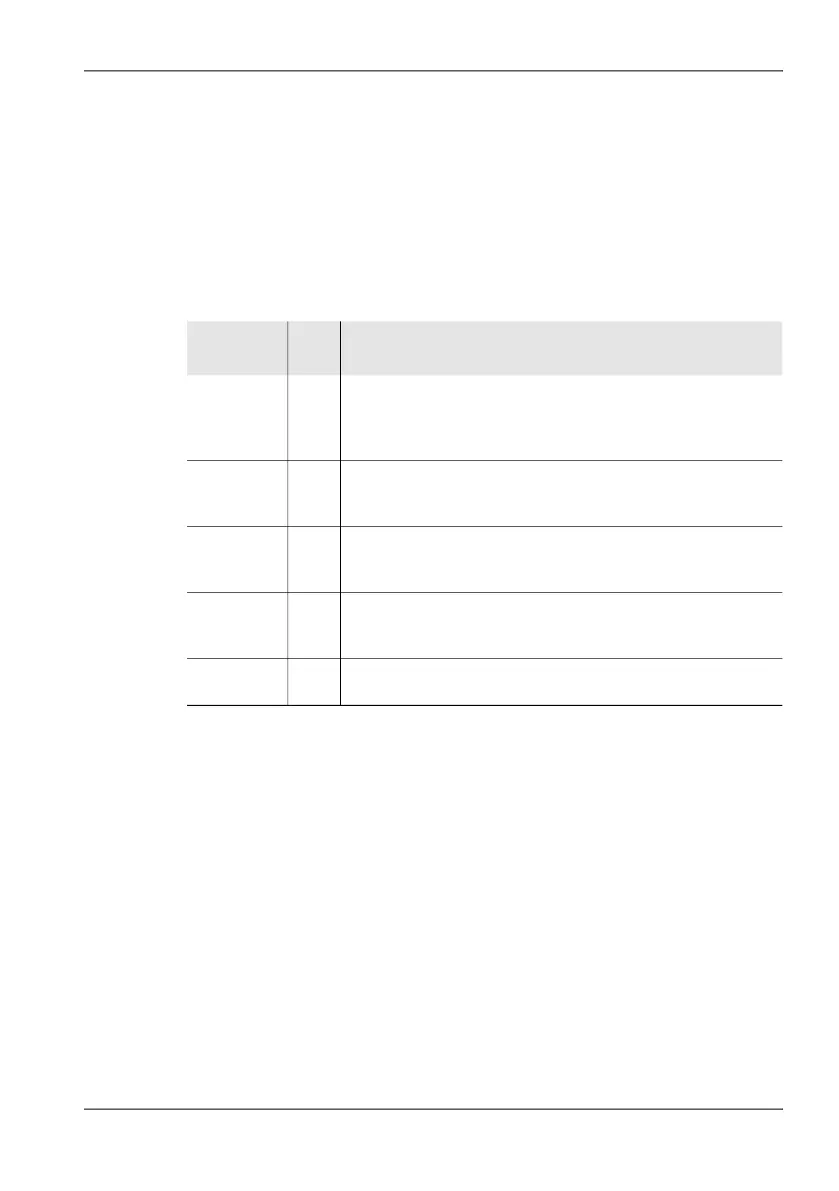
The trace type determines how the recorded values are displayed by the
trace arithmetic. The following trace types can be selected / deselected (you
can select more than one at the same time):
For all the above trace types: If a frequency range is compressed into the
width of a single pixel the display will be in the form of a vertical line between
the minimum and maximum levels in the range.
To select or deselect a trace type:
1. Press the Trace softkey.
2. Use the rotary control knob and the softkeys to make the desired
selection.
You can find information on how to select items from a list under
Selecting entries from a list on page 52
3. When you have made your selection, press the OK key.
Tip: It is recommended to just select the trace type Act if fast fluctuating signals
shall be displayed. In this case the display is refreshed with a particular high
rate.
Table 25: Types listed in the Trace box
Type Abbr
ev.
Function / Explanation
Actual/RMS Act/
RMS
Clears the previous trace and writes the current trace after
each new sweep (also called CLEAR / WRITE). RMS is
always displayed if the integration time T-RMS is activated
(see VBW) and in Multi-Channel Power mode.
Maximum
Hold
Max The trace displays the maximum value from the current
measurement and all previous traces (also called MAX
HOLD).
Average Avg
The trace displays the rolling average RMS value. Averaging is
done over the last 4 to 256 traces or over a time period between
1 and 30 minutes (settable).
Minimum
Hold
Min The trace displays the minimum value from the current
measurement and all previous traces (also called MIN
HOLD).
Reference Ref Trace memory for determining a difference spectrum
(Spectrum and Delta Spectrum only).



 To Next Page