5 The Main Menu
66 IDA-3106 Narda
5.2 Displaying and editing system settings
Main Menu • Settings
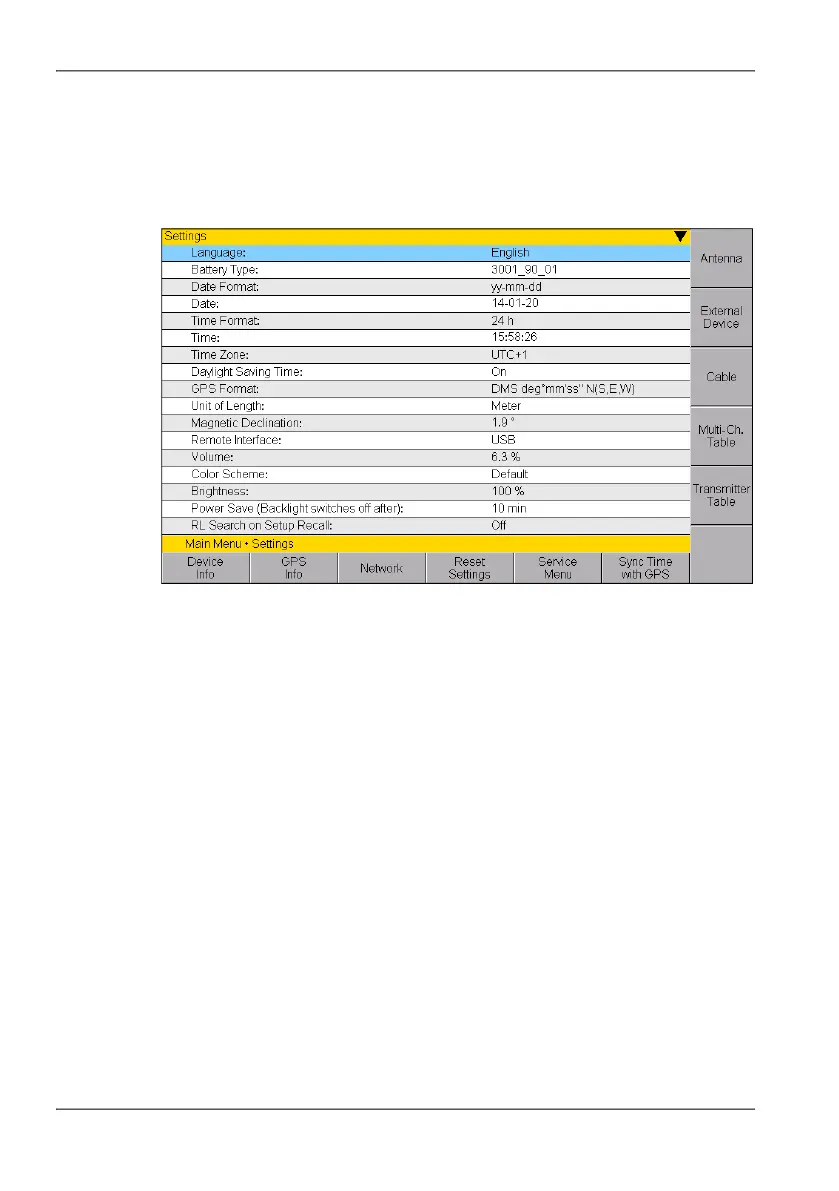
Important general device settings are made in the Settings menu
Figure 16: Settings menu
All device specific settings can be edited immediately by selecting an entry
from the list using the rotary control knob. All other settings (e.g. antennas,
cables, etc.) can be reached by means of the softkeys on the right side. This
menu allows you to perform the following actions:
• Changing the language, battery type, date, and time (page 67)
• Editing device-specific settings (page 68)
• Displaying device information (page 70)
• Displaying GPS information (page 73)
• Changing network settings (page 73)
• Resetting all device settings (page 74)
• Performing device diagnosis (page 75)
• Calibrating the internal compass (page 76)
• Displaying and selecting Antennas (page 77)
• Using external devices (page 78)
• Displaying and selecting cables (page 79)
• Displaying and creating Multi-Channel Tables (page 79)
• Creating and editing Transmitter Tables (page 82)



 To Next Page