5 The Main Menu
68 IDA-3106 Narda
5.2.2 Editing device-specific settings
Main Menu • Settings
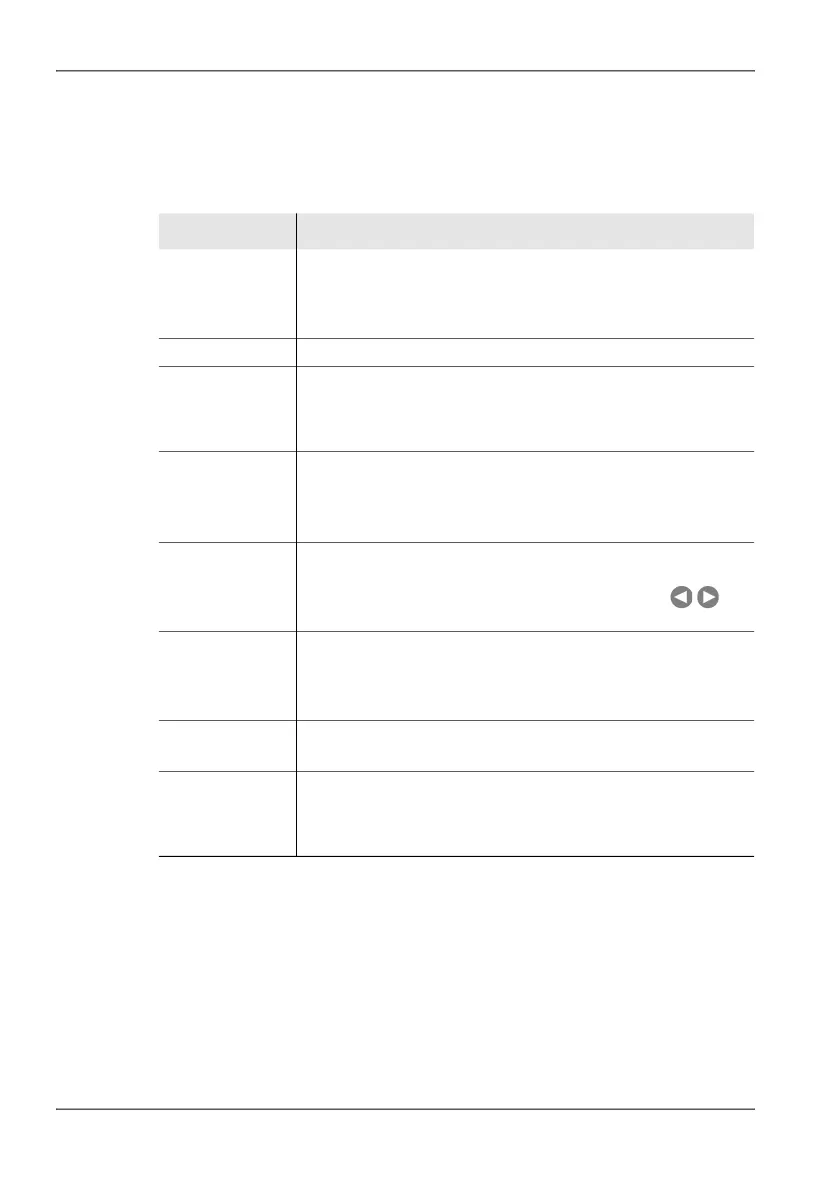
Table 6: Description of device-specific settings
Item Description and available options
GPS Format GPS data display format:
• DegDec (-)ddd.ddddd
• MinDec (-)ddd°mm.mmm
• DMS deg°mm’ss” N(S,E,W)
Unit of Length Length units: meters, feet
Magnetic
Declination
Entry of magnetic declination at the measurement location for
correcting the compass display. You can find the declination
values for any location at (e.g.):
http://www.magnetic-declination.com
Remote Interface Interface used for remote control:
• Optical
• USB
Also see Connecting the device to a PC on page 236
Volume Audio volume from the built-in loudspeaker or headphones
(stepwise setting).
You can also alter the volume using the arrow keys
when Demodulation is activated.
Color Scheme Display color scheme
• Default (display with light background)
• Night
• High-Contrast
Brightness LCD screen brightness
In 5 % steps from 1 % to 100 %
Power Save
(Backlight
switches off
after):
Power save mode, backlight switches off automatically:
• In steps from 1 min. to 30 min
• Never (on permanently)



 To Next Page