5 The Main Menu
82 IDA-3106 Narda
5.3.5 Creating and editing Transmitter Tables
Main Menu • Settings
Transmitter tables are mainly used in Direction Finding mode to simplify
the search for several interference transmitters. You only need to select the
transmitter from the list to eliminate the need to make manual settings for
the frequency and RBW.
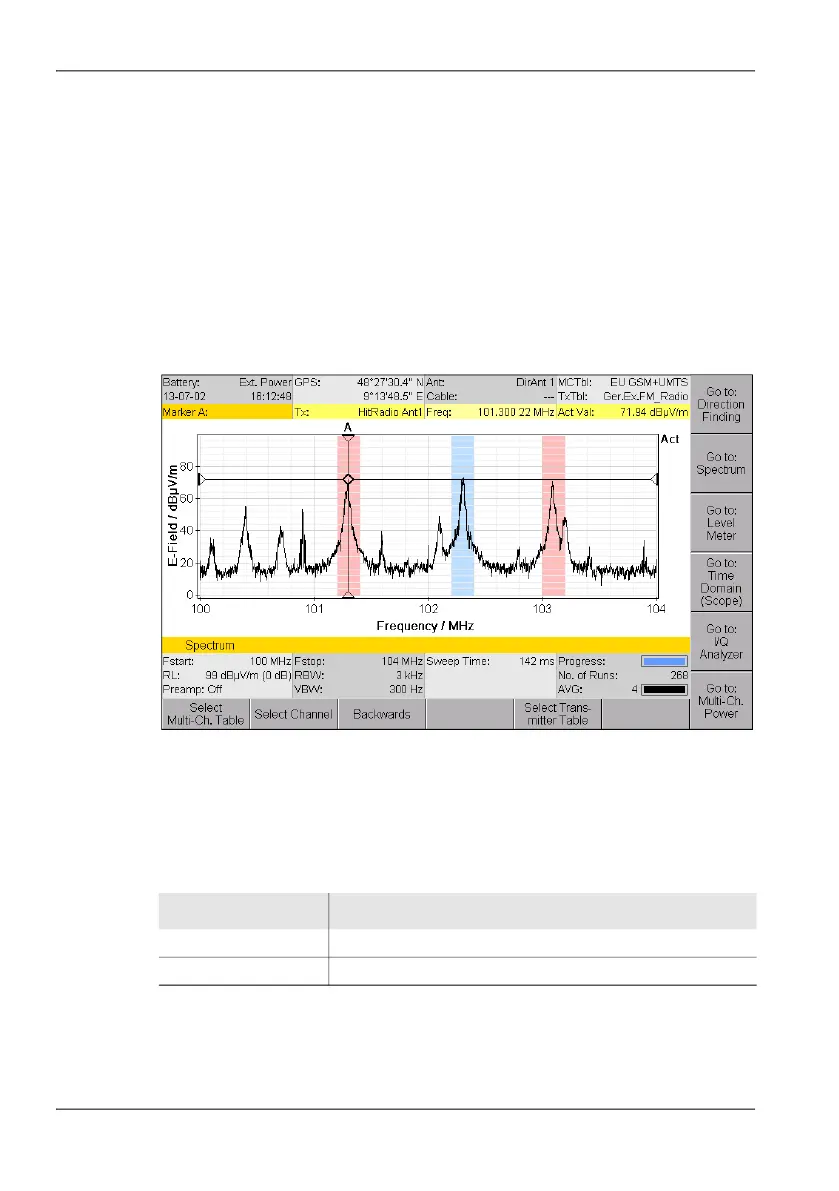
When you have selected a Transmitter Table, all the transmitters defined in
it will be highlighted in color in the spectrum to make them easy to see. If
you set the Marker to this section, the transmitter name will be shown
automatically in the Marker bar (HitRadio Antenne 1 in the example).
Figure 17: Example showing the use of a Transmitter Table.
Displaying and selecting Transmitter Tables
1. Press the Transmitter Table softkey.
A list of the available transmitter tables is displayed.
2. Use the rotary control knob to select an item and press OK to confirm the
selection.
Table 22: Description of Transmitter Tables list
Item Description
Short Name Short name (in the display)
Long Name Name (in the selection menu)



 To Next Page