8 Spectrum Analysis Mode
172 IDA-3106 Narda
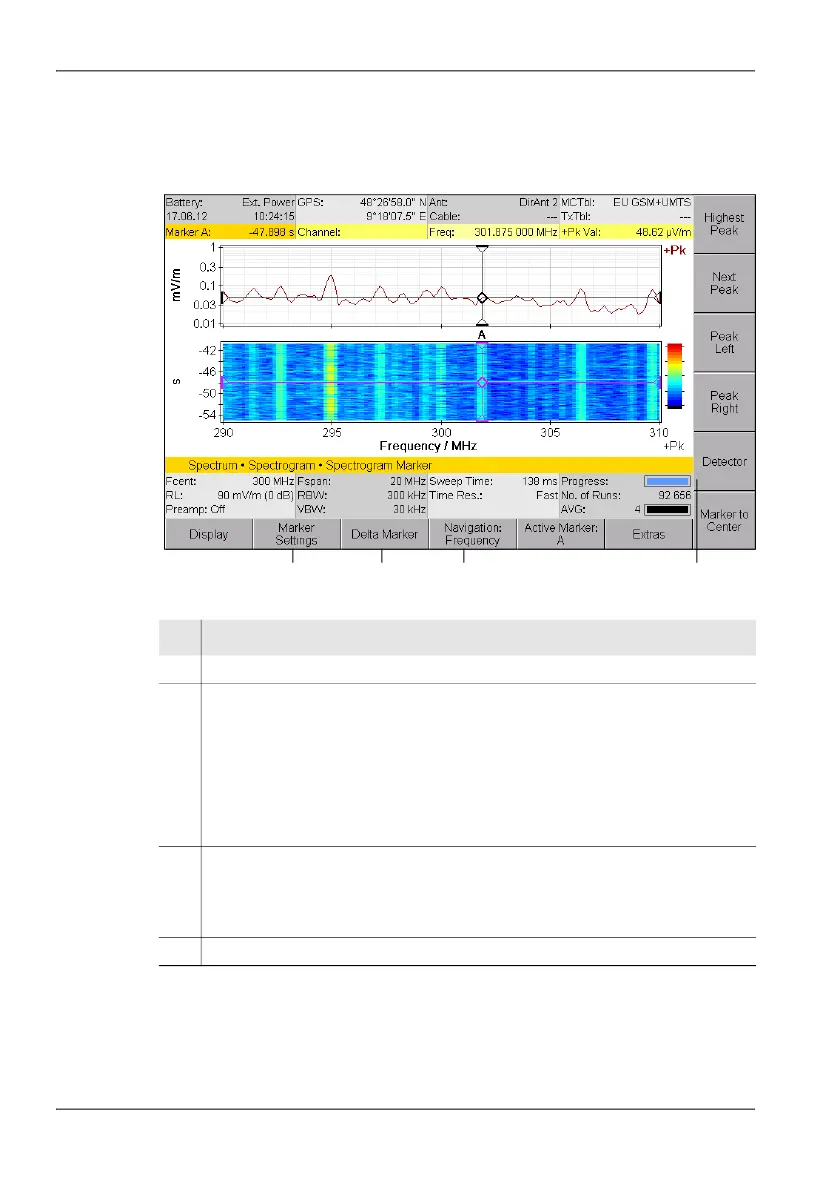
To activate the Marker function in the spectrogram:
Press the Spectrogram Marker softkey in the Spectrum main menu.
The Spectrogram Marker main menu opens.
Figure 41: The Spectrogram Marker main menu
To open the Spectrogram Marker sub menu:
Press the Marker Settings softkey.
No. Function / Explanation
1 Marker Settings: Opens the sub menu for further marker settings.
2 Delta Marker: Selects the marker function:
• Single Marker: Displays Marker A or Marker B only.
• Delta Time & Frequency: Displays Marker A and Marker B. Both markers
can be moved on the time and frequency axes independently of each other.
• Delta Time: Displays Marker A and Marker B. Both markers can only be
moved together on the frequency axis.
• Delta Frequency: Displays Marker A and Marker B. Both markers can only
be moved together on the time axis.
3 Navigation: Selects the marker movement type
• Time: The markers can be moved on the time axis.
• Frequency: The markers can be moved on the frequency axis.
The marker is moved using the rotary control knob.
4 Detector: Selects a detector: RMS, +Peak, -Peak
21 3 4



 To Next Page