11
Setting up your Quad Cortex
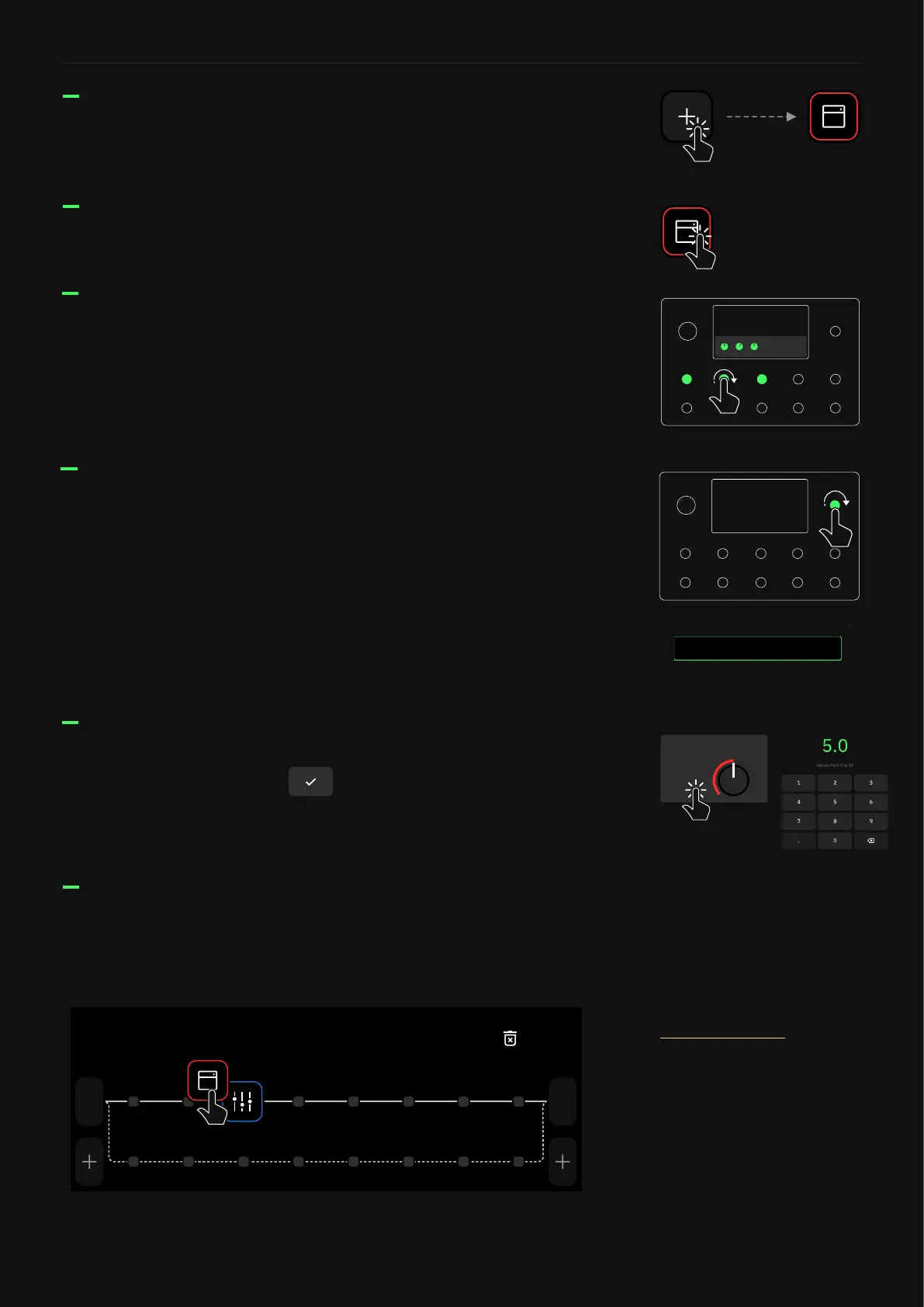
Tap on an empty space in The Grid to create a new Virtual Device
Block.
Tap on a block to access its parameters. You can either use the
touch controls on the screen or the rotary actuators to modify the
parameters.
Tap and hold a device block to drag-and-drop it to another place
on The Grid. Drag a block to the upper-right corner to remove it.
1
In
1/2
Out
Remove
For more details, check the
Working on The Grid section.
Double-tap a block to bypass/activate it.
x2
Tap on a parameter value to ne control. Write a value with the
numeric keyboard and tap to change it. This also works in
the I/O Settings menu.
50
GAIN
When a block menu is open, turn the top-right rotary actuator
clockwise or counterclockwise to navigate through the virtual
devices or Neural Captures within the same category without
opening the Virtual Devices Library.
Turning the top-right rotary actuator also changes the position of
the caret in any text eld.
CancelSetlist
Change
My Presets / 1A
q
a
123
s
z
,
x c v
Space .
b n m
d f g h j k l
w e r t y u i o p
Save
PRESET NAME
Electric LEAD



 To Next Page