84
Computer Integration
A common DAW recording technique is to record a dry D.I. (Direct
Input) signal from your instrument or microphone along with your
processed tone. Only a single-row Preset is needed for recording
both processed and dry signals from Quad Cortex.
Recording a Dry D.I. Track
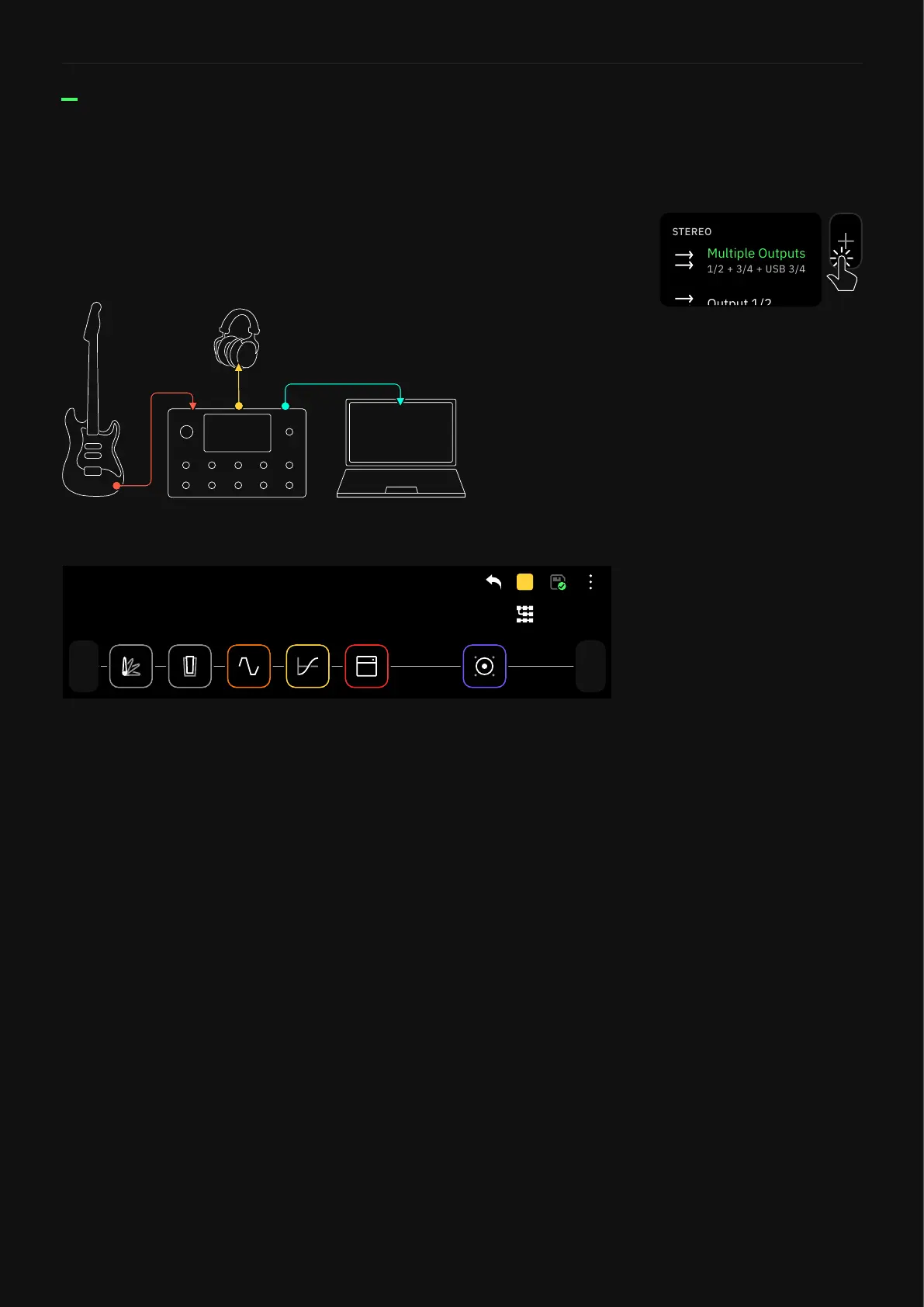
The instrument is connected to Quad Cortex’s INPUT 1 and it’s
being monitored by headphones only. Quad Cortex is connected to
the laptop through USB.
Out
Multi
1
In
PRESET
A
Preset Grid
Routing:
• Open your DAW and choose Quad Cortex as main audio device.
• Create a mono audio track and set its input as Input 1.
The track will receive the dry input signal coming from your
instrument.
• Then, create a stereo audio track and set its input as Input 3/4.
The track will receive the processed signal coming from the
row via USB 3/4.
• Finally, arm both tracks for recording.
Tap any output block in The Grid
then select “Multiple Outputs”
to enable this feature.
The Multi-Out block routes your
signal through XLR Outs 1/2
as well as TRS Outs 3/4, and
USB. It’s the default setting for
all Factory Presets and newly
created Presets.



 To Next Page