170
r
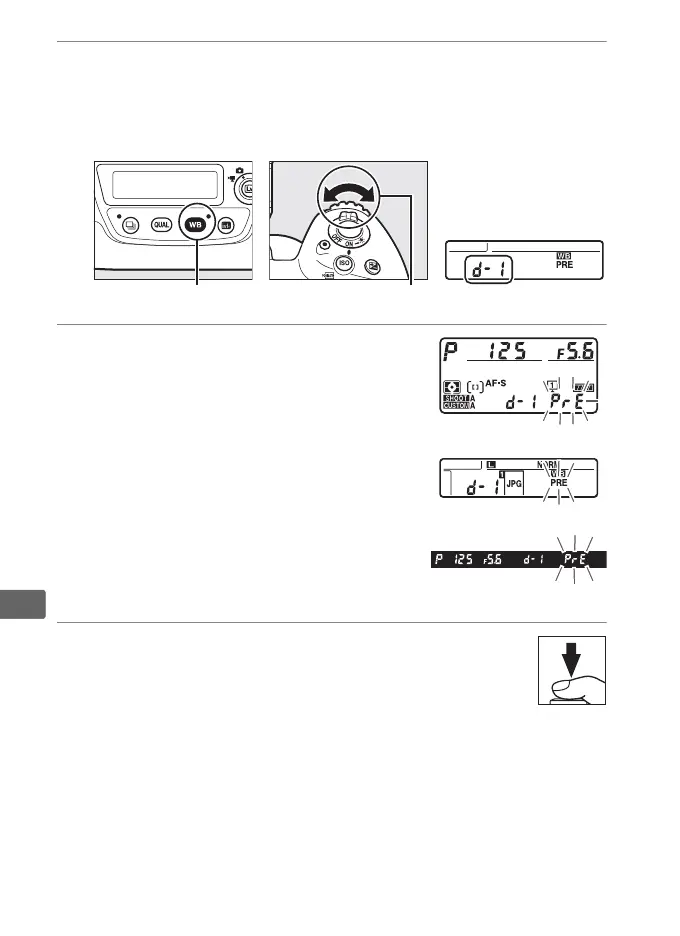
3 Select a preset.
Press the U button and rotate the sub-command dial until
the desired white balance preset (d-1 to d-6) is displayed in
the rear control panel.
4 Select direct measurement mode.
Release the U button briefly and then
press the button until the L icon in
the rear control panel starts to flash.
A
flashing D will also appear in the top
control panel and viewfinder.
5 Measure white balance.
In the few seconds before the indicators stop
flashing, frame the reference object so that it fills the
viewfinder and press the shutter-release button all
the way down.
The camera will measure a value for white
balance and store it in the preset selected in Step 3.
No
photograph will be recorded; white balance can be measured
accurately even when the camera is not in focus.
U button Sub-command dial Rear control panel
Top control panel
Rear control panel
Viewfinder



 To Next Page