5
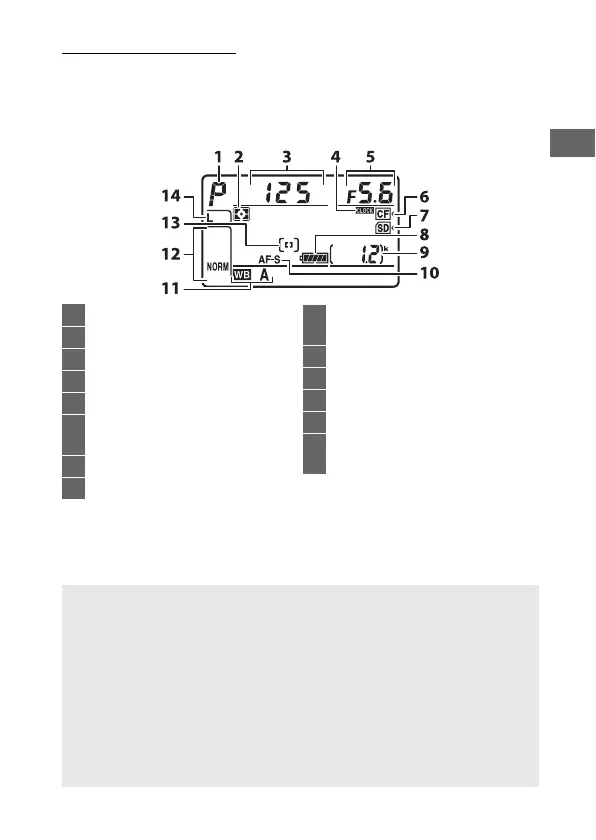
The Control Panel
The control panel shows a variety of camera settings when the
camera is on.
The items shown here appear the first time the
camera is turned on; information on other settings can be found
in the relevant sections of this manual.
312 4 5
6
7
9
13
14
12
11
8
10
1 Exposure mode ...........................116
2 Metering .......................................114
3 Shutter speed .....................119, 121
4 B indicator ...............................372
5 Aperture (f-number) .........120, 121
6 CompactFlash memory card
indicator......................................... 14
7 SD memory card indicator.......... 14
8 Battery indicator ........................... 19
9 Number of exposures
remaining............................. 20, 489
10 Focus mode.................................... 87
11 White balance.............................. 148
12 Image quality ................................ 79
13 AF-area mode ..........................90, 91
14 Image size (JPEG and TIFF
images) .......................................... 83
A The B Indicator
The camera clock is powered by an independent, rechargeable power
source, which is charged as necessary when the main battery is
installed or the camera is powered by an optional power connector
and AC adapter (0 436).
Two days of charging will power the clock for
about three months.
If the B icon flashes in the control panel, the
clock has been reset and the date and time recorded with any new
photographs will not be correct.
Set the clock to the correct time and
date using the Time zone and date > Date and time option in the
setup menu (0 18).



 To Next Page