24
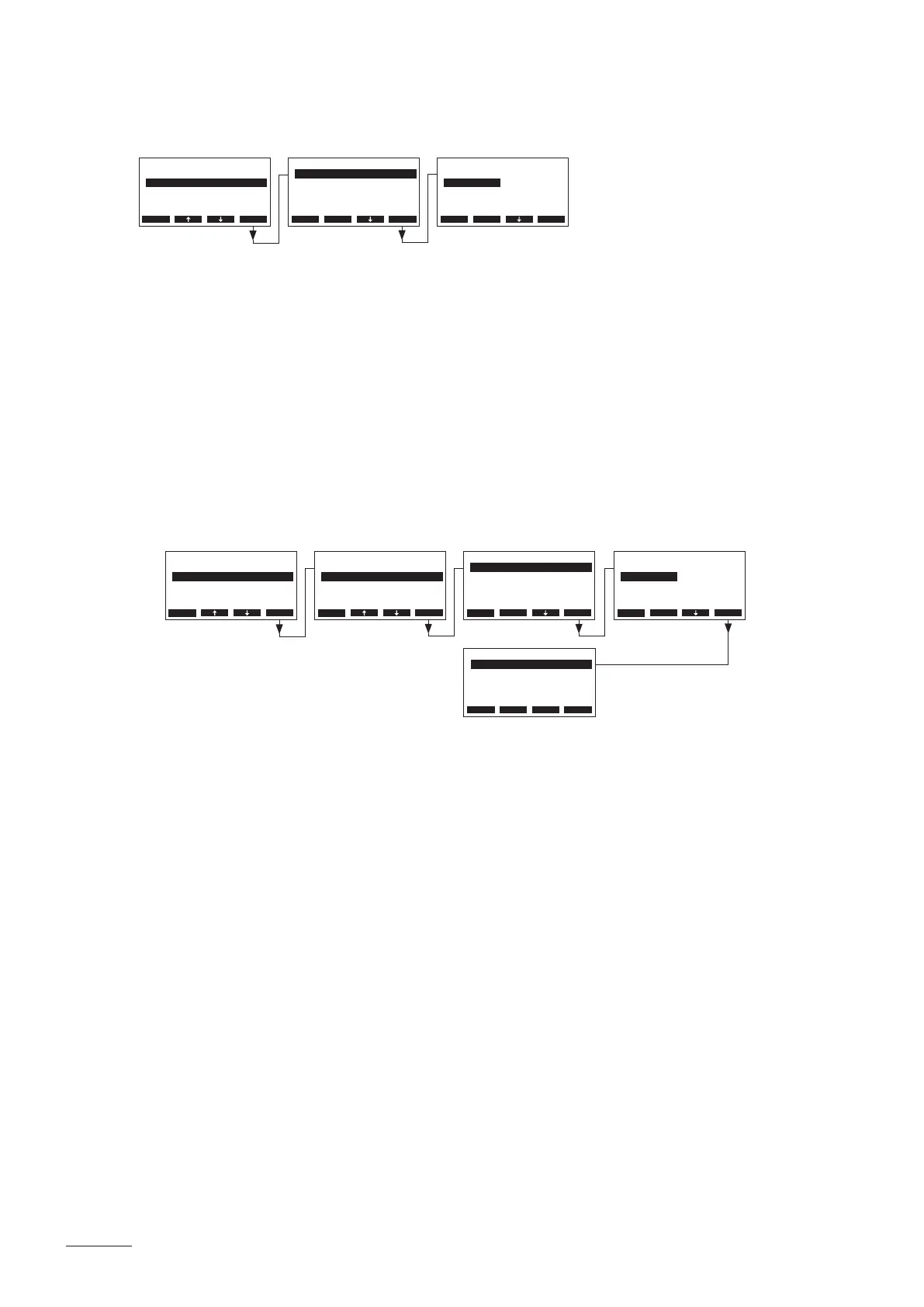
5.3.3.1 Setting the operation mode
Select “Operation” in the steam bath settings menu, then press the <Set> key.
In the upcoming modication dialogue you determine, whether the bathing operation shall be started
manually or via the day timer function (Panel) or automatically via the week timer function (WeekTime).
Factory setting: Panel
Options: Panel (manually or day timer controlled)
WeekTime (week timer controlled)
5.3.3.2 Conguringweektimer
Note: this menu item is available only if the operating mode (see chapter 5.3.3.1) is set to “WeekTime”.
– Deactivating the Week Timer :
Select “Week Timer” in the steam bath settings menu, then press the <Set> key.
Select “Timer”, then press the <Set> key. In the upcoming modication dialogue deactivate (off) the
timer function and conrm the setting with the <Set> key.
If the timer functions is deactivated the Nordmann AT4 remains in standby operation until the timer
is activated again or the operating mode is changed to “Panel” (see chapter 5.3.3.1).
BathSettings
Week Timer :Set
Max Heating :24h
Fan :Set
Operation :WeekTime
Fragrance :Set
Esc Set
Settings
BathSettings:Set
Cylinder :4564
SC-System :Set
Language :English
Power Limit :100%
Esc Set
Settings
BathSettings:Set
Cylinder :4564
SC-System :Set
Language :English
Power Limit :100%
Esc Set
Week Timer
Event 1 :12:00
Event 2 :13:00
Event 3 :14:00
Timer :On
Event 4 :--:--
Esc Set
Week Timer
Timer :O
Esc Set
Timer
O
On
O
Esc Set
Opertion
Panel
WeekTime
Panel
Esc Set
BathSettings
Fan :Set
Fragrance :Set
Light :Set
Operation :Panel
Sensor :Set
Esc Set


 To Next Page