48
16 Actual status steam bath door switch
17 Total operating hours since the initial commissioning
18 Actual operating status inlet valve
19 Actual operating status drain pump
20 Actual operating status main contactor
21 Actual operating status SC pump
22 Actual operating status light 1
23 Actual operating status light 2
24 Actual operating status fragrance pump 1
25 Actual operating status fragrance pump 2
26 Actual operating status relay 8
27 Actual operating status relay 9
28 Actual operating status fan relay
29 Actual voltage on analog ap control output
30 Actual voltage on analog sensor output
31 Actual status remote relay “Steam”
32 Actual status remote relay “Service”
33 Actual status remote relay “Error”
34 Actual status remote relay “Unit on”
Press the <Esc> key several times to quit the unit information list and to return to the standard operat-
ing display.
5.5.3 Performing remote steam bath tests
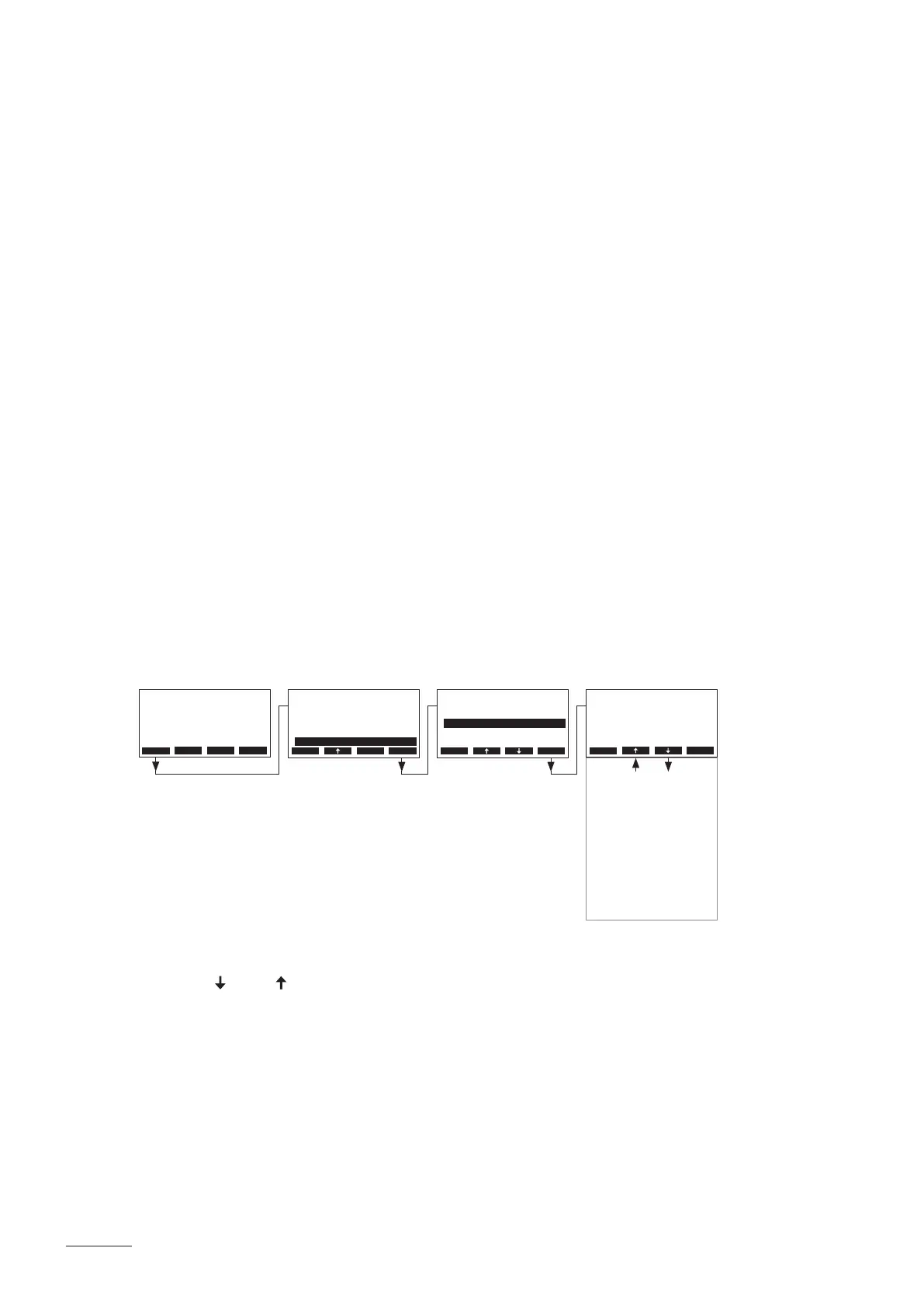
Select the steam bath test:
Path: Main Menu > Diagnostic > Bath Test
The list with the steam bath tests appears, the rst steam bath test (Light 1) is shown.
Press the < > and < > keys in order to select the further steam bath tests available and press the <Set>
key to activate/deactivate the corresponding component for testing or to increase the shown value.
Diagnostic
Unit Status::Set
Bath Test :Set
Remote Test :Set
ErrorHistory:Set
Module Test :Set
Esc Set
Esc Set
Bath Test
Light 1
O
Light 2
Relay 8
O
O
Fragrance Pump 1
Relay 9
Flap Analog Out
O
O
0.0V
Fragrance Pump 2
Fan Relay
Sensor Analog Out
O
1&2 O
0.0V
Main Menu
Light-2 :O
User :Set
Engineering :Set
Fragrance :Set
Diagnostic :Set
Esc Set
Menu Light Start
AT4D 65kg/h 400V3
Steam Bath :Standby
Temperature :34°C
Setpoint :48°C
2011-08-31 12:00:00


 To Next Page