51
5.6.2 Remote terminal settings
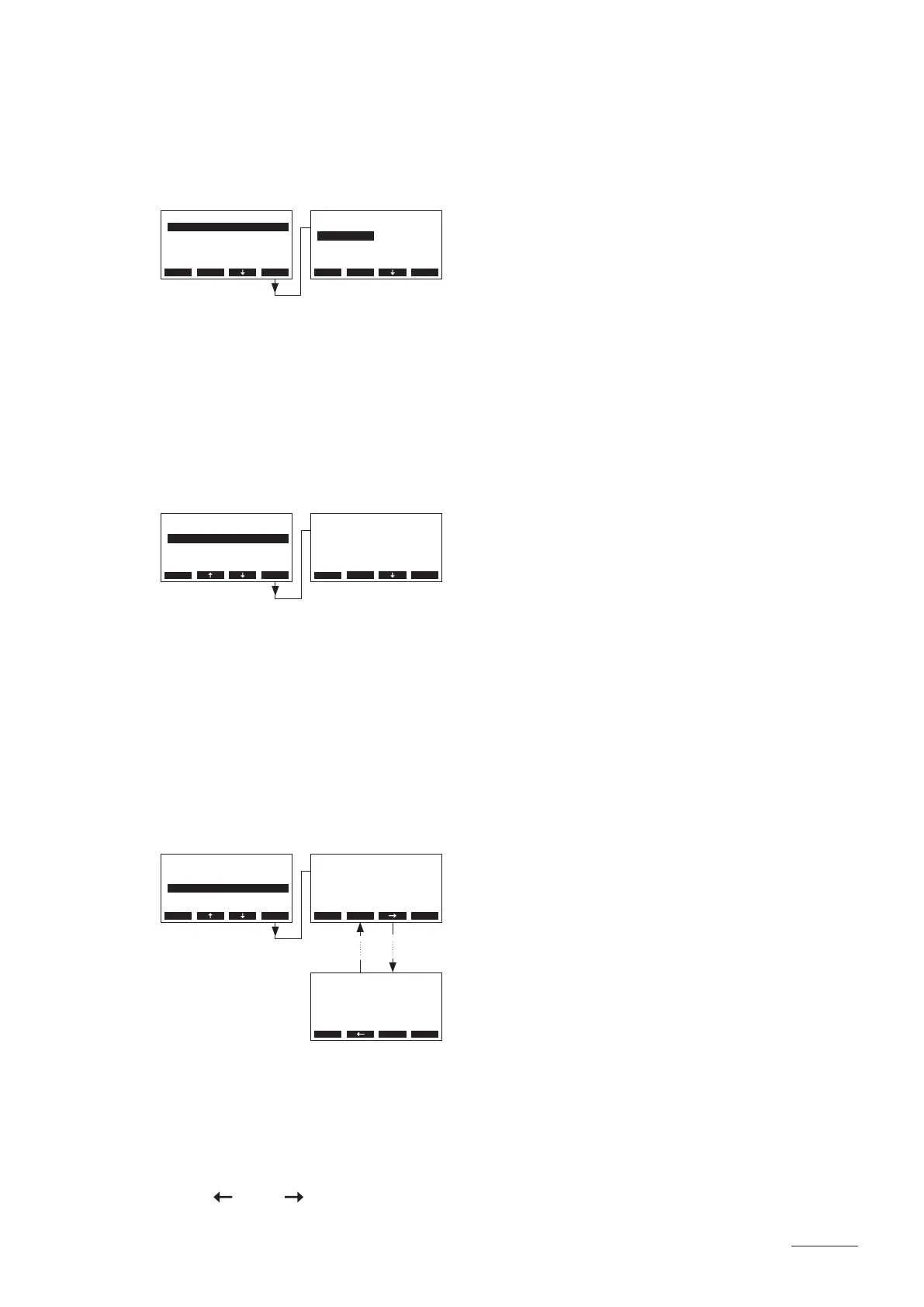
5.6.2.1 Selecting the dialogue language
Select “Language” in the main menu, then press the <Set> key.
In the upcoming modication dialogue select the desired dialogue language. After conrmation, the unit
automatically switches to the selected dialogue language.
Factory setting: country specic
Options: divers languages
5.6.2.2 Setting the number of steam generators connected to the remote terminal
Select “Remote Units” in the main menu, then press the <Set> key.
In the upcoming modication dialogue set the number of steam generators connected to the remote terminal.
Factory setting: 1
Setting range: 1...8
5.6.2.3 Interrogation of the error history of the remote terminal
The error messages generated by the last 20 malfunctions that occurred are saved in the error history
list of the remote terminal and can be interrogated.
Select “ErrorHistory” in the main menu, then press the <Set> key.
The last error that occurred is shown with:
– running number of the error
– date and time of occurrence
– error code (Warning: W..., Error: E...)
– error message
– additional info text regarding the error
Press < > and < > keys, in order to select further error messages in the list.
Language
English
German
French
English
Italian
Esc Set
Main Menu
RemoteUnits :8
ErrorHistory:Set
HistoryReset:Set
Language :English
Baudrate :9600
Esc Set
RemoteUnits
8
8
Esc Set
Main Menu
RemoteUnits :8
ErrorHistory:Set
HistoryReset:Set
Language :English
Baudrate :9600
Esc Set
Main Menu
RemoteUnits :8
ErrorHistory:Set
HistoryReset:Set
Language :English
Baudrate :9600
Esc Set
ErrorHistory
W16 Unit missing
no connection
with humidier
05/05 15-03-15 16:34
Esc Set
ErrorHistory
W16 Unit missing
no connection
with humidier
01/05 11-03-15 12:34
Esc Set


 To Next Page