35
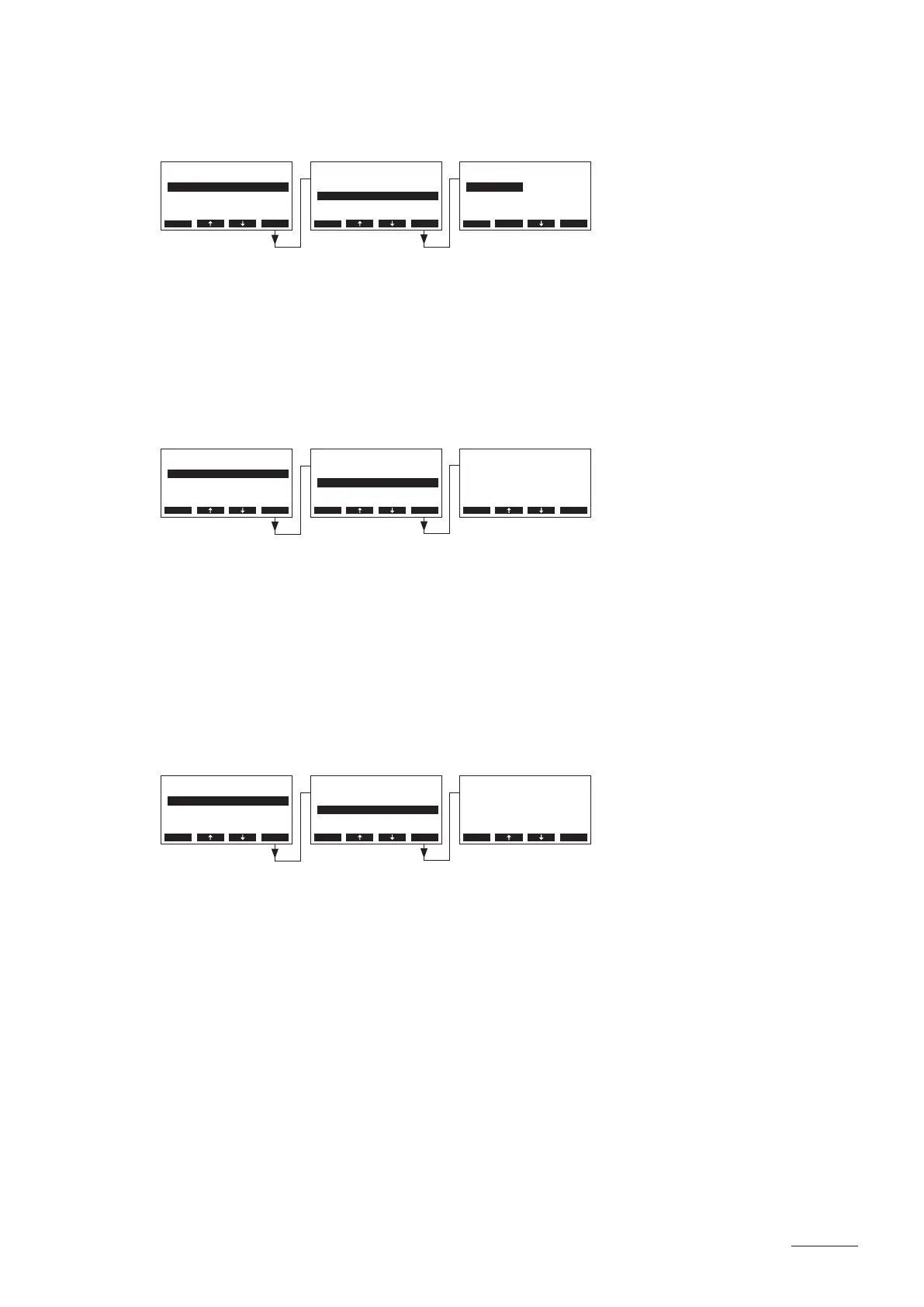
5.3.3.8 Setting the controller type
Select “Control” in the steam bath settings menu, then press the <Set>.
In the upcoming modication dialogue select the desired controller type.
Factory setting: Int (P)
Options: Int (P) or Int (PI)
5.3.3.9 Setting the proportional range for the internal P/PI controller
Select “P-Band” in the steam bath settings menu, then press the <Set>.
In the upcoming modication dialogue set the proportional range in °C or %rH (caldarium operation) for
the internal P/PI controller.
Factory setting: 4 °C (18 %rH)
Options: 2...60 °C (6...65 %rH)
5.3.3.10 Setting the integral time for the internal PI controller
Note: this setting is available only if the internal PI controller is activated.
Select “Integr.-Time” in the steam bath settings menu, then press the <Set> key.
In the upcoming modication dialogue set the integral time in minutes for the internal PI controller.
Factory setting: 2 minutes
Options: 1...60 minutes
BathSettings
P-Band :4°C
Integr.-Time:2min
Operat.Range:Set
Control :Int.(PI)
Max.DoorOpen:2min
Esc Set
Settings
BathSettings:Set
Cylinder :4564
SC-System :Set
Language :English
Power Limit :100%
Esc Set
Integr.-Time
2 min
2 min
Esc Set
BathSettings
Control :Int.(P)
P-Band :4°C
Operat.Range:Set
Sensor :Set
Max.DoorOpen:2min
Esc Set
Settings
BathSettings:Set
Cylinder :4564
SC-System :Set
Language :English
Power Limit :100%
Esc Set
P-Band
4 °C
4 °C
Esc Set
BathSettings
Sensor :Set
Control :Int.(P)
P-Band :4°C
Light :Set
Operat.Range:Set
Esc Set
Settings
BathSettings:Set
Cylinder :4564
SC-System :Set
Language :English
Power Limit :100%
Esc Set
Control
Int.(P)
Int.(PI)
Int.(P)
Esc Set


 To Next Page