26
5.3.3.4 Fan control settings
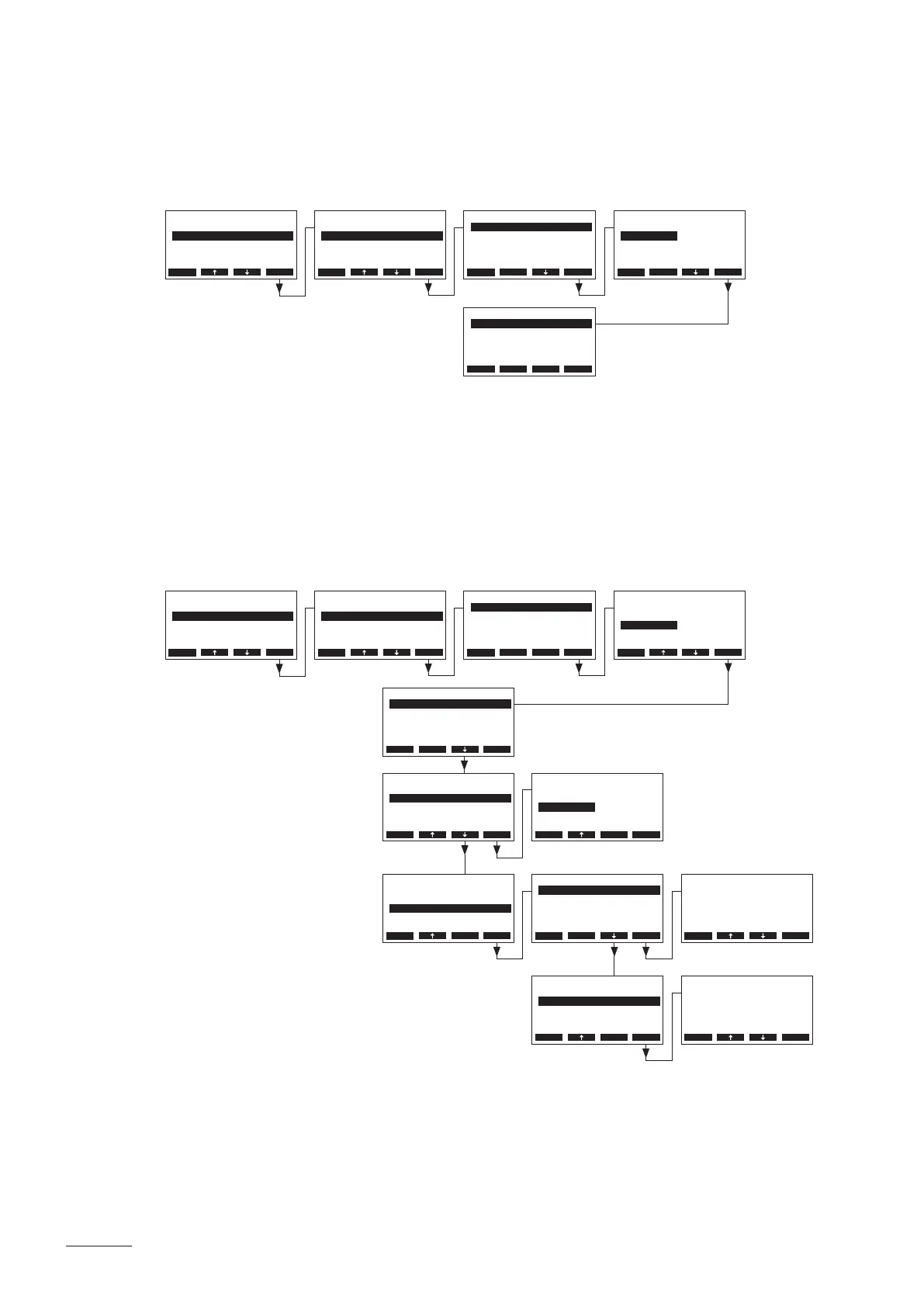
– Operation without fan
Select “Fan” in the steam bath settings menu, then press the <Set> key. In the following display
select “Mode”, then press the <Set> key.
Adjust the settings for the operation without fan as follows:
• “Mode”: Off
Note: use this setting if no fan is connected to the Nordmann AT4 D (e.g. for steam baths with ap
actuators). In the bathing operation without fan the drying phase is omitted.
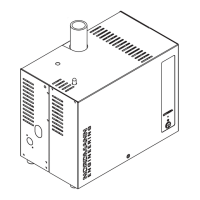
– Operation with 3-step exhaust air fan
Select “Fan” in the steam bath settings menu, then press the <Set> key. In the following display
select “Mode”, then press the <Set> key.
Adjust the settings for the operation with a 3-step exhaust air fan as follows:
• “Mode”: 1-Fan
• “While Light”: If this function is activated (On, factory setting) the 3-step exhaust air fan
starts running on step 1, as soon as light 1 or light 2 is switched on in standby
mode. The fan stops if the light is switched off again.
BathSettings
Fan :Set
Fragrance :Set
Light :Set
Operation :Panel
Sensor :Set
Esc Set
BathSettings
Fan :Set
Fragrance :Set
Light :Set
Operation :Panel
Sensor :Set
Esc Set
Settings
BathSettings:Set
Cylinder :4564
SC-System :Set
Language :English
Power Limit :100%
Esc Set
Settings
BathSettings:Set
Cylinder :4564
SC-System :Set
Language :English
Power Limit :100%
Esc Set
Fan
While Light :On
Fan Out :Set
Mode :1-Fan
Esc Set
Fan
Mode :O
Esc Set
Fan
Mode :O
Esc Set
Mode
O
1-Fan
2-Fan
O
Esc Set
Mode
O
1-Fan
2-Fan
1-Fan
Esc Set
Fan
While Light :On
Fan Out :Set
Mode :1-Fan
Esc Set
While Light
O
On
On
Esc Set
Drying Time
20 min
20 min
Esc Set
Hysteresis
4 °C
4 °C
Esc Set
Fan
While Light :On
Fan Out :Set
Mode :1-Fan
Esc Set
Fan
While Light :On
Fan Out :Set
Mode :1-Fan
Esc Set
Fan Out
Hysteresis :4°C
Drying Time :20min
Esc Set
Fan Out
Hysteresis :4°C
Drying Time :20min
Esc Set


 To Next Page