38
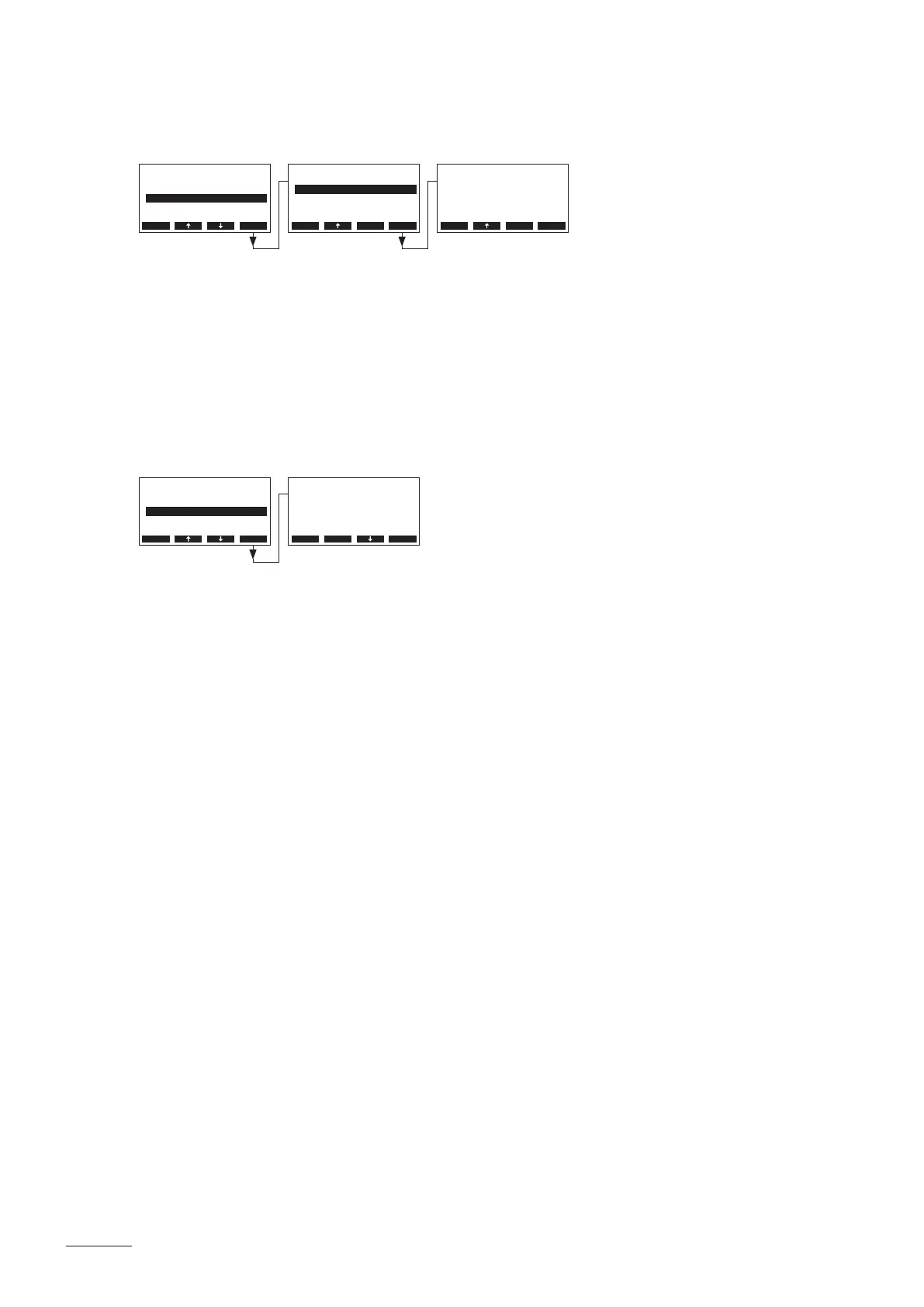
5.3.5.2 Setting the operation time of the SC-Pump
Select “On-Time” in the SC-System settings menu, then press the <Set> key.
In the upcoming modication dialogue set the operating time of the SC-Pump per hour in minutes.
Factory setting: 20 minutes
Setting range: 20 ... 60 minutes
5.3.6 Conguringthecapacitylimitation
Select “Power Limit” in the user settings menu, then press the <Set> key.
In the upcoming modication set the desired capacity limitation in % of maximum steam capacity.
Factory setting: 100 %
Setting range: 30 ... 100 %
SC-System
OnTime :20min
SC-Pump :On
Esc Set
Settings
Cylinder :4564
SC-System :Set
Power Limit :100%
BathSettings:Set
Water Manag.:Set
Esc Set
OnTime
20 min
20 min
Esc Set
Settings
SC-System :Set
Power Limit :100%
Water Manag.:Set
Cylinder :4564
Date
Esc Set
Power Limit
100 %
100 %
Esc Set


 To Next Page